
Invoicing
Client Quotes
A client can have multiple client quotes. The base quotes can be shared amongst clients. A base quote can be created separately and then client quotes can link to it, or a base quotes can be created as a client quote is created.
Configuring a client quote involves defining:
- The client quote's date range
- The list of schemes and analytes covered by the quote
- A generic percentage discount applicable to each scheme and analyte NOT covered by the quote
- For each scheme and analyte covered by the quote, then either a percentage discount applicable to book pricing, or a quote pricing schedule.
Although quote documents can be generated from CCLAS, the quotes provided to customers are typically created externally and then attached to the CCLAS client quotes. The quotes in CCLAS are the ‘codified content’ of the actual quote document created by the laboratory or business development manager.
Client quotes are managed with the CCCLNT—Client application.
Invoicing Configuration per Job
A production or proposal job can have multiple job invoices.
Each job invoice involves defining:
- The client to invoice, currency and price book
- A quote, if required
- The samples and tests (which can only be added to the job invoice after the job is activated), and their invoiceability state
- A list of surcharges and rebates, if required (inherited from the client)
- A list of taxes, if required (inherited from the client).
Job invoices are managed with the CCREGN—Job application.
Generating WIP and Estimate Job Costs
For any job in the laboratory, as long as the laboratory's costing price catalogue group is defined and contains a price catalogue that has a price book whose currency matches the laboratory's currency and date range that matches the job's received date, then the job can be costed with either estimate or work-in-progress (WIP) workflow statuses. An estimate costing calculates costs as though all samples have completed analysis, and a WIP costing calculates costs at the current state of completion.
Refer to Generating WIP and Estimate Job Costs during registration.
WIP and estimate job costs are managed with the CCREGN—Job application.
Generating WIP and Estimate Job Invoices
For any job invoice on a job, as long as the job invoice is linked to a currency and price book, then the job can be invoiced with either estimate or work-in-progress (WIP) workflow statuses. An estimate invoice calculates costs as though all samples have completed analysis, and a WIP invoice calculates costs at the current state of completion.
Refer to Generating WIP and Estimate Job Invoices during registration.
WIP and estimate job invoices are managed with the CCREGN—Job application.
Generating Client Invoices
For any job invoice on a job, the job invoice can be included in a draft invoice. Job invoices for the same client, project, contact, currency and ignore tax check box state, can be merged into one client invoice, in a grouped-by job or combined-job pricing mode. The laboratory's default job invoice merging mode denotes how the job invoices are merged, though this can be changed dynamically for the drafted client invoice:
- Combined-job pricing mode rolls the job's samples and tests together into one invoice and applies pricing efficiencies to the merged counts based upon pricing ranges.
- Grouped-by-job pricing mode prices each job individually but presents the output in one invoice.
Invoice definitions can be edited until the invoice is released. These edits include:
- Adjustment of surcharges and rebates
- Adjustment of taxes
- Editing or addition of line items
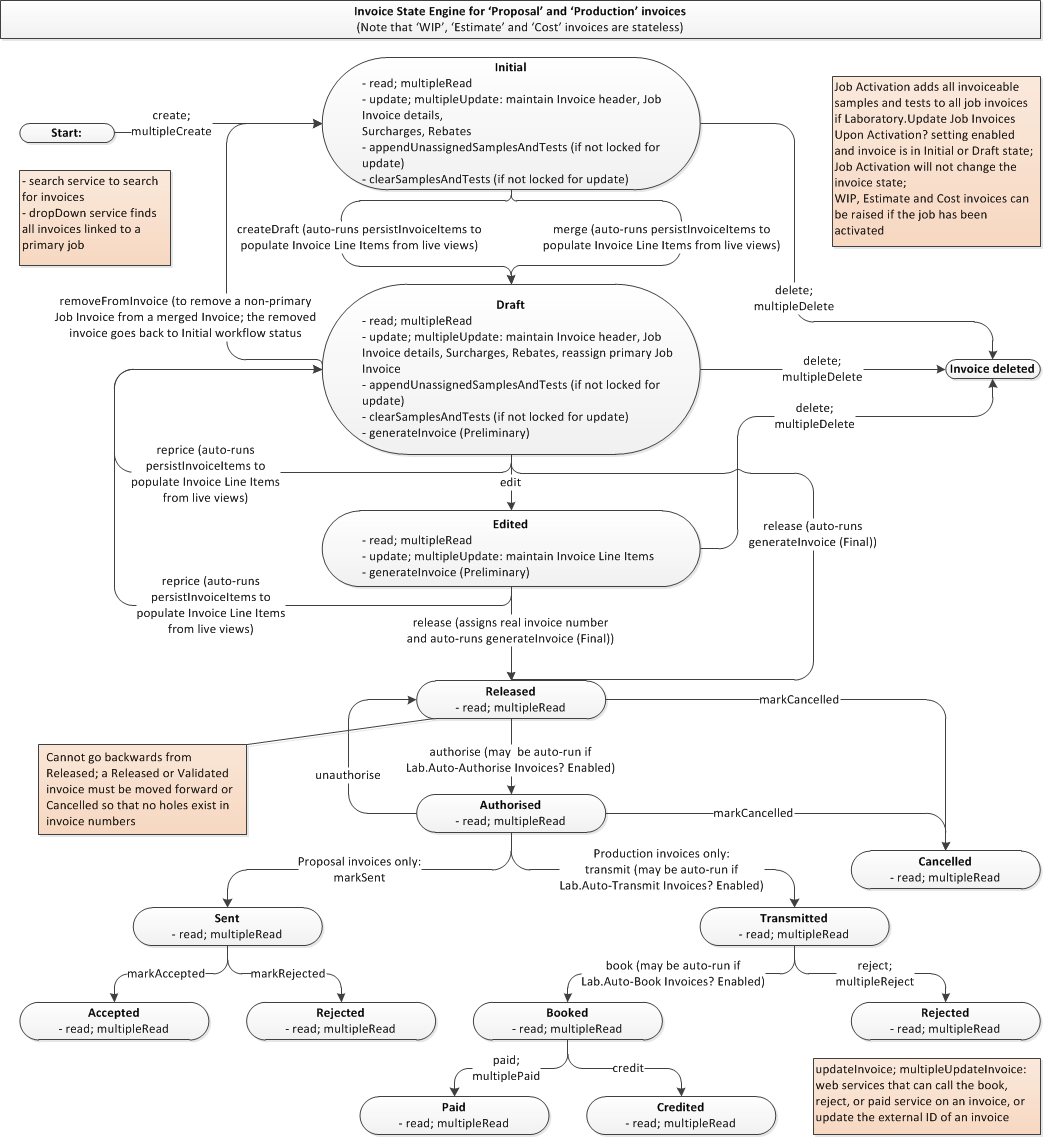
The invoicing process in CCLAS is tightly controlled by invoice status, so that for an invoice at a particular state in its life-cycle, set actions can be applied to it to move it on from being an initial invoice to being a finalised invoice.
Invoice totals can be previewed prior to release. Invoices cannot be released until its jobs are completed. Attempting to assign a status of released prior to job completion results in an error. Invoice release is the point at which the invoice is ready for authorisation.
Invoice authorisation is the point at which the invoice is ready for transmission or sending to the client. An invoice can be deleted only up until it is released, after which it is cancelled to remove it from financial calculations.
The invoice document can be generated either at invoice release or authorisation, or reprinted any time after that.
After authorisation, the life-cycle of a proposal invoice differs slightly to that of a production invoice. A proposal invoice is sent to the client, after which it is marked either as accepted or rejected. A production invoice is transmitted to the client upon which is booked, after which it is marked either as paid or rejected. After a production invoice is marked as paid, it can be credited in which a reverse invoice is created, and the invoice and credited invoice are linked.
Invoicing configuration allows for the automation of changes in various invoice states.
Client invoices are managed with the CCINV—Invoice application.
Invoice Life-cycle
An invoice starts life as a job invoice, that is, it is created as an invoice on a job. When an invoice is created, it is known as an initial invoice, and has an invoice status of 'Initial'.
Invoice status can be:
- Initial—An initial invoice is essentially a job invoice that has not yet been drafted into an actual invoice. Requesting a preview, generating an invoice estimate or a work-in-progress invoice does not advance this status. No actual pricing occurs.
- Draft—A proposal invoice is drafted from a job invoice in a proposal job.
A production invoice is drafted from a job invoice in a production job or from multiple job invoices from production jobs where the job invoices have a common client, project, contact, currency and ignore tax check box.
Pricing occurs using the pricing engine, either in the background based upon various trigger points, or in the foreground upon user demand.
- Edited—A draft invoice that is edited with amendments to the default costs that were generated by the pricing engine. This can include:
- The adding or removal of invoice items
- Adjustment of costs
- The addition or removal of surcharges or rebates, or
- The addition or removal of discounts or taxes.
After these types of amendments, pricing no longer occurs using the pricing engine but is set as per the invoice content. An edited invoice can be repriced to set it back to a draft invoice.
- Released—A draft or edited invoice that is marked as released for potential authorisation which usually involves the department head performing a final review. Pricing is set as per the Invoice content. A released invoice can be repriced to revert it to an invoice status of draft.
- Authorised—A released proposal invoice that is marked as authorised for potential sending, or a released production invoice that is authorised for potential transmission. Pricing is set as per the invoice content. An authorised invoice can be unauthorised to revert it to an invoice status of released.
- Cancelled—A proposal invoice that has not yet been sent, or a production invoice that has not yet been transmitted, but is cancelled. No pricing occurs.
As well as these statuses, proposal and production jobs can be assigned the following additional statuses:
- Proposal jobs:
- Sent—An authorised proposal invoice that is sent (electronically or physically) to the client.
- Accepted—A sent proposal invoice that is accepted by the client.
- Rejected—A sent proposal invoice that is rejected by the client.
- Production jobs:
- Transmitted—An authorised production invoice that is transmitted (electronically or physically) to the client.
- Booked—A transmitted production invoice that is booked into the client's financial system.
- Paid—A booked production invoice that is paid by the client.
- Credited—A booked production invoice that is credited to the client.
- Rejected—A transmitted production invoice that is rejected by the client's financial system.
Working with Invoice Statuses
Manual Transmission of Invoices to the ERP System
Manual transmission of financial data to an ERP system is typically managed by generating financial reports and customising the generation to transmit the report to the ERP system, with a feedback loop so that the report is not re-exported.
Refer to Generating Financial Reports from invoicing.
Automatic Transmission of Invoices to the ERP System
CCLAS does not provide core interfacing with external systems. ERP interfacing typically involves setting up some customisation around the services that apply invoice state changes. For example, upon authorisation then auto transmit the invoice, where the transmit service has a pre- or post-service hook to manage the transmission. Another custom solution would be to use the task scheduler and a script that extracts and transmits the required payload.
Financial Reporting
Whilst CCLAS is not an invoicing nor financial system, financial report are designed to provide the laboratory manager the financial summary details required to make decisions.
Financial reports can be generated from job costs which are displayed in the laboratory's currency, and can include the costed amounts.
Financial reports can be generated from client invoices which can be displayed in either the laboratory's or client's currency, and can include the invoiced amounts, including tax.
Managing Proposals of Work Costings to Clients
Proposal jobs are special types of jobs that have samples and tests assigned, which typically are not included in a laboratory batch nor analysed, but can be opened in workbook so that a typical result may be entered and a report and invoice generated on a 'look what we offer' basis.
Proposal jobs create proposal job invoices which are drafted into proposal invoices, and as mentioned above, pass through a slightly different workflow compared to production invoices. Proposal invoices are typically not passed to an ERP system, but can be included in financial reports raised from CCLAS.
Dashboard and Invoicing Amounts
Depending on the state of the invoice, the tables and views in which the WIP/estimate/invoice details are located vary. CCLAS invoice and financial reporting takes this into consideration to prepare the cost and invoice charges for any job. Any dashboard tool (for example, PowerBI) design must take this into consideration when modelling dashboards to show this information.
