
Maintaining Quotes for a Client
Overview
A quote in CCLAS 6 exists in two ways. The first one is in CCQUOTE application where you can create the quote, apply applicable dates, assign the schemes and analytes and the special prices. The quotes that exist in this space may or may not have connections to a client. This is an important distinction because a quote without links to a client is not applied to the job invoice of that client. It is effectively a template or generic quote. To determine if a quote is linked to a client, you would have to go to CCCLNT>Invoicing>Quote and check if the quote exists. The second one is in CCCLNT>Invoicing>Quote. The quotes that exists, linked, or are to be created here are associated to the client. A quote linked to a client can be applied to the production jobs associated to the client which then affects how the invoice is calculated from common book rates to the new quote rates. To put it simply, a quote created in CCQUOTE has to be linked to a client to be used in the job. A quote created or linked in the CCCLNT can be used in the job and essentially also creates a Quote Code which is a record on CCQUOTE.
There are three objects to be aware of: client, quote, and client quote. A client quote is an intersection between a client (in CCCLNT) and a quote (in CCQUOTE). A client quote has its own code (Client Quote Code), not to be confused with Quote Code. The client quote contains additional information to contextualise the quote for the client, for example, a description, start and end dates, and quote document. When adding schemes and special rates, you are actually creating an actual quote.
Note: If you are still relatively new to CCLAS 6, it is recommended you create quotes from CCCLNT. Later on, as you gain more experience, you will be able to differentiate much easier setting up quotes from either applications. The next few topics focus on client quotes.
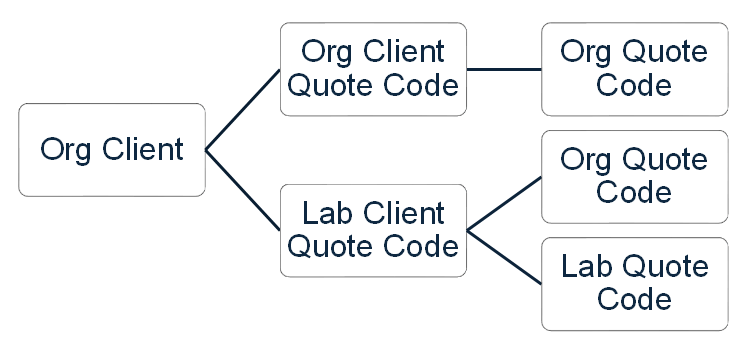
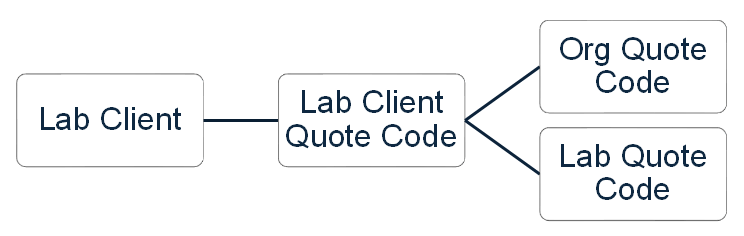
Just as Client Codes have org and lab scope, the same goes for Client Quotes. Client Quotes are initially scoped by their parent client by default but for Org Clients, this is not restricted, such that, an org-scope client can have an org-scope or lab-scope client quote. A lab-scope client can have a lab-scope client quote only.
Then, an org-scope client quote can link to an org-scope quote only, and a lab-scope client quote can link to an org-scope quote or lab-scope quote. The diagrams below shows these relationships.
Org Client to Client Quote Code to Quote Code Scope Relationship
Lab Client to Client Quote Code to Quote Code Scope Relationship
A client quote is created for a client, optional project, and optional contact, so that a job invoice linked to the client can link to the client quote. A client can contain multiple quotes.
Note: It does not matter whether a client quote links to a project, or contact, or not linked since this has no filtering affect upon the selection of the client quote in a job invoice for the client; filtering is only applied based on client, currency and registration date.
Client Quotes:
- CQ1 is in AUD for CLI_A
- CQ2 is in AUD for CLI_A + PROJ_A
- CQ3 is in AUD for CLI_A + PROJ_A + CONT_A
Job Invoices:
- JI1 is in AUD for CLI_A, so can link to CQ1, CQ2, CQ3
- JI2 is in AUD for CLI_A + PROJ_A, so can link to CQ1, CQ2, CQ3
- JI3 is in AUD for CLI_A + PROJ_A + CONT_A, so can link to CQ1, CQ2, CQ3.
Process
If not manually entered by the user, a client quote's Client Quote Code is generated from the laboratory's Quote Code Pattern and Quote Last Used Number.
A client quote contains the following information:
- Quote—Link to the shareable underlying base quote.
- Activity status—Indicates whether the client quote is selectable for a job invoice.
- Description—The description of the client quote, inherited from a quote when an existing quote is selected.
- Currency—The currency of the quote. If currency is selected, then only quotes with a matching currency are selectable. If a quote is selected, then the currency displays the quote's currency and cannot be updated unless the quote is cleared.
- Project—Optional. Note that the selection of a project does not restrict the selection of a job invoice's client quote based on the job invoice's project.
- Contact—Optional. Note that the selection of a contact does not restrict the selection of a job invoice's client quote based on the job invoice's contact.
- Start and end date—Start date is mandatory, but end date is optional, both inherited from a quote when an existing quote is selected, so that the client quote is only applied in job invoices where the job is registered during that time frame.
- Document—Optional.
Updating Prices in the Shareable Underlying Base Quote
Quotes are reviewed regularly, such that, whilst an individual quotes can be modified, from time to time, it is usual for a bulk update to be applied to all the quotes for a client. For example: Where apply a 5% CPI increase to one or more client quotes, to increase or decreases prices, without having to update each underlying base quote individually.
Underlying price schedules in the base quote can have a specified Percentage change applied, after which:
-
a selected rounding factor, Round New Scheme, Sample and Price prices by, is applied to round new price determinations for quote schedules that have a Price Type of Scheme-Based, Sample-Based and Analyte-Based, after which prices are rounded again to the currency's Minor Unit digits, and
-
a separate rounding factor, Round New Unit Prices by is applied to round new price determinations for quote schedules that have a Price Type of Unit-Based , after which prices are rounded again to the currency's Minor Unit digits + 1.
 Related processes...
- Maintaining Quotes
- Maintaining Tests for a Quote
- Maintaining Clients
- Maintaining Invoicing Details for a Client
- Maintaining Client and Client Contact Syntaxes
- Maintaining Invoice Syntaxes and Laboratory-based Numbering Patterns
- Maintaining Invoices
- Maintaining Job Invoices in Registration
- Maintaining Job Invoices in an Invoice
- Generating WIP and Estimate Job Invoices
- Releasing Invoices
- Appendix—Pricing Engine
