
Configuring Price Schedules in a Price Book or Quote
Overview
A price schedule is the pricing structure for a given price code within a price book or quote.
A pricing structure follows the monetary value of the price book it is in.
A pricing structure can contain fixed pricing or variable pricing based upon the count of items being priced, as denoted by the price type:
-
For scheme-based pricing, it is the number of invoiceable analytes in each invoiceable sample scheme linked to the scheme that is counted,
-
For sample-based pricing, it is the number of invoiceable sample schemes linked to the scheme that is counted.
-
For unit-based pricing, it is the number of units recorded on the job scheme that is counted.
-
For analyte-based pricing, it is the magnitude of the final numeric result that is counted in each invoiceable sample scheme analyte linked to the analyte that is counted.
Price Schedules within the Pricing Hierarchy
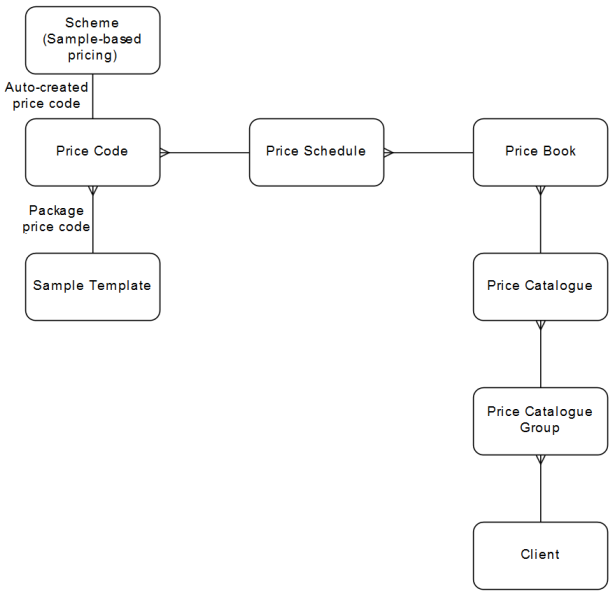
When an invoice is priced using a specific price book, in a job cost or invoice, then the samples and tests are priced using the price schedules in the price book in play, for the matching price code.
Process
Price schedules in price books are configured using the CCPRCCAT—Price Catalogue application. Refer to Configuring Price Catalogues and Price Books.
Price schedules in quotes are configured using the CCQUOTE—Quote application. Refer to Configuring Tests for a Quote to configure overriding price schedules for quote tests.
 Configure price schedules in a price book or quote
A price schedule's currency follows that of the price book it is in. Currency cannot be changed on a price schedule.
When a price schedule is created, its Price Type is selected and cannot be updated after that.
A price schedule can only link to a Price Code that has a matching price type.
A price schedule can have a base price and block price for an entity. When the Price Type is:
- Scheme-Based—The entity is a sample scheme analyte.
- Sample-Based—The entity is a sample scheme.
- Unit-Based—The entity is a job scheme.
- Analyte-Based—The entity is a sample scheme analyte result bracket.
A price schedule can have:
- A Base Price which reflects the base setup fee for the test and is charged once when the price schedule is applied, regardless of the number of invoiceable items. The base price is independent of any block pricing effects and always appears on an invoice when it is of a non-zero amount.
- A Base Price Note that is used to accompany the base price item on the invoice.
- A Block Price which reflects the execution fee for the test and is charged per number of invoiceable entities when the price schedule is applied. This is determined from:
- A variable price per line flag—Indicates whether to apply a variable price per line of price schedule item. Note that a fixed block price is stored as a hidden row in the price schedule item grid, so is subject also to this flag.
- Fixed block price, OR from the price schedule item grid—When using the grid, the aggregate flag specifies whether to apply only the grid row matching the up-to range, or whether to apply each grid row up to the matching up-to range.
- A Block Price Note that is used to accompany the block price item on the invoice.
- A range table of pricing, based upon the number of Invoiceable entities, used in preference to Block Price.
- Variable Price Per Line, used when a sliding-scale of pricing is applied to determine the block price.
- Aggregate, used when a sliding-scale of pricing is applied to determine the block price.
- A flag to indicate whether Variable Price Per Line is applied. Fixed pricing means that the number of invoiceable entities is not broken up into blocks, where each block is priced, but all of the invoiceable entities are priced at a fixed price.
- A flag to indicate whether the sliding-scale of pricing rows are Aggregated.
A range table of pricing has multiple rows, where each row has:
-
An Up To limit, such that, when Aggregated is selected, then the number of invoiceable entities up to the specified amount are charged according to the range table row, then the residue invoiceable entities up to the specified amount are charged according to the range table row, and so forth. If there are more entities than the last row's Up To amount, then these entities are not priced. So it is important to have the last row containing a 'catch -all' Up To amount.
Negative values can be entered in the range table for analyte-based pricing. This is useful when performing some tests that actually generate a negative result that still are chargeable in the range-based pricing mechanisms.
-
A Block Size that is only applied where Variable Price Per Line is selected.
-
A Block Price that is applied to each block of invoiceable entities where Variable Price Per Line is selected, and to one block containing all invoiceable entities where Variable Price Per Line is not selected, and used to determine the item price.
-
A Min Price that overrides the item price where it is lower than the specified minimum price.
-
A Max Price that overrides the item price where it is higher than the specified maximum price.
Where the Base Price or Fixed Block Price for a price schedule, or the Block Price, Min Price and Max Price for a price schedule item, in a price book or quote is being updated in the CCPRCSCHD Price Schedule Detail screen, where the Price Type is:
-
Scheme-Based, Sample-Based or Analyte-Based, then the prices display up to the currency’s Minor Unit digits with a trailing '0', and when a price is entered, then no rounding occurs on the price, but the price is trimmed to the currency’s Minor Unit digits.
-
Unit-Based, then the prices then the prices can only be displayed up to the currency’s Minor Unit digits + 1, and when a price is entered, then no rounding occurs on the price, but the price is trimmed to the currency’s Minor Unit digits + 1.
This ensures that the prices seen on the screen are the prices stored in the database, giving more clarity to the invoicing pricing process.
| Scheme ,Sample, Analyte Based price type | ||||
|---|---|---|---|---|
| Minor Unit digits | Existing Price | Display | On focus | Display after submit |
| 0 | 0.0 | 0.0 | 0.0 | 0.0 |
| 0 |
27.8888 |
27.8 |
27.8888 |
27.0 |
| 2 | 0.000 | 0.000 | 0.000 | 0.000 |
| 2 |
27.8888 |
27.888 |
27.8888 |
27.880 |
| 3 | 0.0000 | 0.0000 | 0.0000 | 0.0000 |
| 3 | 27.8888 | 27.8888 | 27.8888 |
27.8880 |
| Unit-Based price type | ||||
|---|---|---|---|---|
| Minor Unit digits | Existing Price | Display | On focus | Display after submit |
| 0 |
0.0101 |
0.0 |
0.0101 |
0.0 |
| 2 | 0.0101 | 0.010 | 0.010 | 0.010 |
| 3 | 0.0101 | 0.0101 | 0.0101 | 0.0101 |
Applying Price Schedules
Block prices are applied as fixed, where no matter how many items are being priced, all items are treated as one block, and the block price applied to that one block, or as variable, where, based upon a give block size, the number of items is divided by the block size to determine the number of blocks to price, and the block price applied to each of those blocks. All block pricing is stored as one or more price schedule items.
Specifying the Unit Price as a Fixed Block Price
In the simplest case, the block price can be fixed, that is, the unit price is determined by treating all priced items as one block, so regardless of the number of items being priced, the price is fixed.
A fixed price is simply entered as the Fixed Block Price. Behind the scenes, the system stores the Fixed Block Price as one Price Schedule Item where the Block Price is set to the Fixed Block Price and the Block Size is set to a very large number to cover all of items possibly being priced.
Specifying the Unit Price based upon the Number of Items being Priced
In more complex cases, the unit price can be determined based the number of items being priced, to allow for economy-of-scale, where the more items there are then the cheaper the price, or to allow for impact-based-on-scale, where the more items there are then the more expensive the price. So, based upon the number of items being priced, the price can vary.
Range pricing is achieved by leaving the Fixed Block Price empty so that the Price Schedule Item grid is displayed. Each row in the grid contains the defined Up To limit, to dictate which row or rows are applied for the pricing.
Non-aggregated or Aggregated Pricing
When considering which row/s within the grid are used for pricing, the pricing from rows of the grid is applied in one of two ways:
- Non-aggregated—Where Aggregated is not selected, then the unit price is determined from the first row in the grid where the number of items being priced is less than or equal to the Up To limit, and if no such row is found, then the unit price is 0.
- Aggregated—Where Aggregated is selected, then unit prices are determined from all rows in the grid, up to and including the row where the number of items being priced is less than or equal to the Up To limit, and if no such row is found, then from all rows in the grid. For each row, the unit price is determined using the delta number of items based upon the Up To limit for the row. For example, where 12 items are priced, and the grid contains the rows:
- Up To is 6
- Up To 10
- Up To is 20
- Up To is 99999,
then non-aggregated pricing returns a unit price based upon the pricing in row 3, and aggregated pricing returns three unit prices where the first 6 items have a unit price based upon the pricing in row 1, the next 4 items (delta between 10 and 6) have a unit price based upon the pricing in row 2, and the next 2 items (delta between 12 and 10) have a unit price based upon the pricing in row 3.
Non-variable or Variable Price per Line in the Price Schedule Item Grid
When considering how a unit price is determined from a row within the grid, the pricing is applied in one of two ways:
- Non-variable—Where Variable Price Per Line is not selected, then only a Block Price is entered, such that, the unit price for the row is set to the Block Price.
- Variable—Where Variable Price Per Line is selected, then a Block Size, Block Price, Min Price and Max Price are entered, such that, the unit price for the row is set to the number of blocks, as determined from the row's delta number of items being priced and the Block Size, multiplied by the Block Price, but limited by the Min Price and Max Price.
 Related processes...
- Configuring Currencies
- Configuring Price Codes
- Configuring Price Catalogues and Price Books
- Applying and Removing Package Pricing for Samples
- Maintaining Job Invoices in Registration
- Maintaining Job Invoices in an Invoice
- Generating WIP and Estimate Job Invoices
- Generating WIP and Estimate Job Costs
- Appendix—Pricing Engine
