
Configuring System Logging
Overview
System logs are used to assist developers analyse and resolve the issue if something inadvertently goes wrong with CCLAS 6.
Debugger Logger (java logging)
CCLAS 6 now uses the logging capabilities of Java to collect, standardise and consolidate log data from different sources into a centralised platform, allowing for streamlined log analysis and correlation.
Trace Logger (legacy logging)
The original logging of system activities in CCLAS 6 shows a log of all activities on the system, not just for the current user. This type of logging is still available.
Process
In Java, logging is managed through various components, each playing a crucial role in the logging process. The key logging components are Loggers, Handlers, Log Levels, Formatters, and Logging methods.
Java logging is based on various standard libraries, particularly:
-
slf4j (Simple Logging Facade for Java) that provides the interface for all libraries to implement when logging in java
-
Assorted implementations of slf4j include logback, log4j, java.util.logging. CCLAS 6 uses logback.
CCLAS 6 logging leverages a few features that come from Logback, combined with some customised java servlets that provide a download capability for some grouped log files from the server. There is also a customised folder backed by EFS, however there is a small limitation on this as the folder needs to be mounted directly into the server so that the log append operation can be done properly.
There are several configurations that separate the loggings depending on their usage. The configuration dictates which format is being used and the output destination, whether it is the system default console or file-based logging complete with file rolling and retention policy.
Configuring the Debugger Logger Framework
The logging framework provides some uniform patterns to define: log levels, logging code, appenders, markers, MDC, patterns, layouts and customisable java.
CCLAS 6 employs various of these constructs to provide rich logging to the server manager.
Log Levels
Log levels define the level of verbosity, from least to noisiest: ERROR, WARN, INFO, DEBUG, TRACE - Level (SLF4J 2.0.1 API)
These levels are cumulative, for example, if the logging level in the logback-xml is set to:
-
INFO—Includes any java lines that are log.error(), log.warn() and log.info()
-
DEBUG—Includes everything but TRACE, that is, any java lines that are log.error(), log.warn(), log.info() and log.debug().
A good explanation of these levels is here: Logging levels - Logback - rule-of-thumb to assign log levels - Stack Overflow
Note: ALL, FATAL and OFF are log4j levels (not standard slf4j), so they should not be used with Logback: Level (SLF4J 2.0.1 API)
Logging Code
Logging code is a simple code mechanism to include logging lines in java:
private static Logger logger = LoggerFactory.getLogger(MyClass.class);
...
logger.debug("Debug log message"); logger.info("Info log message"); logger.error("Error log message");
Having included those lines in java code, the server operator can filter how noisy they want the logs to be by setting the log level for the logs in configuration parameters.
This can be very fine-grained, by setting how noisy or quiet specific java packages are, via setting individual Log levels per package or class.
Appenders
Assorted output pathways are configurable via Appenders, for example, file appenders, console output, and message systems. These are configurable on specific subsets of logging, by package or other markers.
Markers
Markers allow a label to be added at runtime that server-configured filters can use to send logs to different destinations or take other actions, for example:
MDC
MDC is a map of variables that can be used to convey arbitrary information from inside the java runtime across to other java running in the same user session context, and out to the logging context, for example:
-
https://medium.com/javarevisited/mapped-diagnostic-context-mdc-6447b598736d
-
Java Logging with Mapped Diagnostic Context (MDC) | Baeldung
Patterns
Each appender can have individually configured log text formatting, including various available variables definable from the runtime and system.
This can include either simple per-line messages, or structured JSON maps of data.
Data included in the messages can come from the server context, Logging code, Markers, or MDC data, for example:
log4j.appender.consoleAppender.layout.ConversionPattern=
%-4r [%t] %5p %c{1} %x - %m - tx.id=%X{transaction.id} tx.owner=%X{transaction.owner}%n638 [pool-1-thread-2] INFO Log4JBusinessService
- Has transfer of 1104$ completed successfully ? true. - tx.id=2 tx.owner=Marc
logging.pattern.console=%d{"yyyy/MM/dd HH:mm:ss,SSS"} [%p] [%t] %M\\(%F:%L\\) - %msg%n
There are many ways to configure these patterns depending on the logger in use, so tutorials often provide different advice.
Logback’s Pattern parameters are described here: Chapter 6: Layouts (qos.ch) - ClassicPatternLayout.
Layouts
A deeper level of formatting can be customised with Layouts: Chapter 6: Layouts (qos.ch) (CCLAS does not use custom Layouts)
Customisable Java
All of the above is largely also extensible by using java code to extend the standard classes and add functionality. CCLAS 6 has some examples of this, as described below in CCLAS 6 Custom Appenders.
Debug Logger Definition File
The functionality above is assembled together using an XML definition file, depending on the logging library used. In logback, this definition file is logback.xml, for whatever format is output and whatever reader is used.
A feature of the logback.xml file is the ability to define filtration at the class orpackage level, so that if individual java classes or packages are either too noisy or more detail is wanted, the logging levels can be adjusted to be different to the overall system’s level just by setting a level per package/class. For example, the following setting restricts messages from Crystal Reports to only ERROR and WARN levels:
<logger name="com.crystaldecisions" level="WARN" />
Each server instance can have its own entirely customised logging verbosity, format and destination setup, via its own logback.xml file, directing log output in verbosity, formats and to destinations unique to that server.
The only element of logging that is fixed in the CCLAS 6 software (regardless of server instance) is the Logging Code, for example:
log.info("message to user"))
where the messages are originated at specific verbosity levels, with specific MDC data and markers. If these messages are incorrectly verbose, they can be altered either by changing the java code from log.info() to log.debug() etc, or by setting the log level per-package or per-class in the servers' logback.xml file to hide or expose that log level per java class/package.
Default logback.xml Configuration File
For future reference, the following logback.xml file comes from logback.xml coming from our ellipse-logging module (as at 01 Nov 2023).
logback.xml (from the ellipse-logging module)
<configuration>
    <!-- no longer supporting JBOSS port -->
    <!-- <define name="port.alloc" class="com.mincom.ellipse.logback.PortPropertyDefiner">
    </define> -->
    <appender name="WRAPPED" class="com.mincom.ellipse.logback.WrappedAppender">
        <appender name="STDOUT" class="ch.qos.logback.core.ConsoleAppender">
            <encoder>
                <pattern>%-5level %logger{5} - %msg%n</pattern>
            </encoder>
            <filter class="com.mincom.ellipse.logback.filters.SystemFlagFilter">
                <flagName>ellipse.stdout</flagName>
                <value>false</value>
                <OnMatch>DENY</OnMatch>
            </filter>
            <!-- Leave out AUDIT/SECURITY/SLOW_QUERY logging from default console appender for extra log marking later -->
            <filter class="com.mincom.ellipse.logback.filters.MarkerFilter">
                <markerName>AUDIT</markerName>
                <OnMatch>DENY</OnMatch>
            </filter>
            <filter class="com.mincom.ellipse.logback.filters.MarkerFilter">
                <markerName>SECURITY</markerName>
                <OnMatch>DENY</OnMatch>
            </filter>
            <filter class="com.mincom.ellipse.logback.filters.MarkerFilter">
                <markerName>SLOW_QUERY</markerName>
                <OnMatch>DENY</OnMatch>
            </filter>
        </appender>
        <filter class="ch.qos.logback.classic.filter.ThresholdFilter">
            <level>INFO</level>
        </filter>
        <filter class="com.mincom.ellipse.logback.filters.MDCValueFilter">
            <keyName>parent.uuid</keyName>
            <matchValue>null</matchValue>
            <matchOnNoMDC>true</matchOnNoMDC>
            <OnMismatch>DENY</OnMismatch>
            <OnMatch>NEUTRAL</OnMatch>
        </filter>
    </appender>
    <!-- this appender will probably not required but we'll just keep it here for backup -->
    <!-- <appender name="ScreenDefMergerAppender" class="ch.qos.logback.classic.sift.SiftingAppender">
        <discriminator>
            <Key>traceKey</Key>
            <DefaultValue>unknown</DefaultValue>
        </discriminator>
        <sift>
            <appender name="TRACE-ScreenDef-${user}" class="com.mincom.ellipse.logback.DeletedRollingFileAppender">
                <File>/${traceKey}/ScreenDef-${traceKey}.log</File>
                <Append>false</Append>
                <encoder>
                    <Pattern>%d [%X] [%t] %-5level %logger{35} - %msg%n</Pattern>
                </encoder>
                <rollingPolicy class="com.mincom.ellipse.logback.ServerFixedWindowRollingPolicy">
                    <fileNamePattern>/${traceKey}/ScreenDef-${traceKey}.%i.log.zip</fileNamePattern>
                    <minIndex>1</minIndex>
                    <maxIndex>10</maxIndex>
                </rollingPolicy>
                <triggeringPolicy class="ch.qos.logback.core.rolling.SizeBasedTriggeringPolicy">
                    <maxFileSize>200MB</maxFileSize>
                </triggeringPolicy>
            </appender>
        </sift>
        <filter class="com.mincom.ellipse.logback.filters.LoggerNameFilter">
            <startsWith>com.abb.enterprise.diff</startsWith>
            <OnMismatch>DENY</OnMismatch>
            <OnMatch>NEUTRAL</OnMatch>
        </filter>
        <filter class="com.mincom.ellipse.logback.filters.TraceInActiveFilter">
            <uiTraceValue>false</uiTraceValue>
            <OnMismatch>NEUTRAL</OnMismatch>
            <OnMatch>DENY</OnMatch>
        </filter>
    </appender> -->
    <!-- both TRACE and UI_TRACE is needed for the UI trace capture/download feature to work so just leave it here -->
    <appender name="TRACE" class="ch.qos.logback.classic.sift.SiftingAppender">
        <discriminator>
            <Key>traceKey</Key>
            <DefaultValue>unknown</DefaultValue>
        </discriminator>
        <sift>
            <appender name="TRACE-${user}" class="com.mincom.ellipse.logback.DeletedRollingFileAppender">
                <File>/${traceKey}.log</File>
                <Append>false</Append>
                <encoder>
                    <Pattern>%d [%X] [%t] %-5level %logger{35} - %msg%n</Pattern>
                </encoder>
                <rollingPolicy class="com.mincom.ellipse.logback.Role">
                    <fileNamePattern>/${traceKey}/${traceKey}.%i.log.zip</fileNamePattern>
                    <minIndex>1</minIndex>
                    <maxIndex>10</maxIndex>
                </rollingPolicy>
                <triggeringPolicy class="ch.qos.logback.core.rolling.SizeBasedTriggeringPolicy">
                    <maxFileSize>200MB</maxFileSize>
                </triggeringPolicy>
            </appender>
        </sift>
        <filter class="com.mincom.ellipse.logback.filters.TraceInActiveFilter">
            <uiTraceValue>false</uiTraceValue>
            <OnMismatch>NEUTRAL</OnMismatch>
            <OnMatch>DENY</OnMatch>
        </filter>
    </appender>
    <appender name="UI_TRACE" class="ch.qos.logback.classic.sift.SiftingAppender">
        <discriminator>
            <Key>traceKey</Key>
            <DefaultValue>unknown</DefaultValue>
        </discriminator>
        <sift>
            <appender name="TRACE-ui-${user}" class="com.mincom.ellipse.logback.DeletedRollingFileAppender">
                <File>/${traceKey}ui.log</File>
                <Append>false</Append>
                <encoder>
                    <Pattern>%date{yyyy-MM-dd} %msg%n</Pattern>
                </encoder>
                <rollingPolicy class="com.mincom.ellipse.logback.ServerFixedWindowRollingPolicy">
                    <fileNamePattern>/${traceKey}/${traceKey}ui.%i.log.zip</fileNamePattern>
                    <minIndex>1</minIndex>
                    <maxIndex>10</maxIndex>
                </rollingPolicy>
                <triggeringPolicy class="ch.qos.logback.core.rolling.SizeBasedTriggeringPolicy">
                    <maxFileSize>200MB</maxFileSize>
                </triggeringPolicy>
            </appender>
        </sift>
        <filter class="com.mincom.ellipse.logback.filters.TraceInActiveFilter">
            <uiTraceValue>true</uiTraceValue>
            <OnMismatch>NEUTRAL</OnMismatch>
            <OnMatch>DENY</OnMatch>
        </filter>
    </appender>
    <appender name="BATCH" class="ch.qos.logback.core.ConsoleAppender">
        <encoder>
            <Pattern>%d %-5level %-32.32logger{0} - %msg%n</Pattern>
        </encoder>
        <filter class="com.mincom.ellipse.logback.EhCacheExpiredFilter"/>
        <filter class="com.mincom.ellipse.logback.filters.MDCValueFilter">
            <keyName>parent.uuid</keyName>
            <matchValue>null</matchValue>
            <matchOnNoMDC>true</matchOnNoMDC>
            <OnMismatch>NEUTRAL</OnMismatch>
            <OnMatch>DENY</OnMatch>
        </filter>
        <filter class="ch.qos.logback.classic.filter.ThresholdFilter">
            <level>INFO</level>
        </filter>
    </appender>
    <appender name="BATCH_TRACE" class="ch.qos.logback.core.ConsoleAppender">
        <encoder>
            <Pattern>%d [app=%X{app}, eibline=%X{eibline}] [%t] %-5level %logger{35} - %msg%n</Pattern>
        </encoder>
        <filter class="com.mincom.ellipse.logback.filters.BatchTraceInactiveFilter">
            <OnMismatch>NEUTRAL</OnMismatch>
            <OnMatch>DENY</OnMatch>
        </filter>
    </appender>
    <!-- This log is used to log BEC/BATCH related messages -->
    <appender name="BEC" class="ch.qos.logback.core.ConsoleAppender">
        <filter class="com.mincom.ellipse.logback.filters.LoggerNameFilter">
            <startsWith>com.mincom.batch</startsWith>
            <OnMismatch>DENY</OnMismatch>
            <OnMatch>NEUTRAL</OnMatch>
        </filter>
        <filter class="com.mincom.ellipse.logback.filters.LevelHigherThanFilter">
            <levelName>INFO</levelName>
            <OnMismatch>NEUTRAL</OnMismatch>
            <OnMatch>ACCEPT</OnMatch>
        </filter>
        <filter class="com.mincom.ellipse.logback.filters.MDCValueFilter">
            <keyName>bectrace</keyName>
            <matchValue>true</matchValue>
            <OnMismatch>DENY</OnMismatch>
            <OnMatch>ACCEPT</OnMatch>
        </filter>
        <encoder>
            <pattern>%d [%X] [%t] %-5level %logger{35} - %msg%n</pattern>
        </encoder>
    </appender>
    <!-- Otherwise isTraceEnabled() will always return true -->
    <turboFilter class="ch.qos.logback.classic.turbo.DynamicThresholdFilter">
        <Key>trace</Key>
        <DefaultThreshold>INFO</DefaultThreshold> <!-- So return INFO as the DEFAULT threshould level -->
        <MDCValueLevelPair>
            <value>true</value>
            <level>TRACE</level> <!-- So if MDC trace=true then log for TRACE and higher. Else default -->
        </MDCValueLevelPair>
    </turboFilter>
    <!-- Ignore the VFS logging as is can cause deadlocks between SiftingAppender and LocalFileSystem locks -->
    <turboFilter class="com.mincom.ellipse.logback.filters.turbo.TurboLoggerNameFilter">
        <StartsWith>org.apache.commons.vfs</StartsWith>
        <OnMatch>DENY</OnMatch>
    </turboFilter>
    <!-- This log is used to log transaction messages -->
    <appender name="TX" class="ch.qos.logback.core.ConsoleAppender">
        <filter class="com.mincom.ellipse.logback.filters.TxFilter">
            <markerName>TX</markerName>
            <OnMismatch>DENY</OnMismatch>
            <OnMatch>NEUTRAL</OnMatch>
        </filter>
        <filter class="ch.qos.logback.classic.filter.ThresholdFilter">
            <level>INFO</level>
        </filter>
        <encoder>
            <pattern>%d [%X] [%t] %-5level %logger{35} - %msg%n</pattern>
        </encoder>
    </appender>
    <!-- Handle secure logs tagging including security/audit/slow_query logs -->
    <!-- <appender name="SECURITY" class="ch.qos.logback.core.ConsoleAppender">
        <filter class="com.mincom.ellipse.logback.filters.MarkerFilter">
            <markerName>SECURITY</markerName>
            <OnMismatch>DENY</OnMismatch>
            <OnMatch>NEUTRAL</OnMatch>
        </filter>
        <encoder>
            <pattern>%d [%X] [securelog=%marker] [%t] %-5level %logger{35} - %msg%n</pattern>
        </encoder>
    </appender> -->
    <appender name="AUDIT" class="ch.qos.logback.core.ConsoleAppender">
        <filter class="com.mincom.ellipse.logback.filters.MarkerFilter">
            <markerName>AUDIT</markerName>
            <OnMismatch>DENY</OnMismatch>
            <OnMatch>NEUTRAL</OnMatch>
        </filter>
        <encoder>
            <pattern>%d [%X] [securelog=%marker] [%t] %-5level %logger{35} - %msg%n</pattern>
        </encoder>
    </appender>
    <appender name="SLOW_QUERY" class="ch.qos.logback.core.ConsoleAppender">
        <filter class="com.mincom.ellipse.logback.filters.MarkerFilter">
            <markerName>SLOW_QUERY</markerName>
            <OnMismatch>DENY</OnMismatch>
            <OnMatch>NEUTRAL</OnMatch>
        </filter>
        <encoder>
            <pattern>%d [%X] [securelog=%marker] [%t] %-5level %logger{35} - %msg%n</pattern>
        </encoder>
    </appender>
    <!-- This is to stop an informational message created by hibernate when lazy loading is enabled -->
    <logger name="org.hibernate.engine.StatefulPersistenceContext.ProxyWarnLog" level="ERROR"/>
    <!-- Reduce this level to see more information about cache clustering and replication status -->
    <logger name="net.sf.ehcache.distribution.RMIAsynchronousCacheReplicator" level="ERROR"/>
    <!-- This is to stop a stack trace which is only INFO when an object is loaded but does not exist, which is done a bit in our code -->
    <logger name="org.hibernate.event.def.DefaultLoadEventListener" level="WARN"/>
    <logger name="com.mincom.ellipse.lsi.implementation.ConnectionManagerImpl" level="ERROR"/>
    <!-- Hide some of the more verbose tracing from Hibernate -->
    <logger name="org.hibernate.hql.ast" level="INFO"/>
    <!-- prevent ClassCastExceptions on foreign key to non primary key columns when level is trace -->
    <logger name="org.hibernate.engine.loading.LoadContexts" level="INFO"/>
    <logger name="org.hibernate.event.def.EvictVisitor" level="INFO"/>
    <logger name="org.hibernate.engine.Collections" level="INFO"/>
    <logger name="org.hibernate.util.JDBCExceptionReporter" level="OFF"/>
    <!-- Hide some of the more verbose tracing from DB Unit -->
    <logger name="org.dbunit" level="OFF"/>
    <logger name="o.d.dataset" level="OFF"/>
    <!-- <logger name="com.abb.enterprise.diff" additivity="false">
        <appender-ref ref="ScreenDefMergerAppender"/>
    </logger> -->
    <root level="${ROOT_LOG_LEVEL:-TRACE}">
        <appender-ref ref="WRAPPED"/>
        <appender-ref ref="TRACE"/>
        <appender-ref ref="UI_TRACE"/>
        <appender-ref ref="BATCH"/>
        <appender-ref ref="BATCH_TRACE"/>
        <appender-ref ref="BEC"/>
        <appender-ref ref="AUDIT"/>
        <appender-ref ref="SLOW_QUERY"/>
        <!-- <appender-ref ref="SECURITY"/> -->
        <appender-ref ref="TX"/>
    </root>
</configuration>
High-level System Properties in the logback.xml Configuration File
In this logback.xml configuration file, there are several high-level system properties that are used to determine which configuration is applied, depending on the value or presence of these properties in system properties. At the moment there are three system properties that determine the configuration: LOG_FILE, LOG_MODE and ROOT_LOG_LEVEL.
| LOG_FILE |
When this is provided with an appropriate value for log level (TRACE, DEBUG, INFO, WARN, ERROR), the following two (and only) appenders are enabled:
This LOG_FILE system parameter also sets the root log level (overriding the ROOT_LOG_LEVEL parameter, if used). If the system property is defined but has no value, then DEBUG is assigned as the root level. Setting this variable overrides and disables the functionality of LOG_MODE, ROOT_LOG_LEVEL and overrides the Default Logging Configuration described below. |
| LOG_MODE |
When this property is provided, and the LOG_FILE property is not present), the following two (and only) appenders are enabled:
When the LOG_MODE property is defined but has no value, the root level log is set to DEBUG, thereby turning on debug level log for literally EVERYTHING, which could be very dangerous to system performance, and therefore not advised in a production environment. This is due to the fact that the default extended logging configuration (following) is set to lessen some of the logging verbosity, that is, by restricting some noisy java packages to ERROR level to minimise excess logging. But, if the LOG_MODE is set and has a proper value for the logging level (such as TRACE, DEBUG, INFO, WARN, ERROR), then that logging level filter is applied to all logging occurring in the system This also applies to direct and transitive libraries which may have inappropriately verbose logging included. Setting this variable overrides and disables the functionality of ROOT_LOG_LEVEL and overrides the Default Logging Configuration described below. |
| ROOT_LOG_LEVEL |
Additionally, there is a variable called ROOT_LOG_LEVEL that should be overwritten via system properties, otherwise it defaults to TRACE which is the most verbose. This property sets the root log level for any java packages that are not otherwise defined in logback.xml to have specific logging levels applied. Note: This is only effective in the absence of LOG_MODE and LOG_FILE properties. |
Default Logging Configuration
In this logback.xml configuration file, the extended configuration section, which is enabled when neither LOG_FILE nor LOG_MODE is provided, contains the default behaviour of a CCLAS 6 production environment.
Extended configuration section
<root level="${ROOT_LOG_LEVEL:-TRACE}">
    <appender-ref ref="WRAPPED" />
    <appender-ref ref="TRACE" />
    <appender-ref ref="UI_TRACE" />
    <appender-ref ref="LOG_DEBUGGER_TRACE" />
    <appender-ref ref="BATCH" />
    <appender-ref ref="BATCH_TRACE" />
    <appender-ref ref="BEC" />
    <appender-ref ref="AUDIT" />
    <appender-ref ref="SECURITY" />
    <appender-ref ref="TX" />
    <appender-ref ref="QUERY" />
</root>
Description of appenders in the extended configuration section:
In either case of LOG_DEBUGGER_TRACE or LOG_DEBUGGER_ROLLING, whether logging to the console or a file, the log aggregator must capture the logs from the console or log file for further filtering.
Alternatively, to reuse an existing appender to consistently capture log debugger events, add the following filter configuration and place it as the first filter in the appender:
<filter class="com.mincom.ellipse.logback.filters.LogDebuggerInActiveFilter">
    <OnMismatch>ACCEPT</OnMismatch>
    <OnMatch>NEUTRAL</OnMatch>
</filter>
<!-- other filter goes here e.g. -->
<filter class="ch.qos.logback.classic.filter.ThresholdFilter">
    <level>INFO</level>
</filter>
In Logback, the filters are evaluated in the order they are defined. If a filter returns ACCEPT or DENY, then the evaluation stops and the decision is made. If a filter returns NEUTRAL, then the next filter in the chain is evaluated.
In above case, if the LogDebuggerInActiveFilter is active, that is, it is set to OnMismatch, then it returns ACCEPT and the logging event is accepted immediately without consulting the remaining filters.
However, if the LogDebuggerInActiveFilter filter is inactive, that is, it is set to OnMatch, then it returns NEUTRAL and the next filter, for example, ThresholdFilter is evaluated. If the logging event's level is INFO or higher, then the ThresholdFilter accepts the event. If the logging event's level is lower than INFO, then the ThresholdFilter denies the event.
CCLAS 6 Custom Appenders
Logging Suggestion for Container-based CCLAS 6
Although the logging.xml shown above is quite elaborate in separating the logs and populating the files nicely in EFS, this does not work quite as well in a container context, especially in combination with a log aggregator. The log aggregator by default expects the log to be populated in the container console, but the default CCLAS 6 configuration directs some of the logs to EFS.
To fulfil a requirement to accommodate container/aggregator logging we could set the LOG_MODE to a valid log level, but that disables the feature of downloading a user trace log from the CCLAS 6 user interface. Alternatively, to keep most of the existing default logging functionality, with the necessary log visible in the console, while also keeping the additional capability to hide some logs with security risks, the following log configuration can be used:
logback-console.xml
<configuration>
    <!-- no longer supporting JBOSS port -->
    <!-- <define name="port.alloc" class="com.mincom.ellipse.logback.PortPropertyDefiner">
    </define> -->
    <appender name="WRAPPED" class="com.mincom.ellipse.logback.WrappedAppender">
        <appender name="STDOUT" class="ch.qos.logback.core.ConsoleAppender">
            <encoder>
                <pattern>%-5level %logger{5} - %msg%n</pattern>
            </encoder>
            <filter class="com.mincom.ellipse.logback.filters.SystemFlagFilter">
                <flagName>ellipse.stdout</flagName>
                <value>false</value>
                <OnMatch>DENY</OnMatch>
            </filter>
            <!-- Leave out AUDIT/SECURITY/SLOW_QUERY logging from default console appender for extra log marking later -->
            <filter class="com.mincom.ellipse.logback.filters.MarkerFilter">
                <markerName>AUDIT</markerName>
                <OnMatch>DENY</OnMatch>
            </filter>
            <filter class="com.mincom.ellipse.logback.filters.MarkerFilter">
                <markerName>SECURITY</markerName>
                <OnMatch>DENY</OnMatch>
            </filter>
            <filter class="com.mincom.ellipse.logback.filters.MarkerFilter">
                <markerName>SLOW_QUERY</markerName>
                <OnMatch>DENY</OnMatch>
            </filter>
        </appender>
        <filter class="ch.qos.logback.classic.filter.ThresholdFilter">
            <level>INFO</level>
        </filter>
        <filter class="com.mincom.ellipse.logback.filters.MDCValueFilter">
            <keyName>parent.uuid</keyName>
            <matchValue>null</matchValue>
            <matchOnNoMDC>true</matchOnNoMDC>
            <OnMismatch>DENY</OnMismatch>
            <OnMatch>NEUTRAL</OnMatch>
        </filter>
    </appender>
    <!-- this appender will probably not required but we'll just keep it here for backup -->
    <!-- <appender name="ScreenDefMergerAppender" class="ch.qos.logback.classic.sift.SiftingAppender">
        <discriminator>
            <Key>traceKey</Key>
            <DefaultValue>unknown</DefaultValue>
        </discriminator>
        <sift>
            <appender name="TRACE-ScreenDef-${user}" class="com.mincom.ellipse.logback.DeletedRollingFileAppender">
                <File>/${traceKey}/ScreenDef-${traceKey}.log</File>
                <Append>false</Append>
                <encoder>
                    <Pattern>%d [%X] [%t] %-5level %logger{35} - %msg%n</Pattern>
                </encoder>
                <rollingPolicy class="com.mincom.ellipse.logback.ServerFixedWindowRollingPolicy">
                    <fileNamePattern>/${traceKey}/ScreenDef-${traceKey}.%i.log.zip</fileNamePattern>
                    <minIndex>1</minIndex>
                    <maxIndex>10</maxIndex>
                </rollingPolicy>
                <triggeringPolicy class="ch.qos.logback.core.rolling.SizeBasedTriggeringPolicy">
                    <maxFileSize>200MB</maxFileSize>
                </triggeringPolicy>
            </appender>
        </sift>
        <filter class="com.mincom.ellipse.logback.filters.LoggerNameFilter">
            <startsWith>com.abb.enterprise.diff</startsWith>
            <OnMismatch>DENY</OnMismatch>
            <OnMatch>NEUTRAL</OnMatch>
        </filter>
        <filter class="com.mincom.ellipse.logback.filters.TraceInActiveFilter">
            <uiTraceValue>false</uiTraceValue>
            <OnMismatch>NEUTRAL</OnMismatch>
            <OnMatch>DENY</OnMatch>
        </filter>
    </appender> -->
    <!-- both TRACE and UI_TRACE is needed for the UI trace capture/download feature to work so just leave it here -->
    <appender name="TRACE" class="ch.qos.logback.classic.sift.SiftingAppender">
        <discriminator>
            <Key>traceKey</Key>
            <DefaultValue>unknown</DefaultValue>
        </discriminator>
        <sift>
            <appender name="TRACE-${user}" class="com.mincom.ellipse.logback.DeletedRollingFileAppender">
                <File>/${traceKey}.log</File>
                <Append>false</Append>
                <encoder>
                    <Pattern>%d [%X] [%t] %-5level %logger{35} - %msg%n</Pattern>
                </encoder>
                <rollingPolicy class="com.mincom.ellipse.logback.Role">
                    <fileNamePattern>/${traceKey}/${traceKey}.%i.log.zip</fileNamePattern>
                    <minIndex>1</minIndex>
                    <maxIndex>10</maxIndex>
                </rollingPolicy>
                <triggeringPolicy class="ch.qos.logback.core.rolling.SizeBasedTriggeringPolicy">
                    <maxFileSize>200MB</maxFileSize>
                </triggeringPolicy>
            </appender>
        </sift>
        <filter class="com.mincom.ellipse.logback.filters.TraceInActiveFilter">
            <uiTraceValue>false</uiTraceValue>
            <OnMismatch>NEUTRAL</OnMismatch>
            <OnMatch>DENY</OnMatch>
        </filter>
    </appender>
    <appender name="UI_TRACE" class="ch.qos.logback.classic.sift.SiftingAppender">
        <discriminator>
            <Key>traceKey</Key>
            <DefaultValue>unknown</DefaultValue>
        </discriminator>
        <sift>
            <appender name="TRACE-ui-${user}" class="com.mincom.ellipse.logback.DeletedRollingFileAppender">
                <File>/${traceKey}ui.log</File>
                <Append>false</Append>
                <encoder>
                    <Pattern>%date{yyyy-MM-dd} %msg%n</Pattern>
                </encoder>
                <rollingPolicy class="com.mincom.ellipse.logback.ServerFixedWindowRollingPolicy">
                    <fileNamePattern>/${traceKey}/${traceKey}ui.%i.log.zip</fileNamePattern>
                    <minIndex>1</minIndex>
                    <maxIndex>10</maxIndex>
                </rollingPolicy>
                <triggeringPolicy class="ch.qos.logback.core.rolling.SizeBasedTriggeringPolicy">
                    <maxFileSize>200MB</maxFileSize>
                </triggeringPolicy>
            </appender>
        </sift>
        <filter class="com.mincom.ellipse.logback.filters.TraceInActiveFilter">
            <uiTraceValue>true</uiTraceValue>
            <OnMismatch>NEUTRAL</OnMismatch>
            <OnMatch>DENY</OnMatch>
        </filter>
    </appender>
    <appender name="BATCH" class="ch.qos.logback.core.ConsoleAppender">
        <encoder>
            <Pattern>%d %-5level %-32.32logger{0} - %msg%n</Pattern>
        </encoder>
        <filter class="com.mincom.ellipse.logback.EhCacheExpiredFilter"/>
        <filter class="com.mincom.ellipse.logback.filters.MDCValueFilter">
            <keyName>parent.uuid</keyName>
            <matchValue>null</matchValue>
            <matchOnNoMDC>true</matchOnNoMDC>
            <OnMismatch>NEUTRAL</OnMismatch>
            <OnMatch>DENY</OnMatch>
        </filter>
        <filter class="ch.qos.logback.classic.filter.ThresholdFilter">
            <level>INFO</level>
        </filter>
    </appender>
    <appender name="BATCH_TRACE" class="ch.qos.logback.core.ConsoleAppender">
        <encoder>
            <Pattern>%d [app=%X{app}, eibline=%X{eibline}] [%t] %-5level %logger{35} - %msg%n</Pattern>
        </encoder>
        <filter class="com.mincom.ellipse.logback.filters.BatchTraceInactiveFilter">
            <OnMismatch>NEUTRAL</OnMismatch>
            <OnMatch>DENY</OnMatch>
        </filter>
    </appender>
    <!-- This log is used to log BEC/BATCH related messages -->
    <appender name="BEC" class="ch.qos.logback.core.ConsoleAppender">
        <filter class="com.mincom.ellipse.logback.filters.LoggerNameFilter">
            <startsWith>com.mincom.batch</startsWith>
            <OnMismatch>DENY</OnMismatch>
            <OnMatch>NEUTRAL</OnMatch>
        </filter>
        <filter class="com.mincom.ellipse.logback.filters.LevelHigherThanFilter">
            <levelName>INFO</levelName>
            <OnMismatch>NEUTRAL</OnMismatch>
            <OnMatch>ACCEPT</OnMatch>
        </filter>
        <filter class="com.mincom.ellipse.logback.filters.MDCValueFilter">
            <keyName>bectrace</keyName>
            <matchValue>true</matchValue>
            <OnMismatch>DENY</OnMismatch>
            <OnMatch>ACCEPT</OnMatch>
        </filter>
        <encoder>
            <pattern>%d [%X] [%t] %-5level %logger{35} - %msg%n</pattern>
        </encoder>
    </appender>
    <!-- Otherwise isTraceEnabled() will always return true -->
    <turboFilter class="ch.qos.logback.classic.turbo.DynamicThresholdFilter">
        <Key>trace</Key>
        <DefaultThreshold>INFO</DefaultThreshold> <!-- So return INFO as the DEFAULT threshould level -->
        <MDCValueLevelPair>
            <value>true</value>
            <level>TRACE</level> <!-- So if MDC trace=true then log for TRACE and higher. Else default -->
        </MDCValueLevelPair>
    </turboFilter>
    <!-- Ignore the VFS logging as is can cause deadlocks between SiftingAppender and LocalFileSystem locks -->
    <turboFilter class="com.mincom.ellipse.logback.filters.turbo.TurboLoggerNameFilter">
        <StartsWith>org.apache.commons.vfs</StartsWith>
        <OnMatch>DENY</OnMatch>
    </turboFilter>
    <!-- This log is used to log transaction messages -->
    <appender name="TX" class="ch.qos.logback.core.ConsoleAppender">
        <filter class="com.mincom.ellipse.logback.filters.TxFilter">
            <markerName>TX</markerName>
            <OnMismatch>DENY</OnMismatch>
            <OnMatch>NEUTRAL</OnMatch>
        </filter>
        <filter class="ch.qos.logback.classic.filter.ThresholdFilter">
            <level>INFO</level>
        </filter>
        <encoder>
            <pattern>%d [%X] [%t] %-5level %logger{35} - %msg%n</pattern>
        </encoder>
    </appender>
    <!-- Handle secure logs tagging including security/audit/slow_query logs -->
    <!-- <appender name="SECURITY" class="ch.qos.logback.core.ConsoleAppender">
        <filter class="com.mincom.ellipse.logback.filters.MarkerFilter">
            <markerName>SECURITY</markerName>
            <OnMismatch>DENY</OnMismatch>
            <OnMatch>NEUTRAL</OnMatch>
        </filter>
        <encoder>
            <pattern>%d [%X] [securelog=%marker] [%t] %-5level %logger{35} - %msg%n</pattern>
        </encoder>
    </appender> -->
    <appender name="AUDIT" class="ch.qos.logback.core.ConsoleAppender">
        <filter class="com.mincom.ellipse.logback.filters.MarkerFilter">
            <markerName>AUDIT</markerName>
            <OnMismatch>DENY</OnMismatch>
            <OnMatch>NEUTRAL</OnMatch>
        </filter>
        <encoder>
            <pattern>%d [%X] [securelog=%marker] [%t] %-5level %logger{35} - %msg%n</pattern>
        </encoder>
    </appender>
    <appender name="SLOW_QUERY" class="ch.qos.logback.core.ConsoleAppender">
        <filter class="com.mincom.ellipse.logback.filters.MarkerFilter">
            <markerName>SLOW_QUERY</markerName>
            <OnMismatch>DENY</OnMismatch>
            <OnMatch>NEUTRAL</OnMatch>
        </filter>
        <encoder>
            <pattern>%d [%X] [securelog=%marker] [%t] %-5level %logger{35} - %msg%n</pattern>
        </encoder>
    </appender>
    <!-- This is to stop an informational message created by hibernate when lazy loading is enabled -->
    <logger name="org.hibernate.engine.StatefulPersistenceContext.ProxyWarnLog" level="ERROR"/>
    <!-- Reduce this level to see more information about cache clustering and replication status -->
    <logger name="net.sf.ehcache.distribution.RMIAsynchronousCacheReplicator" level="ERROR"/>
    <!-- This is to stop a stack trace which is only INFO when an object is loaded but does not exist, which is done a bit in our code -->
    <logger name="org.hibernate.event.def.DefaultLoadEventListener" level="WARN"/>
    <logger name="com.mincom.ellipse.lsi.implementation.ConnectionManagerImpl" level="ERROR"/>
    <!-- Hide some of the more verbose tracing from Hibernate -->
    <logger name="org.hibernate.hql.ast" level="INFO"/>
    <!-- prevent ClassCastExceptions on foreign key to non primary key columns when level is trace -->
    <logger name="org.hibernate.engine.loading.LoadContexts" level="INFO"/>
    <logger name="org.hibernate.event.def.EvictVisitor" level="INFO"/>
    <logger name="org.hibernate.engine.Collections" level="INFO"/>
    <logger name="org.hibernate.util.JDBCExceptionReporter" level="OFF"/>
    <!-- Hide some of the more verbose tracing from DB Unit -->
    <logger name="org.dbunit" level="OFF"/>
    <logger name="o.d.dataset" level="OFF"/>
    <!-- <logger name="com.abb.enterprise.diff" additivity="false">
        <appender-ref ref="ScreenDefMergerAppender"/>
    </logger> -->
    <root level="${ROOT_LOG_LEVEL:-TRACE}">
        <appender-ref ref="WRAPPED"/>
        <appender-ref ref="TRACE"/>
        <appender-ref ref="UI_TRACE"/>
        <appender-ref ref="BATCH"/>
        <appender-ref ref="BATCH_TRACE"/>
        <appender-ref ref="BEC"/>
        <appender-ref ref="AUDIT"/>
        <appender-ref ref="SLOW_QUERY"/>
        <!-- <appender-ref ref="SECURITY"/> -->
        <appender-ref ref="TX"/>
    </root>
</configuration>
This logback-console.xml has switched most of the FileAppender based appenders into ConsoleAppender which prints logs into the container’s standard output, making it visible from the log aggregator. However, some of the logging still remains in the FileAppender to keep the user trace download log functionality working.
Database Migration Logging
The logging during database migration has a different way of working and does not make use of most of the appenders described in the list above. Most of the logging is simply done on standard output (based on the WRAPPED configuration in the logback.xml and any environment variables associated with it), so the only output from this process is the console output and the server.log. But, there are additional things to consider outside of the default logback.xml settings. This includes that the docker image that wraps around the CCLAS 6 server also has manual logging defined within its built image. Several notable things about the CCLAS 6 docker images around logging are as follows:
-
The docker image exposes an environment variable called EFS_DIR which basically states where the EFS root path is.
-
It also has a LOG_DIR environment variable which takes the EFS_DIR value by default unless otherwise specified. This LOG_DIR eventually becomes the final log path that the docker images uses. There are four kinds of logs coming out from the image internals:
-
pre-conversion-hook.log—At the clean up before performing database migration (mostly does clean up of core data which is pulled in during the coreDataLoad process)
-
conversion.log—At the start of performing the conversion to apply the latest model changes (this stage only detects changes or differences between the current database structure and the latest modelled data object coming from RSA)
-
coreDataLoad.log—At the population of the core data based on sets of specified tables (MSF010, MSF025, MSF081, MSF1ED, MSF1EE, MSF1EB, MENUTABLES, SECURITY)
-
post-conversion-hook.log—At the last step of the database migration task where it applies a few customisation changes on top of the upgraded data.
-
-
In kubernetes setting, the EFS folder is mounted on the volumes on a path like /mnt/efs/, and LOG_DIR can be set to have a prefix of /mnt/efs/, and logs are automatically written to the EFS. (This follows what the EFS is defined as, depending on which cloud provider is being run. If it is on Azure, then it goes to the storage account file shared folder, and if on AWS, then it goes to the NFS server instead.)
-
In the CCLAS-DM deployment Ansible playbook, there is a step to upload the finished logs during data migration to the s3 bucket. However the Azure environment does not have Ansible involved so the s3 upload behaviour is not present in Azure, which aligns with our intended direction.
Undertow Logging
In prior versions of CCLAS 6 when JBoss WildFly was used as the application server instead of Spring Boot’s Undertow, the EAR file was deployed as an application on top of a running WildFly server. As an application serve,r WildFly does a lot more compared to a lightweight embedded server such as Undertow. This also affects the standard logging being printed out in the log file. By default, a Wildfly implementation has another log file called console.log to distinguish between the application server log and the bespoke application log. (Some people may be more familiar with calling the console.log a server.log while the server.log that currently referenced in the logback.xml might be called an application.log. The distinction can be separated further by differentiating between error log, security log, batch log, etc.)
On moving away from WildFly to Spring Boot, however, this behaviour has changed. The Undertow server that is used in exchange for WildFly does not have the behaviour of creating a separate log file called console.log. Instead, its logs are just processed via Spring Boot’s logging overall mechanism (as described above regarding the logback.xml file configuration). Since Undertow is embedded inside the Spring Boot application itself, it does not need to have extra logging definitions apart from what is configured at the application level. With that knowledge, and looking at the containerised application context, the need for a separate console.log is no longer relevant. When combined with the intention to use log aggregators, all that is necessary is that Undertow logging naturally outputs to the standard output (if defined in logback.xml) so that it is visible, with specified filtering, to the log aggregators.
In summary, due to the changes between the WildFly environment and Spring Boot, especially in the containerised environment, the need for having the console.log is no longer relevant. The application server starts in conjunction with the application under Spring Boot and logging operates according to the application’s logback.xml file definition. With the above configuration suggested for a container-based application, most, if not all, of the logging is expected to go to the console, then captured by the log aggregator implemented on that container.
JSON Logging format
The net.logstash.logback.encoder.LogstashEncoder for JSON log format can be used in CCLAS 6.
To switch to JSON format, the encoder in logback.xml must be updated. An external logback.xml can be referenced by application start up options , otherwise CCLAS 6 uses the in-build logback.xml which, by default, logs message in plain text format.
To define an external logback.xml in the application start up properties file:
logging.config=/mnt/efs/cclas68/logback.xml
Similarly, use external logback.xml in a java start-up option:
-Dlogging.config=/mnt/efs/cclas68/logback.xml
LogstashEncoder Configuration in logback.xml
The following example patterns are for switching from a plain text encoder to a JSON encoder:
Example pattern 1: <pattern>%-5level %logger{5} - %msg%n</pattern>
From:
To:
<encoder class="net.logstash.logback.encoder.LogstashEncoder">
<fieldNames>
<logger>logger</logger>
<thread>thread</thread>
</fieldNames>
<includeMdc>false</includeMdc>
<includeContext>false</includeContext>
</encoder>Example pattern 2: <Pattern>%d [%X] [%t] %-5level %logger{35} - %msg%n</Pattern>
From:
To:
<encoder class="net.logstash.logback.encoder.LogstashEncoder">
<fieldNames>
<logger>logger</logger>
<thread>thread</thread>
</fieldNames>
<timestampPattern>yyyy-MM-dd' 'HH:mm:ss.SSS</timestampPattern>
<includeContext>false</includeContext>
</encoder>Example pattern 3: <Pattern>%d [app=%X{app}, eibline=%X{eibline}] [%t] %-5level %logger{35} - %msg%n</Pattern>
From:
<encoder>
<Pattern>%d [app=%X{app}, eibline=%X{eibline}] [%t] %-5level %logger{35} - %msg%n</Pattern>
</encoder>To:
<encoder class="net.logstash.logback.encoder.LogstashEncoder">
<fieldNames>
<logger>logger</logger>
<thread>thread</thread>
</fieldNames>
<timestampPattern>yyyy-MM-dd' 'HH:mm:ss.SSS</timestampPattern>
<includeMdcKeyName>app</includeMdcKeyName>
<includeMdcKeyName>eibline</includeMdcKeyName>
<includeContext>false</includeContext>
</encoder>JSON log “pretty“ format:
By default, JSON logs are displayed as a single-line message. To format the JSON logs in a more readable, "pretty" format, it is enabled using the following setting:
<jsonGeneratorDecorator class="net.logstash.logback.decorate.PrettyPrintingJsonGeneratorDecorator"/>
For example:
<encoder class="net.logstash.logback.encoder.LogstashEncoder">
<jsonGeneratorDecorator class="net.logstash.logback.decorate.PrettyPrintingJsonGeneratorDecorator"/>
<fieldNames>
<logger>logger</logger>
<thread>thread</thread>
</fieldNames>
<includeMdc>false</includeMdc>
<includeContext>false</includeContext>
</encoder>Dual Logging in Plain Text and JSON
Both plain text and JSON outputs are configured by defining two appenders, each with a different encoder. This setup allows the same log event to be recorded in both plain text and JSON formats.
Note: This produces duplicate logs for the same event.
<appender name="STDOUT" class="ch.qos.logback.core.ConsoleAppender">
<encoder>
    <pattern>%-5level %logger{5} - %msg%n</pattern>
</encoder>
<filter class="com.mincom.ellipse.logback.filters.SystemFlagFilter">
<flagName>ellipse.stdout</flagName>
<value>false</value>
<OnMatch>DENY</OnMatch>
</filter>
<!-- Don't Log Audit events to StdOut -->
<filter class="com.mincom.ellipse.logback.filters.MarkerFilter">
<markerName>AUDIT</markerName>
<OnMatch>DENY</OnMatch>
</filter>
<!-- Don't Log Security events to StdOut -->
<filter class="com.mincom.ellipse.logback.filters.MarkerFilter">
<markerName>SECURITY</markerName>
<OnMatch>DENY</OnMatch>
</filter>
<!-- Don't Log Security events to StdOut -->
<filter class="com.mincom.ellipse.logback.filters.MarkerFilter">
<markerName>SLOW_QUERY</markerName>
<OnMatch>DENY</OnMatch>
</filter>
</appender>
<appender name="STDOUT_JSON" class="ch.qos.logback.core.ConsoleAppender">
<encoder class="net.logstash.logback.encoder.LogstashEncoder">
<jsonGeneratorDecorator class="net.logstash.logback.decorate.PrettyPrintingJsonGeneratorDecorator"/>
<fieldNames>
<logger>logger</logger>
<thread>thread</thread>
</fieldNames>
<timestampPattern>yyyy-MM-dd' 'HH:mm:ss.SSS</timestampPattern>
<includeContext>false</includeContext>
<includeMdc>true</includeMdc>
</encoder>
<filter class="com.mincom.ellipse.logback.filters.SystemFlagFilter">
<flagName>ellipse.stdout</flagName>
<value>false</value>
<OnMatch>DENY</OnMatch>
</filter>
<!-- Don't Log Audit events to StdOut -->
<filter class="com.mincom.ellipse.logback.filters.MarkerFilter">
<markerName>AUDIT</markerName>
<OnMatch>DENY</OnMatch>
</filter>
<!-- Don't Log Security events to StdOut -->
<filter class="com.mincom.ellipse.logback.filters.MarkerFilter">
<markerName>SECURITY</markerName>
<OnMatch>DENY</OnMatch>
</filter>
<!-- Don't Log Security events to StdOut -->
<filter class="com.mincom.ellipse.logback.filters.MarkerFilter">
<markerName>SLOW_QUERY</markerName>
<OnMatch>DENY</OnMatch>
</filter>
</appender>Using a Log Aggregator
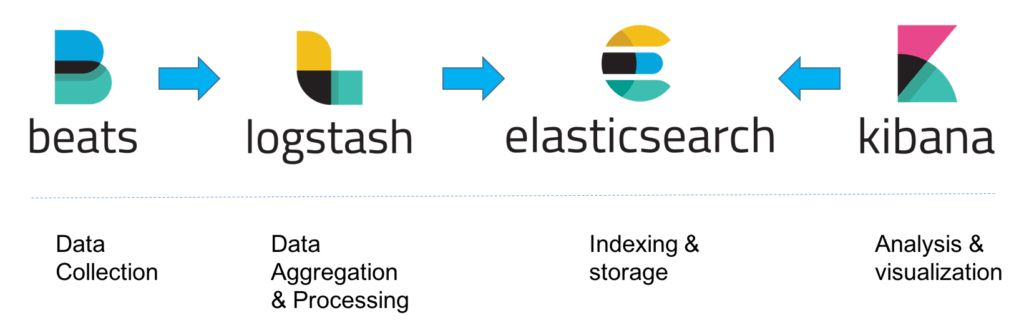
Datamine recommends using the ELK log aggregator to view logs from the debugger logger, however, this is not mandatory as the flat text log files could be viewed, if required.
ELK is the most popular open-source log aggregation tool on the market.
-
E—Elasticsearch, a NoSQL, Lucene search engine implementation
-
L—Logstash, a log pipeline system that can ingest data, transform it, and load it into a store like Elasticsearch
-
K—Kibana, a visualisation layer on top of Elasticsearch.
Refer to The Complete Guide to the ELK Stack.
Apart form that, CCLAS 6 uses Filebeat to forward and centralise logs captured from the debugger logger. Refer to Filebeat—Lightweight shipper for logs.
The filebeat multiline configuration for the ELK log aggregator can be updated as follows to process JSON format logs.
multiline.pattern: '^(ERROR|WARN|INFO|DEBUG|TRACE|FATAL|^\[\d{2} \w{3} \d{4} \d{2}:\d{2}:\d{2}:\d{3}\]|^\d{4}-\d{2}-\d{2} \d{2}:\d{2}:\d{2},\d{3} \[.*\]|^\{)'
multiline.negate: true
multiline.match: after
fields:
  source: cclas-db-migrate-console
fields_under_root: true
processors:
  - decode_json_fields:
      fields: ["message"]
      target: ""  # This will place parsed JSON fields at the root level
      overwrite_keys: true
      add_error_key: true
The multiline.pattern now has an extra ^\{ which caters for the JSON log format.
The decode_json_fields processor parses JSON message fields.
 Related processes...