
Setting and Clearing Dates and User on Workflow Status Changes
As workflow status on the various entities changes, the date and user associated with setting a workflow status are kept in sync with the status.
A workflow status's date field (regardless of whether it's Analysed Date, Released Date, Completed Date) is based on an aggregation of all the dates of below it.
All the dates that are set or unset as part of the cascade flow are 'last-occurrence' dates.
Example: The Analysed Date of all sample scheme analytes is set when results are entered for them. This triggers the setting of the related sample scheme's Analysed Date for the first time (it was null before this). Now the user updates one or more sample scheme analytes, such that, their Analysed Date is updated. This again triggers the setting of the sample scheme's Analysed Date, which is therefore the 'last-occurrence' of this event on the sample scheme's analytes.
During cascade, dates and associated user ID is cleared if the workflow status is set to something 'lower' in the order of statuses. The 'order' of statuses to consider at each level is: Registered < Not Started < Started < Analysed < Released < Completed | Listed Not Received | Insufficient Sample | Not Analysed | No Result < Validated (where Validated is a quasi status comprised of a workflow status of Completed plus the validated date is stamped).
Status changes can occur for any reason, for example, adding or deleting a sample, or changing the sample scheme's workflow status for a sample preparation scheme.
Status changes can occur at any level of the job hierarchy, that is, at sample scheme analyte, sample scheme, sample, job, job scheme analyte or job scheme level.
Less than Started
If Workflow Status is less than Started, then Started Date and Started By User are cleared on the entity.
Less than Analysed
If Workflow Status is less than Analysed, then Analysed Date and Analysed By User are cleared on the entity.
Less than Released
If Workflow Status is less than Released, then Released Date and Released By User are cleared on the entity.
Less than Competed
If Workflow Status is less than Completed, Listed not Received, Insufficient Sample, Not Analysed or No Result (where Listed Not Received, Insufficient Sample, Not Analysed or No Result is only valid for sample scheme analyte, sample scheme and sample level), then Completed Date and Completed By User are cleared on the entity.
Completion
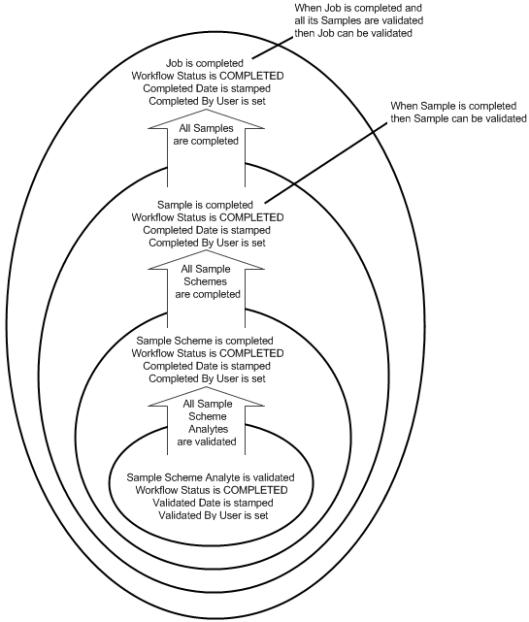
When the underlying children of an entity are completed and validated, then an entity is considered complete.
Only sample scheme analyte, sample and job entities are validated.
Completion and Validation at the Sample Scheme Analyte Level
Sample scheme analytes are at the bottom of the job hierarchy as they have no underlying children (sample scheme analyte readings are not involved in cascading), therefore completion and validation are effectively the same thing for sample scheme analytes. For this reason, Completed Date and Completed By User are not retained at the sample scheme analyte level.
When a sample scheme analyte is validated then the Workflow Status is set to Completed, Validated Date is stamped and Validated By User is set to the current user.
If a sample scheme analyte's Workflow Status is less than Completed then the Validated Date and Validated By User are cleared on the sample scheme analyte.
Completion at Sample Scheme, Sample, Job, Job Scheme Analyte and Job Scheme Level
When an entity is completed then the Workflow Status is set to Completed, Completed Date is stamped and Completed By User is set to the current user.
- At sample scheme or job scheme analyte level, the underlying sample scheme analytes need to be validated for the sample scheme or job scheme analyte, respectively, to be complete.
- At sample or job scheme level, the underlying sample schemes need to be completed (because that indicates that all the underlying sample scheme analytes are validated) for the sample or job scheme, respectively, to be complete.
- At job level, the underlying samples need to be completed (because that indicates that all the underlying sample schemes are completed, which means that all the underlying sample scheme analytes are validated) for the job to be complete.
Validation at Sample and Job Level
When a sample or job is validated then the Workflow Status remains as Completed, Completed Date remains stamped, Completed By User remains set, Validated Date is stamped and Validated By User is set to the current user.
If not all children are children are validated for a sample or job then the Validated Date and Validated By User are cleared on the sample or job, respectively.
