
Example—Add a Delta Date Range Drop-down to search screens
Requirement
Allow the user to select from a set of pre-prepared delta date combinations, when performing searches, so as to speed up their entry of the search criteria and reduce input errors.
Concept
The drop-down lists in CCLAS screens can be sourced from several places. In this case, a simple drop-down list of delta date ranges that the LIMS manager can readily update over time is the best solution, that is, the screen should not need to change every time a new delta date range is required.
To do this, the simple text input must be replaced with a table drop-down.
Preparation
First, the drop-down list content must be set up. This can be done using the MSETBL—Table Code Service application, making it easily maintained by an authorised user.
-
Create the table type.

-
Add the list of drop-down values as table codes within the table type (or use a SQL insert script to construct these records).
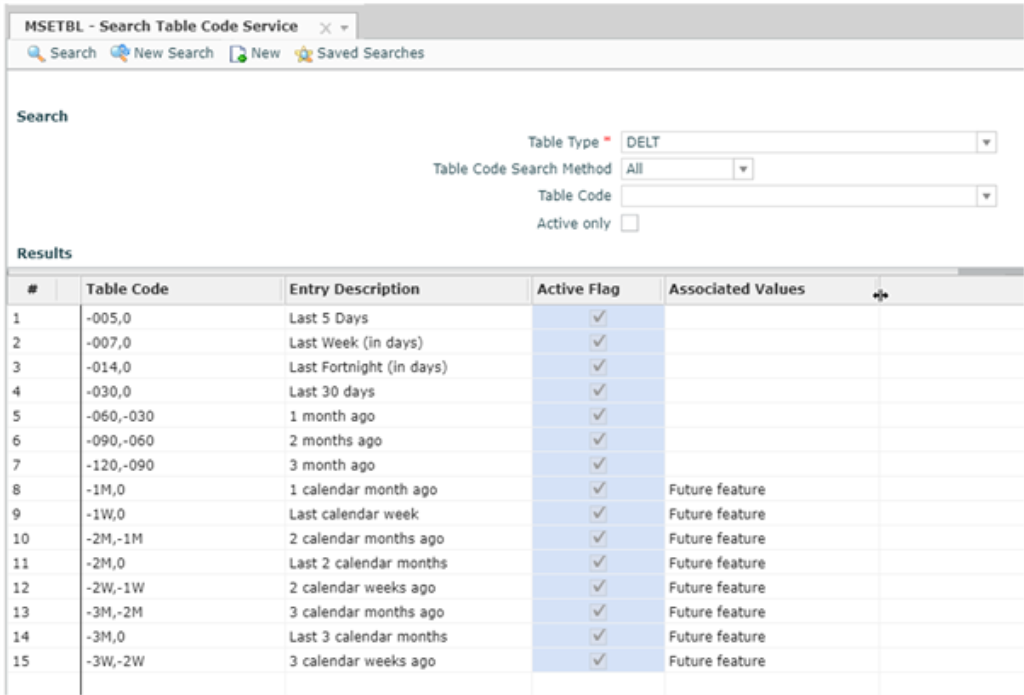
The end result is a set of pre-defined Delta Date Range values that may be updated, as required.
If you wish to have the DELT table type available on the MSETBL—Search Table Code Service screen, then the table type must be added as a record to the XX table type. Refer to Maintaining System Table Codes.
Screen Personalisation
Next, customise the particular search screen and replace the existing delta input with a drop-down populated from the DELT table type. Access to personalisation services is required to do this. Refer to Manage input fields in a layout group (binding).
- Access the particular search application from the main menu or quick launch to display the screen.
-
From the application to be personalised, click
 Personalisation access in the Application Toolbar and select Open Personalisation to display the Screen Personalisation tool on the right of the screen and the customisation on the left of the screen.
 -
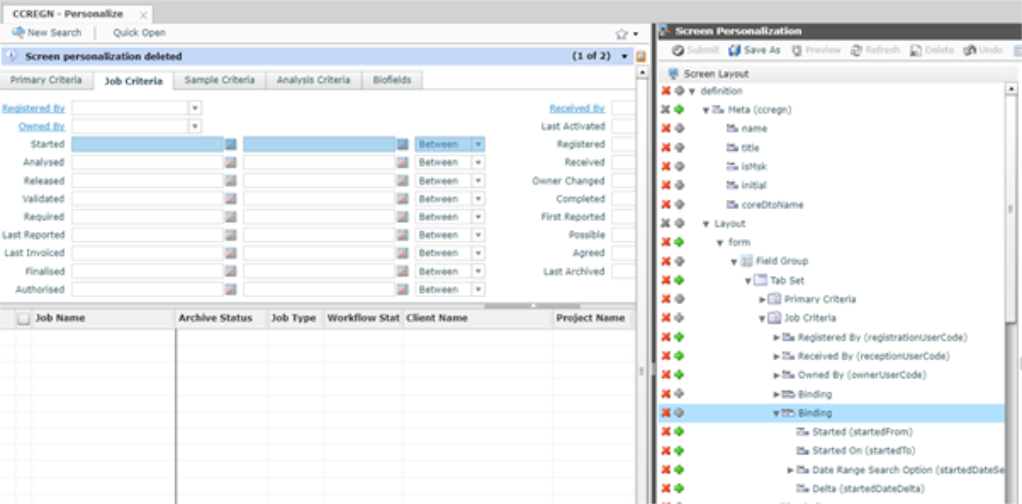
In the Screen Layout panel, click the arrow beside definition to expand and display the form items and components.
-
Navigate down the screen to where the date values are displayed on the screen.
-
Open the Palette panel on the right hand side and drag-and-drop the Dropdown control onto the Screen Layout, placing it before the existing delta date range input on the screen.
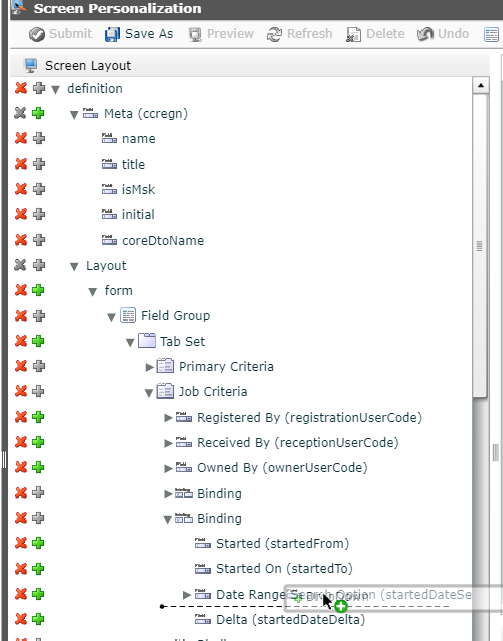
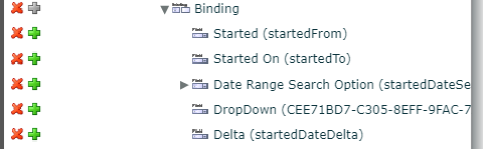
This results in the creation of a new input field on the screen.
-
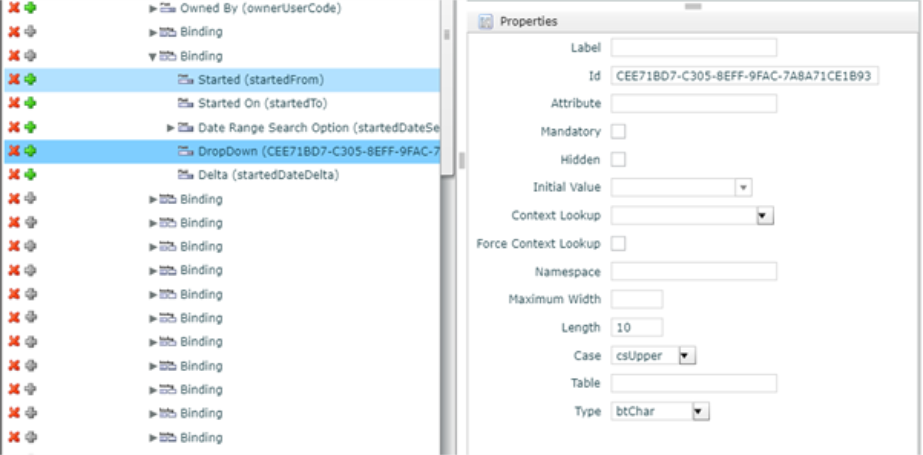
Select the new input field and open the Properties frame on the right-hand side.
-
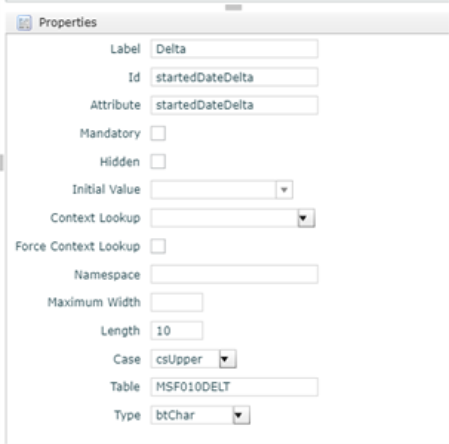
Define the source of the drop-down list and its attributes:
-
Label—Although the label is not displayed on the user interface because it is inside a Binding group, give it a meaningful label anyway.
-
Id—This needs to be the same ID as the original delta input. Click on the original input and copy its ID.
-
Attribute—This should be the same as the ID.
-
Length—Ensure that this is long enough to show the delta ranges, though the default 10 characters should be sufficient.
-
Table—This is the Table Name and the Table Type, so for MSFTBL Table types (those maintained by the MSETBL—Table Code Service application, this is MSF010DELT.
-
-
Remove the original delta text input from the screen.
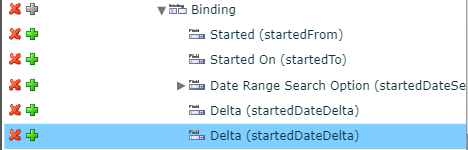
- Click Submit to save the personalisation.
Testing
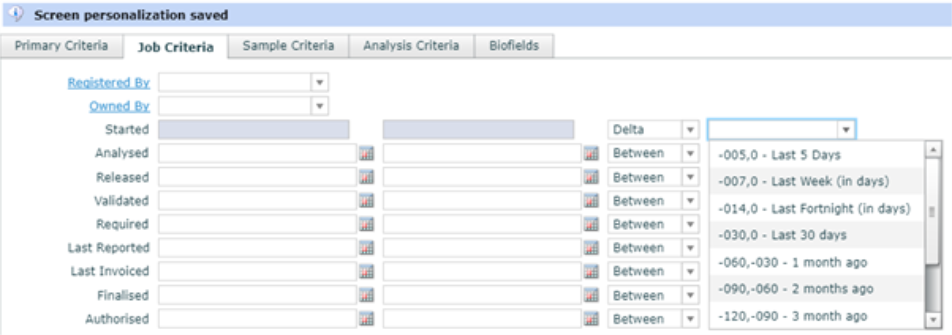
Run the search screen and select the delta mode for the date range to see the pre-defined set of delta date ranges available for selection.
Repeat this process for EACH of the date ranges on the search screen that are to be supported via this extension. If there are some date range criteria that are NEVER used, then ignore adding this extension until these criteria start to add value to users.
Repeat this process for each of the search screens that would benefit the users.
Final Stages
Remember that personalised screens are initially only created for the current user. Once a personalised screen is ready, it can be ‘promoted’ to have laboratory or system scope so that others can utilise these changes.
Future Extensions
Currently the delta date ranges expects numeric entries only, which equate to number of days from the current system date.
Example of current formats:
-
-10,0 = Records for the last 10 days
-
-20,-10 = Records from 20 days ago to 10 days ago
-
-20,10 = Records from 20 days ago to 10 days from now.
-
0,0 = Records from today only.
-
10,20 = Records from 10 days from now to 20 days from now
New enhancements (which come out in future releases) or introduced immediately with some additional service hook programming, could allow alternative scales of these delta date ranges.
Future formats (in addition to current):
-
-3M,0 = Records from 3 calendar months ago to today
-
-3M,-1M = Records from 3 calendar months ago to 2 calendar months ago
-
-3W, 1W = Records from 3 calendar weeks ago to 2 calendar weeks from today.
