
Population of the CCSampleScheme DTO
The CCSampleScheme DTO is referenced when Creating Report Requests from Job Report Stakeholders, to place content into the output document as per the report template.
When an org-scope scheme is registered on an org-scope sample, then for the org-scope sample scheme:
- The master scheme is the org-scope scheme.
- The scoped scheme is the org-scope scheme.
When an org-scope scheme is registered on a lab-scope sample, then for the lab-scope sample scheme:
- The master scheme is the org-scope scheme.
- The scoped scheme is the enabled-scope scheme.
When a lab-scope scheme is registered on a lab-scope sample, then for the lab-scope sample scheme:
- The master scheme is the lab-scope scheme.
- The scoped scheme is the lab-scope scheme.
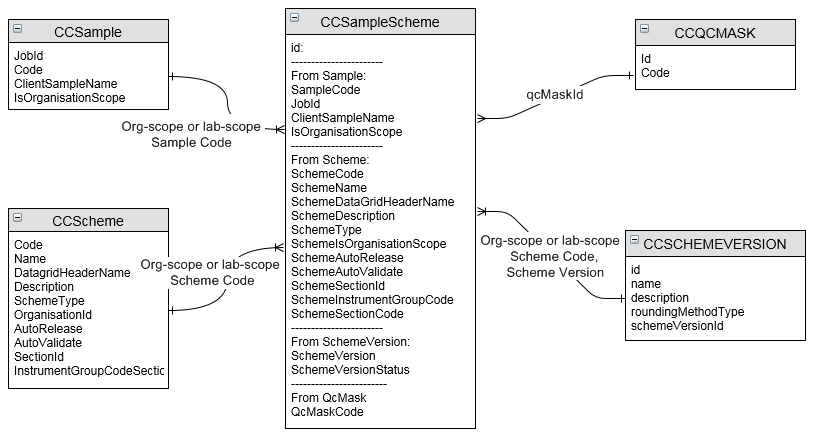
For enabled-scope schemes, defaults originating from the master org-scope scheme or scheme version are indicated.
| Property | Default |
Org-scope sample with |
Lab-scope sample with |
Lab-scope sample with |
|---|---|---|---|---|
|
For identification: |
|
|
|
|
|
Current entity's ID |
|
|
|
|
Indicates whether the entity has organisation scope |
True |
False |
False |
|
sample.organisationCode |
Current organisation |
Current organisation |
Current organisation |
|
sample.laboratoryCode |
|
Current laboratory |
Current laboratory |
|
sample.jobId and jobCode |
|
|
|
|
sample.id and sampleCode |
|
|
|
|
sample.clientSampleName |
|
|
|
|
sample.clientCode |
|
|
|
|
Where the client is org-scope then true, where lab-scope then false |
|
|
|
|
If registration of template sample added the sample scheme, then set to the template sample.id and code |
|
|
|
|
|
|
|
|
|
jobScheme.id |
|
|
|
|
Master scheme.laboratoryId and laboratoryCode |
Empty |
Empty |
Current laboratory's code and id |
|
Master scheme.id and code |
Displays org-scope |
Displays org-scope |
Displays lab-scope |
|
Indicates whether the master scheme has organisation scope |
True |
True |
False |
|
Master scheme.lineOfBusinessId and linked lineOfBusiness.code |
Displays org-scope |
Displays org-scope |
Displays lab-scope |
|
Master scheme.organisationId |
Current organisation's id |
Current organisation's id |
Current organisation's id |
|
Master scheme.schemeType |
Displays org-scope |
Displays org-scope |
Displays lab-scope |
|
Master scheme.name |
Displays org-scope |
Displays org-scope |
Displays lab-scope |
|
Master scheme.description |
Displays lab-scope |
Displays org-scope |
Displays lab-scope |
|
Not populated |
|
|
|
|
Not populated |
|
|
|
|
Not populated |
|
|
|
|
Master scheme.sectionId and linked section.code |
Displays org-scope |
Displays Org-scope scheme's section code and id |
Displays lab-scope |
|
Not populated |
|
|
|
|
Not populated |
|
|
|
|
Master scheme.dataGridColumnHeader |
Displays org-scope |
Displays org-scope |
Displays lab-scope |
|
Master scheme.instrumentGroupId and linked instrumentGroup.code |
Displays org-scope |
Displays org-scope |
Displays lab-scope |
|
Master scheme.scriptId and linked script.code |
Displays org-scope |
Displays org-scope |
Displays lab-scope |
|
Not populated |
|
|
|
|
Master scheme.autoRelease |
Displays org-scope |
Displays org-scope |
Displays lab-scope |
|
Master scheme.autoValidate |
Displays org-scope |
Displays org-scope |
Displays lab-scope |
|
Master schemeVersion.id and versionNumber |
Displays org-scope |
Displays org-scope |
Displays lab-scope |
|
Master schemeVersion.status |
Displays org-scope |
Displays org-scope |
Displays lab-scope |
|
|
Empty |
Empty |
Empty |
|
|
Empty |
Empty |
Empty |
|
Indicates whether the scoped scheme is lab-enabled |
False |
True |
False |
|
Number of sample scheme analytes registered for the sample scheme |
|
|
|
|
Numerical sequence of scheme within the sample |
|
|
|
|
Numerical sequence of sample within the job scheme |
|
|
|
|
Determined using the default rack size of 50 and sample.isStartFromNewRack, unless an append/overwrite QC process is applied, in which case, rack number is determined using the sample.isStartFromNewRack and the scoped schemeVersion.qcMaskId> qcMask.containerTypeId > containerType.defaultNumberOfContainers |
Uses org-scope |
Uses enabled-scope |
Uses lab-scope |
|
|
|
|
|
|
|
|
|
|
|
For registration flow: |
|
|
|
|
|
True when all analytes from the master scheme are added to the sample scheme |
|
|
|
|
False |
|
|
|
|
False |
|
|
|
|
False |
|
|
|
|
True |
|
|
|
|
True |
|
|
|
|
0 |
|
|
|
|
|
|
|
|
|
|
|
|
|
|
|
|
|
|
|
For management: |
|
|
|
|
|
Current system date and time |
|
|
|
|
Current user |
|
|
|
|
Scoped schemeVersion.priority |
Uses org-scope |
Uses enabled-scope scheme |
Uses lab-scope |
|
sample.requiredDate + sampleScheme.priority + Holidays + Working Days of Week if sample.requiredDate and sampleScheme.priority are defined, else set to sample.requiredDate if sample.requiredDate is defined, else empty |
|
|
|
|
sampleScheme.registeredDate + sampleScheme.priority |
|
|
|
|
|
|
|
|
|
|
|
|
|
|
Not Started |
|
|
|
|
For pre-analysis: |
|
|
|
|
|
Scoped schemeVersion.qcMaskId and linked qcMask.Code |
Uses org-scope |
Uses enabled-scope |
Uses lab-scope |
|
True |
|
|
|
|
Precursor scheme registration using scoped scheme's precursor relationships |
Uses org-scope |
Uses enabled-scope |
Uses lab-scope |
|
|
Uses org-scope |
Uses enabled-scope |
Uses lab-scope |
|
|
Uses org-scope |
Uses enabled-scope |
Uses lab-scope |
|
|
|
|
|
|
Scoped schemeVersion.holdingTime |
Uses org-scope |
Uses enabled-scope |
Uses lab-scope |
|
Earliest of all sampleSchemeAnalyte.warningDate |
|
|
|
|
Earliest of all sampleSchemeAnalyte.expiryDate |
|
|
|
|
Scoped schemeVersion.schemeDuration |
Uses org-scope |
Uses enabled-scope |
Uses lab-scope |
|
Scoped schemeVersion.defaultSubContractLabCode |
Uses org-scope |
Uses enabled-scope |
Uses lab-scope |
|
Scoped schemeVersion.defaultSubContractLabOrgCode |
Uses org-scope |
Uses enabled-scope |
Uses lab-scope |
|
|
|
|
|
|
Linked scheme relationships using master scheme's scheme links |
Uses org-scope |
Uses org-scope |
Uses lab-scope |
|
True |
|
|
|
|
True |
|
|
|
|
For analysis: |
|
|
|
|
|
Scoped scheme.limitSpecId and linked specification.code |
Uses org-scope |
Uses enabled-scope |
Uses lab-scope |
|
First active instrument in the instrument group denoted by the scoped scheme.instrumentGroupCode, if the instrument group is active. |
NB, org-scope template sample schemes cannot be assigned an instrument because instruments can only have lab-scope. |
Uses enabled-scope |
Uses lab-scope |
|
Instruments can only be lab-scope |
|
Current laboratory |
Current laboratory |
|
Not Tested |
|
|
|
|
Not Tested |
|
|
|
|
|
|
|
|
|
|
|
|
|
|
|
|
|
|
|
|
|
|
|
|
|
|
|
|
|
|
|
|
|
|
|
|
|
|
|
For validation: |
|
|
|
|
|
|
|
|
|
|
|
|
|
|
|
For reporting: |
|
|
|
|
|
Scoped scheme.isReportable |
Uses org-scope |
Uses enabled-scope |
Uses lab-scope |
|
Scoped scheme.reportSequence |
Uses org-scope |
Uses enabled-scope This differs to the SSA that uses this field from org-scope |
Uses lab-scope |
|
|
|
|
|
|
|
|
|
|
|
|
|
|
|
|
|
|
|
|
|
|
|
|
|
|
|
|
|
|
|
For invoicing: |
|
|
|
|
|
Scoped scheme.isInvoiceable |
Uses org-scope |
Uses enabled-scope This differs to the SSA that uses this field from org-scope |
Uses lab-scope |
|
|
|
|
|
|
|
|
|
|
|
Where the package price code is org-scope then left empty, where lab-scope then set to the current laboratory |
|
|
|
|
If registration of template sample added the sample scheme, then set to the template sample.templatePriceCode |
|
|
|
|
|
|
|
|
|
|
|
|
|
|
Scoped schemeVersion.internalCost |
Uses org-scope |
Uses enabled-scope |
Uses lab-scope |
|
|
|
|
|
