
Population of the CCSampleSchemeAnalyte DTO
The CCSampleSchemeAnalyte DTO is referenced when Creating Report Requests from Job Report Stakeholders, to place content into the output document as per the report template.
When an org-scope scheme version analyte is registered on an org-scope sample, then for the org-scope sample scheme analyte:
- The master scheme is the org-scope scheme.
- The scoped scheme is the org-scope scheme.
When an org-scope scheme version analyte is registered on a lab-scope sample, then for the lab-scope sample scheme analyte:
- The master scheme is the org-scope scheme.
- The scoped scheme is the enabled-scope scheme.
When a lab-scope scheme version analyte is registered on a lab-scope sample, then for the lab-scope sample scheme analyte:
- The master scheme is the lab-scope scheme.
- The scoped scheme is the lab-scope scheme.
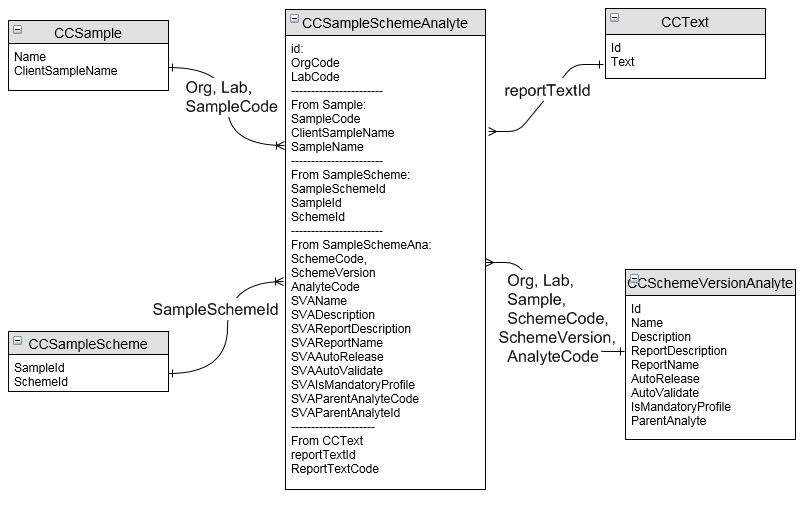
For enabled-scope schemes, defaults originating from the master org-scope scheme version analyte are indicated.
| Property | Default |
Org-scope sample with |
Lab-scope sample with |
Lab-scope sample with |
|---|---|---|---|---|
|
For identification: |
|
|
|
|
|
Current entity's ID |
|
|
|
|
Indicates whether the entity has organisation scope |
True |
False |
False |
|
sample.organisationCode |
Current organisation |
Current organisation |
Current organisation |
|
sample.laboratoryCode |
|
Current laboratory |
Current laboratory |
|
The job code is a string containing the unique code assigned to the job. job.id and code |
|
|
|
|
The sample code is a string containing the unique code assigned to the sample. sample.id and code |
|
|
|
|
sample.name |
|
|
|
|
sample.clientSampleName |
|
|
|
|
If registration of template sample added the sample scheme analyte, then set to the template sample.id and code |
|
|
|
|
jobSchemeAnalyte.id |
|
|
|
|
sampleScheme.id |
|
|
|
|
Master scheme.laboratoryCode |
Empty |
Empty |
Current laboratory's Code |
|
The scheme code is a string containing the unique code assigned to the scheme. Master scheme.id and scoped scheme code |
Displays org-scope |
Displays org-scope |
Displays lab-scope |
|
Indicates whether the master scheme has organisation scope |
True |
True |
False |
|
The scheme version is a string containing the version number for the scheme for which sample scheme analytes were tested. Master schemeVersionAnalyte.schemeVersionId and versionNumber |
Displays org-scope |
Displays org-scope |
Displays lab-scope |
|
The analyte code is a string containing the unique code assigned to the analyte. Master schemeVersionAnalyte.id and code |
Displays org-scope |
Displays org-scope |
Displays lab-scope |
|
Master schemeVersionAnalyte.name |
Displays org-scope |
Displays org-scope |
Displays lab-scope |
|
Master schemeVersionAnalyte.description |
Displays org-scope |
Displays org-scope |
Displays lab-scope |
|
Master schemeVersionAnalyte.parentAnalyteId and parentAnalyteCode |
Displays org-scope |
Displays org-scope |
Displays lab-scope |
|
Master schemeVersionAnalyte.isMandatoryProfile |
Displays org-scope |
Displays org-scope |
Displays lab-scope |
|
Master schemeVersionAnalyte.autoRelease |
Displays org-scope |
Displays org-scope |
Displays lab-scope |
|
Master schemeVersionAnalyte.autoValidate |
Displays org-scope |
Displays org-scope |
Displays lab-scope |
|
Master schemeVersionAnalyte.reportName |
Displays org-scope |
Displays org-scope |
Displays lab-scope |
|
Master schemeVersionAnalyte.reportDescription |
Displays org-scope |
Displays org-scope |
Displays lab-scope |
|
Numerical sequence of analyte within the sample scheme |
|
|
|
|
Numerical sequence of sample within the job scheme analyte |
|
|
|
|
|
|
|
|
|
|
|
|
|
|
For registration flow: |
|
|
|
|
|
|
|
|
|
|
|
|
|
|
|
|
|
|
|
|
|
|
|
|
|
|
|
|
|
|
|
|
|
|
|
For management: |
|
|
|
|
|
sampleScheme.requiredDate |
|
|
|
|
|
|
|
|
|
|
|
|
|
|
Scoped schemeVersionAnalyte.isWorkflowActive |
Uses org-scope |
Uses enabled-scope |
Uses lab-scope |
|
Not Started |
|
|
|
|
|
|
|
|
|
For pre-analysis: |
|
|
|
|
|
Scoped schemeVersionAnalyte.isIncludeOnWorksheet |
Uses org-scope |
Uses enabled-scope |
Uses lab-scope |
|
Scoped schemeVersionAnalyte.holdingTime |
Uses org-scope |
Uses enabled-scope |
Uses lab-scope |
|
sample.sampledDate + sampleSchemeAnalyte.warningTime if sampleSchemeAnalyte.warningTime is defined, else set to sample.sampledDate + sampleScheme.warningTime if sampleScheme.warningTime is defined, else empty |
Uses org-scope |
Uses enabled-scope |
Uses lab-scope |
|
sample.sampledDate + sampleSchemeAnalyte.holdingTime if sampleSchemeAnalyte.holdingTime is defined, else set to sample.sampledDate + sampleScheme.holdingTime if sampleScheme.holdingTime is defined, else empty |
Uses org-scope |
Uses enabled-scope |
Uses lab-scope |
|
|
|
|
|
|
|
|
|
|
|
For analysis: |
|
|
|
|
|
Master schemeVersionAnalyte.spreadsheetFormula |
Uses org-scope |
Uses org-scope |
Uses lab-scope |
|
The unit code is a string containing the unique code assigned to the analytical unit, and represents the unit of the analytical result. Scoped schemeVersionAnalyte.unitId and unit.code |
Uses org-scope |
Uses enabled-scope |
Uses lab-scope |
|
The internal lower detection limit is a numerical value of the lowest quantity of analytical substance that is detectable by the scheme, and is used to determine the internal detection limit status. Scoped schemeVersionAnalyte.internalLowerDetectionLimit |
Uses org-scope |
Uses enabled-scope |
Uses lab-scope |
|
Indicates whether a result that is below the internal lower detection limit causes the internal detection limit status to be set to indicate failure. Scoped schemeVersionAnalyte.isInternalLowerLimitCritical |
Uses org-scope |
Uses enabled-scope |
Uses lab-scope |
|
The internal upper detection limit is a numerical value of the highest quantity of analytical substance that is detectable by the scheme, and is used to determine the internal detection limit status. Scoped schemeVersionAnalyte.internalUpperDetectionLimit |
Uses org-scope |
Uses enabled-scope |
Uses lab-scope |
|
Indicates whether a result that is above the internal upper detection limit causes the internal detection limit status to be set to indicate failure. Scoped schemeVersionAnalyte.isInternalUpperLimitCritical |
Uses org-scope |
Uses enabled-scope |
Uses lab-scope |
|
The template sample whose tests can be registered on the sample if the sample scheme analyte's Workflow Status is Check due to the result being above the Internal Upper DL and the Internal Lower DL Critical is selected. |
Uses org-scope |
Uses enabled-scope |
Uses lab-scope |
|
||||
|
The template sample whose tests can be registered on the sample if the sample scheme analyte's Workflow Status is Check due to the result being below the Internal Upper DL and the Internal Upper DL Critical is selected. |
Uses org-scope |
Uses enabled-scope |
Uses lab-scope |
|
||||
|
|
|
|
|
|
|
|
|
|
|
|
|
|
|
|
|
|
|
|
|
True |
|
|
|
|
|
|
|
|
|
|
|
|
|
|
|
|
|
|
|
|
|
|
|
|
|
|
|
|
|
|
|
|
|
|
|
|
|
|
|
|
|
|
|
|
|
|
|
|
|
|
|
|
|
|
|
|
|
|
|
|
|
|
|
|
|
|
|
|
|
|
|
|
|
|
Scoped schemeVersionAnalyte.dataType |
Uses org-scope |
Uses enabled-scope |
Uses lab-scope |
|
The numeric raw value is the result of the sample scheme analyte, uncorrected for weight, volume, instrument factor and digestion, where the current data type is numeric or numeric only. |
|
|
|
|
The numeric final value is the result of the sample scheme analyte where the current data type is numeric or numeric only. |
|
|
|
|
The boolean value is the result of the sample scheme analyte where the current data type is boolean. |
|
|
|
|
The date time value is the result of the sample scheme analyte where the current data type is date-time. |
|
|
|
|
The text value is the result of the sample scheme analyte where the current data type is text. |
|
|
|
|
The image is a graphics file holding the result of the sample scheme analyte where the current data type is image. Where the current data type is not image, the image is a graphics file associated with the sample scheme analyte. |
|
|
|
|
The document is a data file holding the result of the sample scheme analyte where the current data type is document. Where the current data type is not document, the document is a data file associated with the sample scheme analyte. |
|
|
|
|
|
|
|
|
|
Scoped schemeVersionAnalyte.isQcActive |
Uses org-scope |
Uses enabled-scope |
Uses lab-scope |
|
Not Tested |
|
|
|
|
Not Tested |
|
|
|
|
Not Tested |
|
|
|
|
Not Tested |
|
|
|
|
Not Tested |
|
|
|
|
Not Tested |
|
|
|
|
Not Tested |
|
|
|
|
|
|
|
|
|
|
|
|
|
|
|
|
|
|
|
|
|
|
|
|
The calculated recovery if the sample's primary or secondary analytical type is standard. |
|
|
|
|
Where the sample's primary analytical type is duplicate or replicate, this is the calculated relative percentage difference between the result and the result in the original sample. Where the sample's primary analytical type is blank, standard or spike, this is the calculated relative percentage difference between the result and the expected result of the substance. |
|
|
|
|
|
|
|
|
|
|
|
|
|
|
|
|
|
|
|
|
|
|
|
|
|
|
|
|
|
|
|
|
|
|
For validation: |
|
|
|
|
|
|
|
|
|
|
|
|
|
|
|
For reporting: |
|
|
|
|
|
Indicates the default setting for a sample scheme analyte's reportability within a report request. Scoped schemeVersionAnalyte.isReportable |
Uses org-scope |
Uses enabled-scope |
Uses lab-scope |
|
The report sequence is the default setting for a sample scheme analyte's report sequence within a report request, and is a numerical value used to place the analyte on the report in a sequence that is different to the result set record sequence. Master schemeVersionAnalyte.reportSequence |
Uses org-scope |
Uses org-scope scheme This differs to the SS that uses this field from enabled-scope |
Uses lab-scope |
|
|
|
|
|
|
The report unit code is the default setting for a sample scheme analyte's report unit code within a report request, and is a string containing the unique code assigned to the reportable analytical unit. Scoped schemeVersionAnalyte.reportUnitId and unit.code |
Uses org-scope |
Uses enabled-scope |
Uses lab-scope |
|
The rounding table code is the default setting for a sample scheme analyte's rounding table code within a report request, and is a string containing the code of the rounding table used to apply rounding to the results presented in the report. Scoped schemeVersionAnalyte.roundingTableId and roundingTable.code |
Uses org-scope |
Uses enabled-scope |
Uses lab-scope |
|
The report lower detection limit is the default setting for a sample scheme analyte's report lower detection limit within a report request, and is a numerical value of the lowest quantity of analytical substance that is detectable by the reported scheme. Scoped schemeVersionAnalyte.reportLowerDetectionLimit |
Uses org-scope |
Uses enabled-scope |
Uses lab-scope |
|
The report upper detection limit is the default setting for a sample scheme analyte's report upper detection limit within a report request, and is a numerical value of the highest quantity of analytical substance that is detectable by the reported scheme. Scoped schemeVersionAnalyte.reportUpperDetectionLimit |
Uses org-scope |
Uses enabled-scope |
Uses lab-scope |
|
|
|
|
|
|
|
|
|
|
|
The formatted final value is a string containing the sample scheme analyte result, with any required rounding and formatting applied. If a certificate report is generated with a Report Status Type of Final and the TRANSFER_RRSSA_REPORT_DATA_TO_SSA application preference is checked, when a result is rounded, then sample scheme analyte's Formatted Final Value, Rep Lower Det Limit, Rep Upper Det Limit and Uncertainty Value are set to those on the report request sample scheme analyte. |
|
|
|
|
The uncertainty value is a string containing the calculated uncertainty of the sample scheme analyte result, as a percentage indicating the confidence of the result. If a certificate report is generated with a Report Status Type of Final and the TRANSFER_RRSSA_REPORT_DATA_TO_SSA application preference is checked, when a result is rounded, then sample scheme analyte's Formatted Final Value, Rep Lower Det Limit, Rep Upper Det Limit and Uncertainty Value are set to those on the report request sample scheme analyte. |
|
|
|
|
The formatted report lower detection limit is a string containing the reported lower detection limit, with any required rounding and formatting applied. If a certificate report is generated with a Report Status Type of Final and the TRANSFER_RRSSA_REPORT_DATA_TO_SSA application preference is checked, when a result is rounded, then sample scheme analyte's Formatted Final Value, Rep Lower Det Limit, Rep Upper Det Limit and Uncertainty Value are set to those on the report request sample scheme analyte. |
|
|
|
|
The formatted report upper detection limit is a string containing the reported upper detection limit, with any required rounding and formatting applied. If a certificate report is generated with a Report Status Type of Final and the TRANSFER_RRSSA_REPORT_DATA_TO_SSA application preference is checked, when a result is rounded, then sample scheme analyte's Formatted Final Value, Rep Lower Det Limit, Rep Upper Det Limit and Uncertainty Value are set to those on the report request sample scheme analyte. |
|
|
|
|
|
|
|
|
|
|
|
|
|
|
For invoicing: |
|
|
|
|
|
Master schemeVersionAnalyte.isInvoiceable |
Uses org-scope |
Uses org-scope scheme This differs to the SS that uses this field from enabled-scope |
Uses lab-scope |
|
|
|
|
|
|
Where the package price code is org-scope then left empty, where lab-scope then set to the current laboratory |
|
|
|
|
If registration of template sample added the sample scheme analyte, then set to the template sample.templatePriceCode |
|
|
|
|
|
|
|
|
