
Appendix—Job Status Cascade Engine
This appendix provides information on the cascade engine that is responsible for cascading composite specification, composite QC and workflow status from the point at which a process outside of the cascade engine affects a change to these statuses (usually from sample scheme analyte level, for example, when a result is entered, but can be from the sample scheme level for those schemes that do not have analytes via changing a workflow status on a single job scheme or for all job schemes in a job), up to higher levels in the sample and job. At each level, a composite status on the level below determines the outcome of the cascade.
Changes that occur at the sample scheme analyte level cascade to the sample scheme and job scheme analyte levels. Changes that occur at the sample scheme level (including changes made by the cascade engine itself) cascade to the sample and job scheme levels. Changes that occur at the sample level (including changes made by the cascade engine itself) cascade to the job level.
When a result is entered in context of a laboratory batch job, then statuses are cascaded up both the laboratory batch job tree and the job trees associated with the master jobs. In this case, a sample scheme in a master job cannot attain a workflow status of completed and be stamped as validated until the laboratory batch job achieves a workflow status of completed and is stamped as validated. This is to ensure that the laboratory batch job has passed all quality control assessments, to ensure there is confidence in its analytical results.
When a result is entered in context of a production/internal/etc. (that is, not a laboratory batch job), then statuses are cascaded up only the job trees associated with the master jobs, regardless of whether any of its sample scheme analytes are linked to a laboratory batch job and sample, or not.
This includes the following entities:
- SSA—Sample Scheme Analyte
- SS—Sample Scheme
- S—Sample
- JSA—Job Scheme Analyte
- JS—Job Scheme
- J—Job.
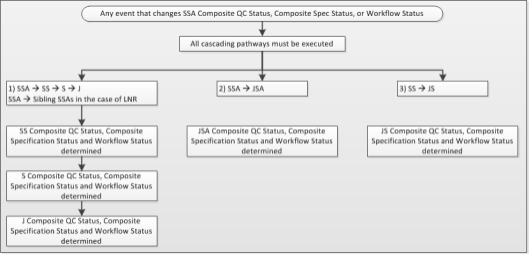
There are several pathways by which cascading occurs up to higher levels. These are:
- SSA --> SS --> S --> J
SS Composite QC Status, Composite Specification Status and Workflow Status are composites of SSA Composite QC Status, Composite Specification Status and Workflow Status, respectively, across all analytes within the sample scheme. The cascade engine is triggered to assess this whenever an SSA receives a new result, or SSA Composite QC Status, Composite Specification Status or Workflow Status for an associated SSA is changed by another process.
S Composite QC Status, Composite Specification Status and Workflow Status are composites of SS Composite QC Status, Composite Specification Status and Workflow Status, respectively, across all schemes within the sample. The cascade engine is triggered to assess this whenever an SS Composite QC Status, Composite Specification Status or Workflow Status for an associated SS is changed by the cascade engine or another process.
J Composite QC Status, Composite Specification Status and Workflow Status are composites of S Composite QC Status, Composite Specification Status and Workflow Status, respectively, across all samples within the job. The cascade engine is triggered to assess this whenever an S Composite QC Status, Composite Specification Status or Workflow Status for an associated S is changed by the cascade engine or another process.
- SS --> S --> J
Sample preparation and miscellaneous sample schemes do not contain analytes. These types of sample schemes are manually marked as completed for a selected job scheme, or for all schemes on a job (or via configured automatic processes). In these cases, the cascade is triggered from sample scheme level.
- SSA --> JSA
JSA Composite QC Status, Composite Specification Status and Workflow Status are composites of SSA Composite QC Status, Composite Specification Status and Workflow Status, respectively, across all samples within the scheme analyte. The cascade engine is triggered to assess this whenever an SSA receives a new result, or SSA Composite QC Status, Composite Specification Status or Workflow Status for an associated SSA is changed by another process.
- SS --> JS
JS Composite QC Status, Composite Specification Status and Workflow Status are composites of SS Composite QC Status, Composite Specification Status and Workflow Status, respectively, across all samples within the scheme. The cascade engine is triggered to assess this whenever an SS Composite QC Status, Composite Specification Status or Workflow Status for an associated SS is changed by the cascade engine or another process.
Note: A sample must have AT LEAST ONE SCHEME for the sample to become completed, as sample completion is only via the analytes or schemes on the sample.
The cascading logic used for production jobs and samples is slightly different to that for laboratory batch jobs and samples.
Latest changes in the Cascade Engine, which only apply when the cascade engine is called from the CCSGRD—Sample grid, CCWKOP—Open Workbook and CCWKOPTRAN—Workbook Open Transposed Detail applications (other applications still work with the known issues, noted below)
- The cascade engine is enhanced to cater for the refinement of the rules as to how the Workflow Status on sample scheme analytes (SSAs) roll up to the sample scheme (SS). These rules are influenced by the Workflow Active (WFA) and Allow Null Result (ANR) flags on the master scheme version analyte (SVA), notably covering cases where all SSAs within a SS have SVA.WFA = No, or SVA.WFA = Yes + SVA.ANR = Yes + SSA.WFS = Not Started, Repeat or Check. Also note that where a SSA.WFA = No, then the ANR flag is ignored.
- Cascade from SS to S ignores SSs where all SSAs have a SVA.WFA = No, or SVA.WFA = Yes + SVA.ANR = Yes + SSA.WFS = Not Started, Repeat or Check. so that these SSs do not hold the sample up from becoming completed.
- Where a job's Workflow Status is Registered (non-activated job), when the CCSGRD—Sample grid application is used to set one or more sample scheme or sample scheme analyte Workflow Status to Listed Not Received, Insufficient Sample, Not Analysed or No Result, then the cascade engine is called instead of having code perform a pseudo cascade of workflow statuses. Now, a cascade to sample only results in the sample's Workflow Status being set to Listed Not Received, Insufficient Sample, Not Analysed, No Result, or being left at Registered, depending on the underlying workflow statuses and the associated scheme version analyte's Workflow Active and Allow Null Result flags, that is, it is never set to Started (as it was in the previous version). Whilst the job's Workflow Status is still Registered, then a reset on sample schemes and sample scheme analytes can change the sample's Workflow Status back to Registered, and never to Not Started (as it was in the previous version), and the job's Workflow Status is not changed from Registered (only job activation can change this to Not Started).
- Set to/Reset from LNR was working differently in the CCSGRD—Sample Grid application vs the CCWKOP—Open Workbook and CCWKOPTRAN—Workbook Open Transposed Detail applications. In workbook, the cascade engine was called; in sample grid it was not called but had code perform a pseudo cascade of LNR. This was especially apparent when a cell started as LNR, was reset, then immediately set to IS/NA/NR with no submit in-between, resulting in different cascade outcomes across the applications at SS and S level. This now works the same and properly in both applications.
- When QC samples are added to a job that has a Workflow Status of Analysed, Released or Completed, then the job's Workflow Status is set back to Started.
Known issues and workarounds with the previous version of the Cascade Engine, which apply to all applications EXCEPT those noted above
- Where a sample exists with no schemes, when analytes that have WFA = Yes + ANR = Yes are added to a sample, then the cascade engine sets the sample scheme's Workflow Status to Completed. However, where a sample is created with those analytes added at the same time, then the cascade engine sets the sample scheme's Workflow Status to Not Started. This is fixed in the new cascade engine called from the sample grid and workbook. The workaround is to reset the workflow status via the sample grid which uses the new cascade engine.
