
Task Information: Actuals
The following table describes the fields on this screen as shown below: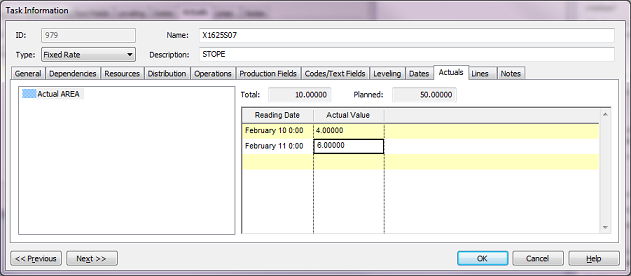
| Field | Description |
| List of production properties | List of production properties set up in the project that record actuals on tasks. Select a value from the list to record actuals for that property. |
| Total | The actual production total associated with the defined task. |
| Planned | The planned production associated with the defined task. |
| Reading Date | The date the reading was taken for the selected production property. Click on the arrow to display the calendar. Select the date and press OK. |
| Actual Value | The value recorded for the selected production property. |
| Previous | Click to display the Task Information screen of the task before this one - the task listed in the Task Table above the one you are currently displaying. |
| Next | Click to display the Task Information screen of the task after this one - the resource listed in the Task Table below the one you are currently displaying. |
| OK | Click to save your changes and close the screen. |
| Cancel | Click to lose the changes you made and close the screen. |
| Help | Click to display the help for this screen. |
