
Task Information: Distribution
The distribution tab is used to control the splitting of tasks over time.
The following table describes the fields on this screen as shown below:
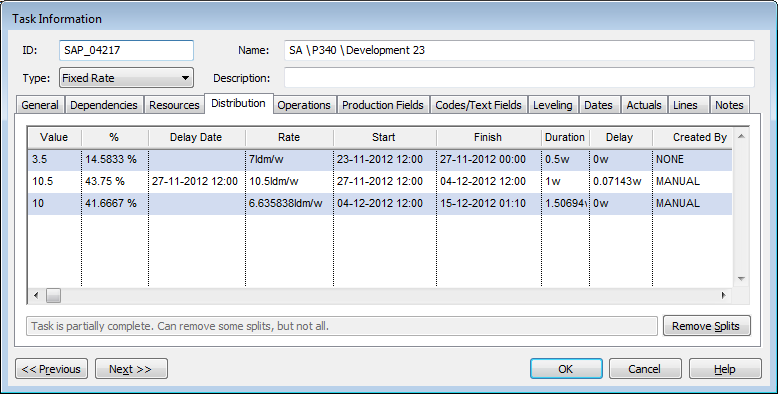
| Field | Description |
| Value | The quantity of the Driving Property contained in the split. |
| Delay Date | The start date of the split. |
| Rate | The rate of the split. |
| Start | The start date of the split. |
| Finish | The finish date of the split. |
| Duration | The duration of the split. |
| Delay | The difference between the date of the finish of the previous split and the start date of the current split. |
| Created By |
The process that created the split. The value of this field displays how the split was created. The value is one of:
|
| Remove Splits | Click to remove splits.
|
| Previous | Click to display the Task Information screen of the task before this one - the task listed in the Task Table above the one you are currently displaying. |
| Next | Click to display the Task Information screen of the task after this one - the task listed in the Task Table below the one you are currently displaying. |
| OK | Click to save your changes and close the screen. |
| Cancel | Click to lose the changes you made and close the screen. |
| Help | Click to display the help for this screen. |
 This field is not editable.