Haulage Resource
If you plan to estimate the number of haulage resources needed to execute a schedule, you have to create and assign a haulage resource to tasks with haulage requirements. Alternatively if you only want to estimate haulage distance (ton km) for each task, this step is not necessary.
The DTS haulage algorithm currently only handles one type of haulage resource per route (i.e. task).
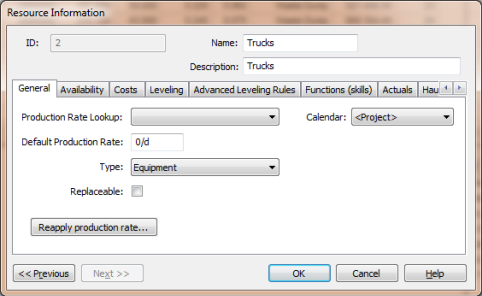
A haulage resource is created as any other type of equipment resource:
The haulage characteristics is defined on the Haulage page:
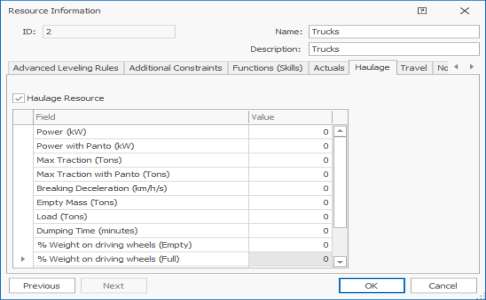
The Haulage Resource check box must be checked to identify a resource as a haulage type. The following fields is used by the haulage algorithm to estimate the cycle time of the resource on a specific haulage route:
- Power - the maximum power in kW that the truck engine can produce
- Power with Panto - the maximum power in kW that the truck engine can produce on road sections served by a pantograph line
- Max Traction - the maximum traction in Tons that the truck can produce at its wheels
- Max Traction with Panto - the maximum traction in Tons that the truck can produce at its wheels when connected by pantograph
- Braking Deceleration - the average rate of deceleration (km/h/s) that the brakes can apply to the truck
- Empty Mass - the mass in Tons of the truck without load
- Load - the maximum load the truck can haul in Tons. This value excludes the empty mass of the truck.
- Dumping time - the duration of the dumping process in minutes
- % Weight on Driving Wheels (Empty) - the weight distribution on the driving wheels when the truck is empty
- % Weight on Driving Wheels (Full) - the weight distribution on the driving wheels when the truck is empty
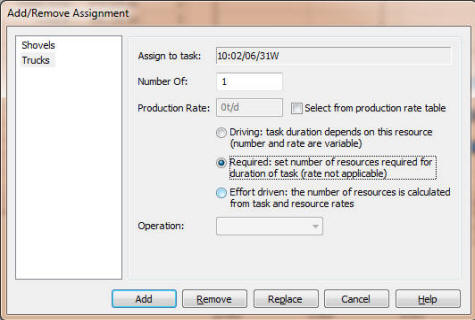
The haulage resource must be assigned to all tasks requiring haulage as a required resource. Initially a Number Of value of 1 can be used as the algorithm will determine the number of trucks required to sustain the production rate of the task.