
Replace Dependencies
- If you want to replace dependencies for selected tasks only, select the tasks in the spreadsheet. Alternatively if you want to replace dependencies for filtered tasks only, apply the relevant task filter.
- Select one of the following options:
- Select the Replace Dependencies option from the Edit menu
- Press the Replace Dependencies button in the Dependencies section of the Editing page on the ribbon bar
-
Specify the necessary parameters in the Replace Dependencies screen box:
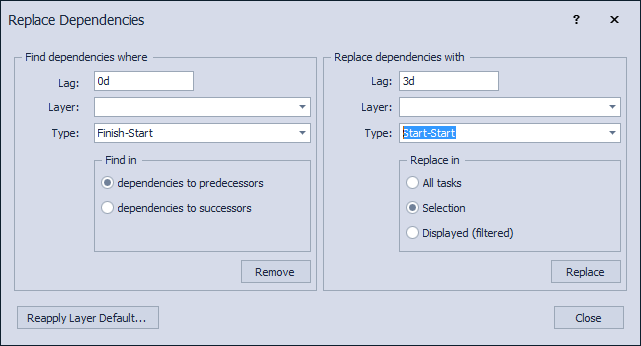
- In the Find dependencies where group specify the lag, layer and type that should be replaced. You can leave any field blank if you do not want to search on that field.
- Specify if predecessors or successors should be modified.
- In the Replace dependencies with group specify the lag, layer and type values that should be set. You can leave any field blank if you want to keep the existing values.
- Specify the tasks for which to replace the selected dependencies (All tasks, Selection, Displayed)
- Press Replace to replace the parameters for the dependencies that match the criteria.
