
Generate Monthly Labels
- The Project Settings form can be opened by using the Project Settings button
 on the Home page of the ribbon.
- Select the Reporting Calendars option under the Calendars section of the tree in the form.
- Select the calendar you want to modify in the list.
- Press the Generate Labels button.
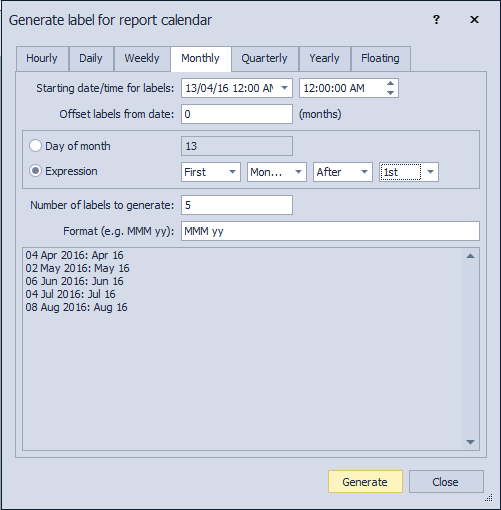
- Select the start date for the generation.
- Use Offset labels from date if you want each label to be calculated from a date larger than the record date, e.g. 28 Jan 13 will translate into a label Feb 13 if an offset of 1 is specified.
- Specify the Day of month to apply each label or use the Expression to setup a more complex pattern (e.g. First Monday After 1st)
- Specify the Number of labels to generate.
- Specify the format for each label (e.g. mmm yy => Jan 13; mmmm yy => January 13; mmmm yyyy => January 2013)
- The preview window will show the first 3 entries that will be generated.
- Press Generate to create the entries.
