Resource Availability Leveling
The process of scheduling tasks needs to take resource constraints into account. In its simplest form, the leveling process delays a task until such a time when sufficient resources are available to meet the task requirement. The task is moved in its entirety, without changing the task duration and rate. As this is not always possible in a real world scenario, this topic discusses some parameters availble in DTS to deal with resource constraints when leveling tasks.
This topic does not include advanced leveling and/or algorithm options. Any other factors and rules that affect the leveling process e.g. predecessor tasks, are beyond the scope of this topic.
The default leveling rules are summarized as follows:
-
Default leveling settings - for the purpose of this topic, leveling (F10) uses the default settings, and Task can be split, Leveling Can Profile and Level by capacity are all set to No.
-
Task/Resource Types - for the purpose of this topic, the leveling rules apply to all task types (Fixed Rate, Fixed Duration etc) and all resource assignment types (Driven, Required and Effort). Exceptions to the rule is highlighted.
-
Task allowed to be leveled - this flag is set at the task level and determines whether a task is considered for leveling or not. Select this option to make sure the the task can be leveled. If this option is not selected, the task is not considered for leveling.
-
Allowed to level - this flag is set at the resource level and determines whether resource requirements are taken into account during the leveling process. If selected, the task is scheduled in a timeslot where sufficient resources are available to meet the requirement. If this field is not selected, the task may still be considered for leveling, but the leveling process will not be affected by resource constraints.
-
Units (number of) - default leveling in DTS looks at the number of assigned, or required, resources (Task Resources tab) and number of available resources (Resource Availability tab).
-
Resource availability - default leveling uses the Standard Availability on the 'Resource Availability tab' to determine availability, unless the availability is specified by date range in the Availability table, in which case numbers specified in the Available column are used to determine availability.
-
Task considered for leveling - a task is only considered for leveling if sufficient resources are available to meet the requirement ie. the smallest unit (number of resources) of an assignment (Task Resources tab) needs to be less than or equal to the availability (Resource Availability tab). If this is not the case, the task is not considered for leveling and is not moved. For example, if you have 1 available resource, and your task requires 2 resources to be able to complete the work, then the task cannot be leveled. The task remains where it is and shows an over-allocation in the Crosstab view.
-
Task moved as unit - default leveling moves a task as a single, unchanged unit, without interrupting the task and without changing the rate/duration. For this to happen, sufficient resources need to be available for the full duration of the task. For example, a 5 day task that requires 2 resources each day, can only be leveled if 2 resources, or more, are available on 5 consecutive days. If a single day within the 5-day period does not have sufficient resources, the task will not be leveled, even if the other 4 days have excess availability.
-
Task Duration - leveling does not change the assignment units (Task Resources tab), and effectively the production rate and task duration.
-
Availability < Assigned - if the available unit is less than the assigned unit, the assigned unit is not decreased, effectively increasing the task duration. In this scenario, the task is not leveled.
-
Availability > Assigned - if the available unit is more than the assigned unit, the assigned unit is not increased, effectively shortening the task duration. Excess availability can be used to run other tasks in parallel.
 Exception - Fixed Duration tasks only support the Required assignment type.
The resource leveling parameters include the following:
-
Task can be split - this flag is set at the task level and determines whether a task can be split during the leveling process. This means that the task does not have to be scheduled in its entirety, but can be interrupted until sufficient resources are available. For example, if your task requires 1 resource for 5 days, and there are not sufficient resources on day 2, then the task is split after day 1, delaying the second section of 4 days to resume on day 3.
 Although the task is split into sections, the overall task duration and rate remain unchanged during leveling. Task sections are not created if availability is less than the assigned unit. For example, if your task requires
1 resource for 5 days and availability on days 2 and 3 is 0.2 and 0.5 respectively, then leveling will not create sections for those days.
Or if a task requires 4 resources and availability is 2, then no split is created. The 'split task' flag ignores excess availability during leveling.
Although the task is split into sections, the overall task duration and rate remain unchanged during leveling. Task sections are not created if availability is less than the assigned unit. For example, if your task requires
1 resource for 5 days and availability on days 2 and 3 is 0.2 and 0.5 respectively, then leveling will not create sections for those days.
Or if a task requires 4 resources and availability is 2, then no split is created. The 'split task' flag ignores excess availability during leveling. -
Leveling Can Profile - this flag is set at the task level and is called Individual resource assignment to this task can be profiled, i.e a number of resources can vary with time. This option allows the leveling process to vary the number of assigned resources over time. Assigned resources are increased/decreased if more/less resources are available at a given time. This process of leveling effectively changes the rate/duration of a task.
If an assigned resource is decreased, the task duration is increased and if the assigned resource is increased the task duration is shortened. The assigned
resource is NEVER more than the initial assignment value i.e. the task duration is NEVER less than the original duration. An indicator icon shows that the task has been profiled. You can double-click the task and look at the profile on the Resources tab. Task can be split and Leveling Can Profile are mutually exclusive. You cannot select both options at the same time. Exception - the 'leveling can profile' flag does not apply to the 'Required' resource type. -
Level by capacity - this flag is set at the resource level and indicates that a resource should be leveled by capacity (of a production field) rather than units (number of). The resource capacity availability is set up in the Resource Availability tab. The Capacity Field is the production field you are specifying capacity values for. The available resource capacity per date range is Available * Quantity per Period. See screenshot below.
-
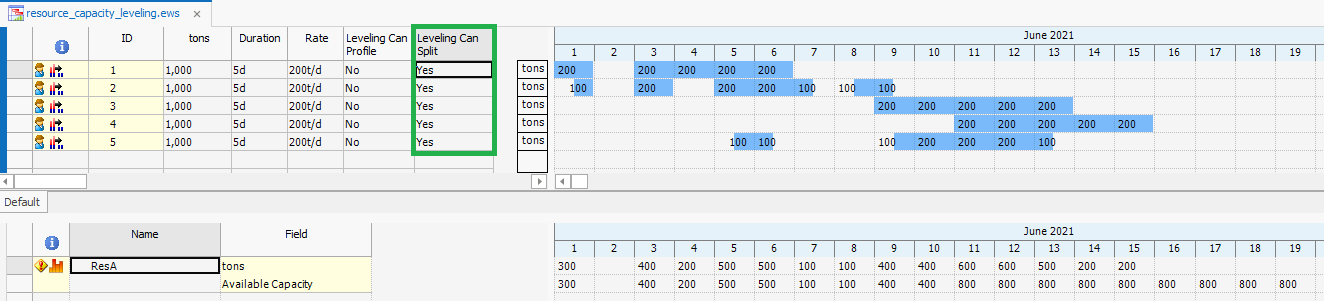
Level by capacity AND Task can be split - with this setup, the task does not have to be scheduled in its entirety, but can be interrupted until sufficient resource capacity is available. For example, if a 5-day task requires 200t/d per day, and there is not sufficient resource capacity on day 3, then the task is split after day 2, delaying the second 3-day section to resume on day 4.
Although the task is split into sections, the overall task duration and rate remain unchanged during capcaity leveling. Unlike default leveling, task sections can be created if capacity availability is less than the required capacity. For example, if a 5-day task requires
100t/d per day and capacity availability on days 3 and 4 is 50t/d and 80t/d respectively, then capacity leveling will create sections for those days. A section will NEVER exceed the
required capacity. Excess capacity availability can be used to run other tasks in parallel.
Leveling by capacity moves the task as a single, unchanged unit, without interrupting the task and without changing the rate/duration. For this to happen,
sufficient resource capacity needs to be available for the full duration of the task, unlike default leveling, where sufficient number of resources
need to be available. For example, a 3-day task, that requires a capacity of 200t/d per day, can only be leveled if 200t/d resource capacity, or more, is available on 3 consecutive days.
If a single day within the 3-day period does not have sufficient resource capacity, the task will not be leveled, even if the other days have excess capacity availability. The overall task duration and rate remain unchanged during capacity leveling. When this flag is set, the Leveling Can Profile flag is ignored and has no effect. This flag can be used in conjunction with the Task can be split flag.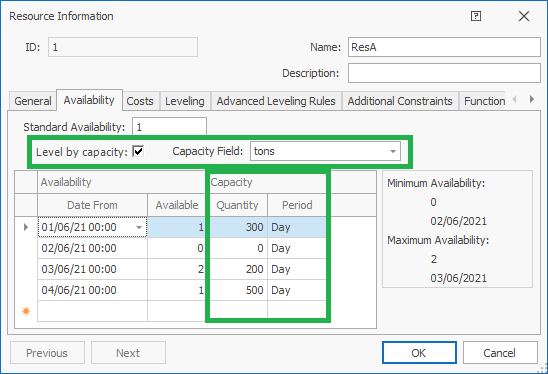
-
The resource parameters are best explained by example
Assume the following base data: 5 fixed rate tasks; production field/value of each task is tons/1000, rate is 200t/d, duration is 5d. Each task has a single 'Driving' assigned resource (ResA).
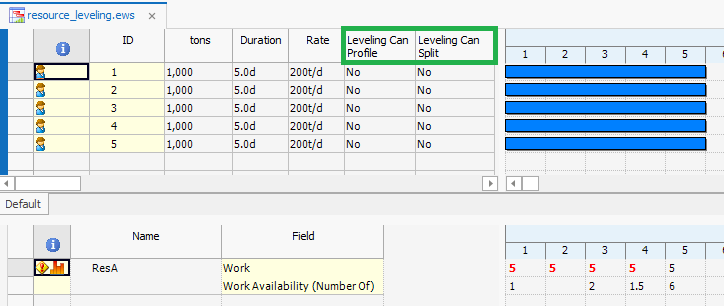
Resource availability by 'units (number of)' and 'capacity' are shown below:
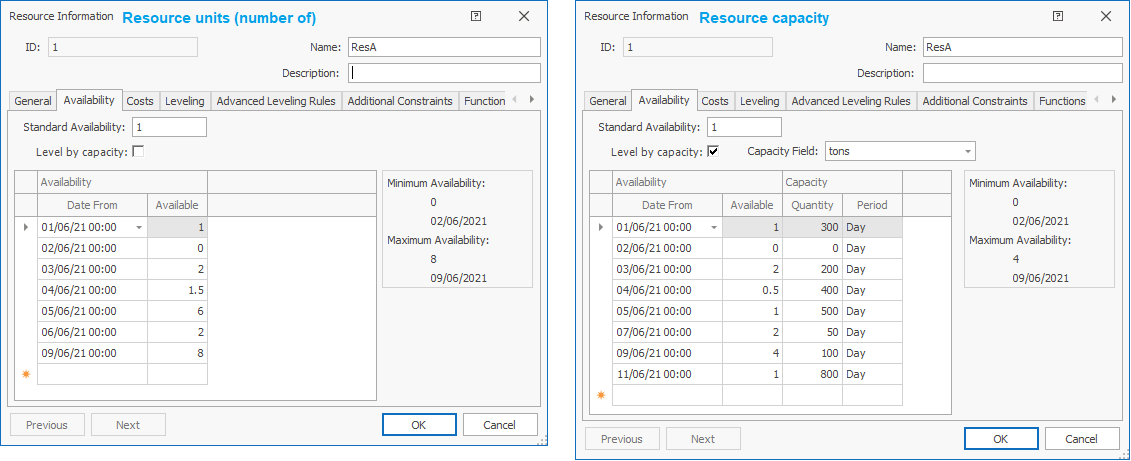
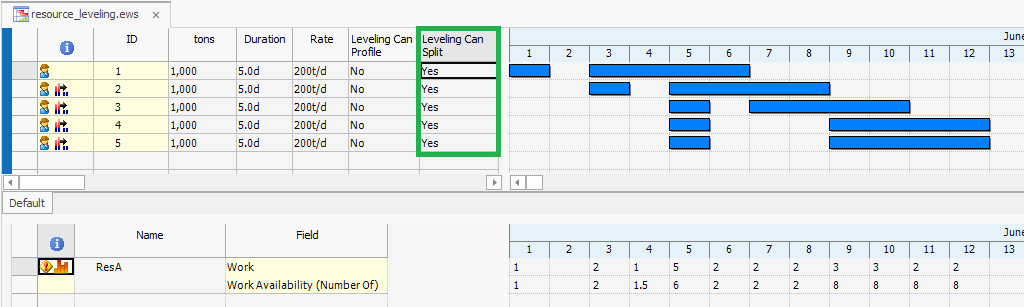
Leveling Can Split (using Resource units) - the rate/duration of all tasks is not changed. Tasks are split (interrupted) when insufficient resources are available. Note day 4: leveling does not create a split if availability is less than assigned ie. leveling does not create a 'partial' split for the remaining available 0.5 resources.
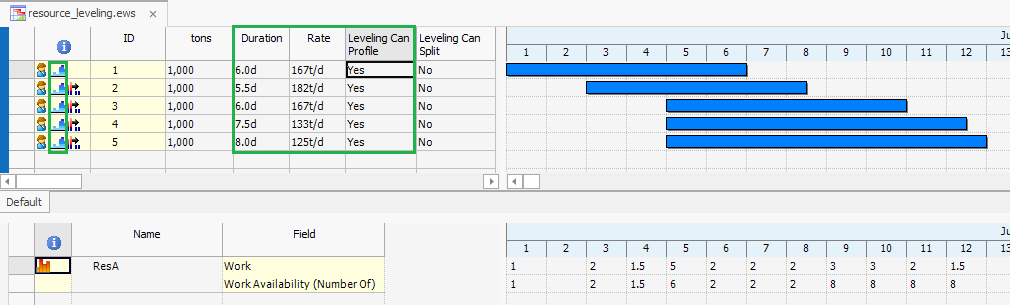
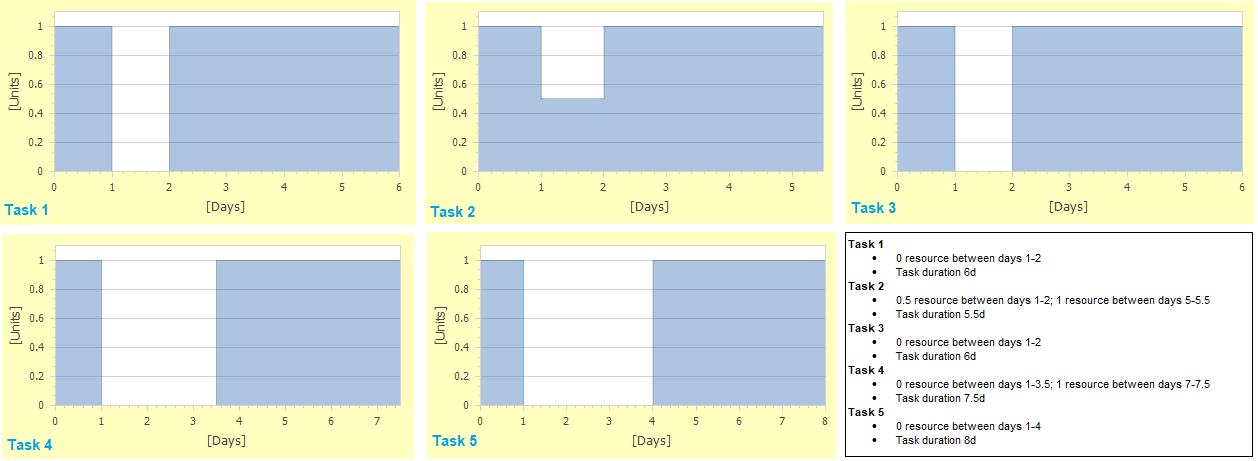
Leveling Can Profile (using Resource units) - in this example the rate/duration of all tasks has changed. Unlike the splitting example, the tasks are not interrupted. When insufficient resources are available, the assigned unit is changed, thereby adjusting the task duration and rate accordingly. The profile icons, highlighted in green, indicate that the task has been profiled. The profiling graphs/tables for all tasks are shown below. These graphs display the work that the resource contributes to the completion of the task over the duration of the task.
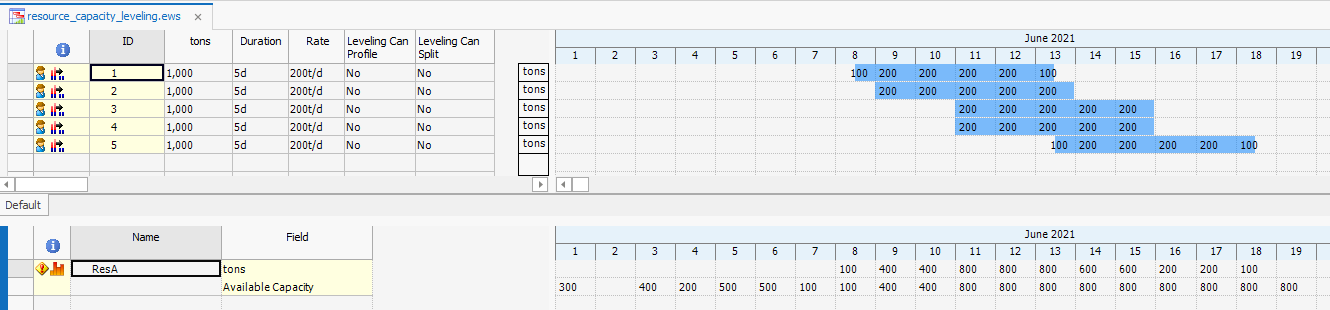
Level by capacity (using Resource capacity) - all tasks are moved as single, uninterrupted units. The rate/duration of all tasks remains unchanged.
Explanation for task 1 - the earliest 5-day period with sufficient capacity starts halfway through day 8. Day 1 (300), would have sufficient capacity, but day 2 does not have any capacity. Days 3-6 (400, 200, 500, 500), have sufficient capacity, but insufficient capacity on day 7 (100), so no full 5-day period can be achieved.
Note: for capacity leveling, the task does not have to start at the beginning of a day 00:00. The task can start as soon as sufficient capacity is available
for a 5-day elapsed time period.
Level by capacity and Leveling Can Split (using Resource capacity) - the rate/duration of tasks is not changed. When insufficient capacity is available, the task is split (or interrupted).