
On-Premise Hosting
Overview
MineTrust is a modular data management platform purpose-built for structured file operations, metadata enrichment, and client-driven data workflows. It features a robust backend powered by modern .NET services, a browser-based frontend, client-side integration, and support for scalable storage and relational database systems.
The platform is optimized for modern infrastructure and supports secure, efficient, and automated data operations across a variety of enterprise environments.
Architecture Diagram
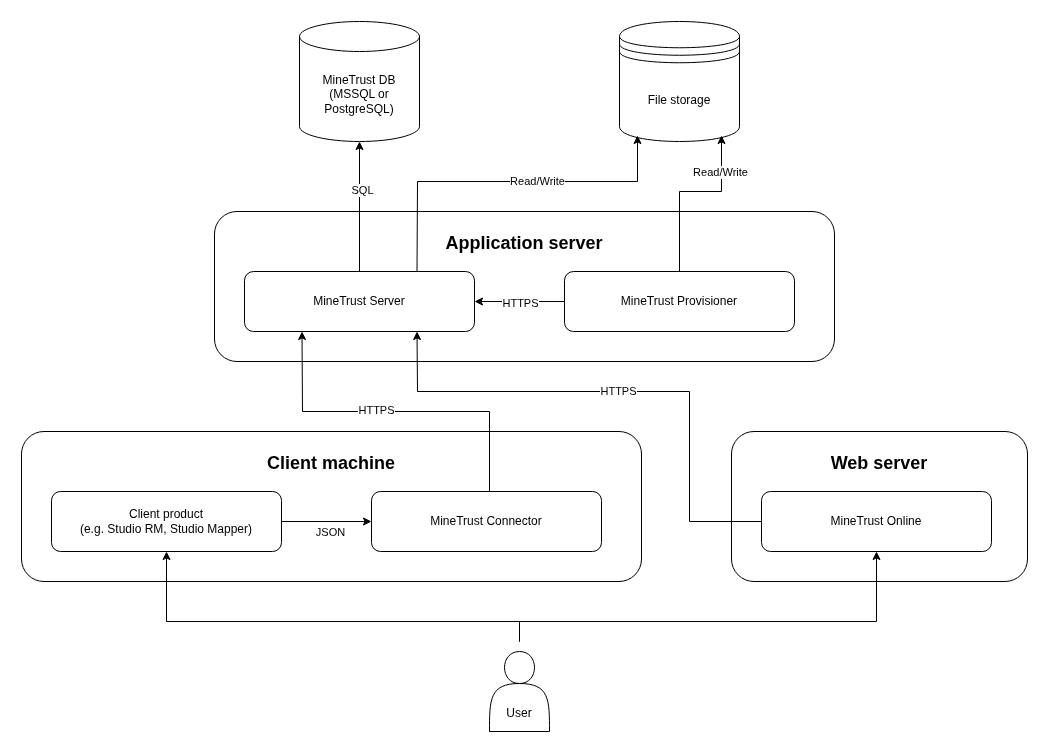
Components
Database Backend
MineTrust supports:
The MineTrust Server interacts with the database using Entity Framework Core, managing structured metadata, configuration, and versioning information.
Application Server
The application tier consists of two core .NET services, both targeting .NET 10.0:
MineTrust Server
An ASP.NET Core Web API that provides:
- File management operations
- Metadata enrichment and tagging
- File version control capabilities
See MineTrust Server for more information.
MineTrust Provisioner
A .NET-based background service offering:
- A lightweight automation platform
- Responsible for entity provisioning, data pre-processing, and scheduled tasks
See MineTrust Provisioner for more information.
Both services use shared File Storage to read and write binary data and payloads.
File Storage
A centralized file store used for:
- Persistent storage of data files and packages
- Shared access by MineTrust Server and MineTrust Provisioner
- Version tracking and large data management
Storage capacity should be scaled according to use, with a typical minimum allocation of 100 GB.
Web Server
MineTrust Online
A Blazor-based web frontend, hosted as part of the Web Server tier, allowing users to:
- Search, upload, and manage data assets
- Review package metadata
- Interact with version-controlled datasets
See MineTrust Online for more information.
Client Machine
MineTrust Connector
A Windows Service that:
- Monitors local directories for JSON manifest files produced by client apps
- Resolves these manifests into structured packages (i.e., a folder of files + metadata)
- Syncs the packages securely with MineTrust Server
See MineTrust Connector for more information.
Client Applications
- Examples include Studio RM and Studio Mapper
- Responsible for authoring data and publishing manifests to the local MineTrust Connector
Connectivity
The communication model of the MineTrust architecture is laid out as follows:
| Source | Destination | Protocol | Port | Description |
|---|---|---|---|---|
| MineTrust Connector | MineTrust Server | HTTPS | 9001 | MineTrust Connector synchronises data with MineTrust Server via the REST API |
| MineTrust Provisioner | MineTrust Server | HTTPS | 9001 | MineTrust Provisioner runs ETL -style jobs against MineTrust Server |
| MineTrust Server | MineTrust DB | SQL | 1433/5432 | MineTrust Server reads and writes entity data to and from the backing DB (MSSQL or PostgreSQL) |
| MineTrust Server | File storage | N/A | N/A | MineTrust Server directly accesses file storage either as local storage or as a network drive |
| User/browser | MineTrust Online | HTTPS | 443 | Users interact with the web application via a browser installed on their local machine |
| MineTrust Online | MineTrust Server | HTTPS | 9001 | MineTrust Online provides a user interface for interacting with files and folders via the MineTrust Server REST API |
Redundancy/Disaster Recovery
The redundancy and disaster recovery aspects of the platform should be configured according to the best practices of IT infrastructure. Some typical recommendations are as follows:
-
Database backups should be configured to run on a weekly basis.
-
File storage backups should be configured to run on a weekly basis.
-
Performance counters should be enabled on the Application/Web servers in order to identify periods of high load and scale hardware requirements where necessary.
Security Model
Transport Layer
All HTTP communication is protected via HTTPS with TLS certificates. This ensures encryption in transit and protection against MITM attacks.
Authentication
- OAuth 2.0 Bearer tokens are used for endpoint authentication.
- Default support is provided for Azure AD B2C directory services.
- The platform is extensible, supporting pluggable authentication schemes to integrate with other identity providers.
Authorization & Access Control
- Role-based access enforcement at the API level
- Package-level permissions can be configured based on user roles and ownership
Integrity Checks
- Packages are built and validated by the MineTrust Connector prior to upload
- MineTrust Server performs integrity verification upon receipt
Operating System Requirements
The following table indicates the operating system requirements for components of the MineTrust platform:
| Component | Version |
|---|---|
| Operating System (Application/Web server) | Windows Server 2019 64-bit (or higher) |
| Client Machine | Windows 10 64-bit (or higher) |
| ASP.NET Runtime (Application/Web server) | .NET 10.0 |
| .NET Desktop Runtime (Client Machine) | .NET 10.0 |
| SQL Server | 2022 (v16.x) |
| PostgreSQL | 17 |
Hardware Requirements
The following table indicates the hardware requirements for components of the MineTrust platform:
| Component | Requirements |
|---|---|
| Database Backend | 2 vCPU, 8 GB RAM, 50 GB storage (recommended) |
| Application Server | 2 vCPU, 8 GB RAM, 50 GB storage (recommended) |
| Web Server | 2 vCPU, 8 GB RAM, 50 GB storage (recommended) |
| File Storage | At least 100 GB, scalable depending on usage (will depend on volume of data) |
Implementation
The MineTrust Platform can be deployed using the on-premise bootstrapper wizard, which automates installation of prerequisites, database setup, service configuration, and identity platform integration. See the Platform Deployment Guide for full details.
-
MineTrust Server: Delivered as a signed
.exeinstaller bundle that includes a guided installation process. -
MineTrust Provisioner: Delivered as a signed
.exeinstaller bundle that includes a guided installation process. -
MineTrust Online: Delivered as a signed
.exeinstaller bundle that includes a guided installation process. -
Database Backend: Database schema and objects are initialized using provided setup scripts, compatible with both MSSQL and PostgreSQL targets.
-
MineTrust Connector: Delivered either as signed
.exeinstaller bundle or as a sub-component of a Studio installation. Endpoint registration can be performed:- Interactively, via the product's built-in configuration UI
- Or, via system notification prompts from the MineTrust Connector service
