
The Logs Window
Creating a log view is simple. The Logs window is used to configure the contents of the log sheet using a host of formatting functions. Similar in behaviour to the Plots window, a log sheet can be enhanced using a selection of Plot Items, from a library, to ensure that data presentation is effective and informative:
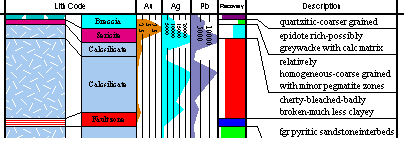
Log sheets consist of header, column and footer sections, the layout and contents of each can be customized easily. The default layout created by the program when a new log view is created contains a useful selection of information about the project and the holes defined in the document.
Downhole data columns are scaled vertically by the downhole Depth and may describe any interval log or depth log field or computed hole data field.
Column data can be displayed as text or in a variety of graphical formats. Header and footer sections may be defined with any number of rows and cells per row, containing user defined text or fields supplied by the program. Table and Field names can be displayed in column title rows above each column.
You can also add images to log sheets according to data held in an external list file.
Note: Once a log sheet has been created, a dedicated Logs ribbon displays to let you navigate between holes, access log properties and more.
Plot Window Templates
With regards to the Plots window (and to a lesser extent, the Logs window), much of the hierarchical structure of a particular sheet can be stored in template form. This minimizes the effort required to generate a consistent look and feel across a range of presentation projects by automatically generating a standard arrangement of sheets, projections and, if required, data object overlays.
- A Sheet Template is a file (.dmtpl) which stores information about the layout and data used by a single sheet. It remembers the layout and formatting of all your plot items, and also remembers which data and legends were used by those plot items.
- Once you have created a Sheet Template, you can use it to create a sheet in any project as many times as you wish, thus avoiding the hassle of re-creating new sheets from scratch.
- Sheet Templates are interchangeable between Studio products that use them.
- The other great thing about Plot window templates is that they are also compatible with the 3D window template format. See 3D Window Templates.
See Plot Sheet Templates.
Related topics and activites
