
Wireframe Union
To access this screen:
-
Wireframe ribbon >> Boolean >> Union.
-
Using the command line, enter "wireframe-union"
-
Use the quick key combination "wun".
-
Display the Find Command screen, locate wireframe-union and click Run.
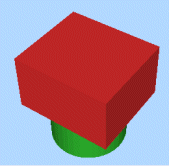
Perform a boolean union operation on two wireframe objects (or separate collections of selected triangle data) to create a new, single wireframe object with the same surface appearance and characteristics as the two component wireframes together. Any common volume is not distinguishable.
You can optionally set a Key field for Wireframe 1 and Wireframe 2. Use <None> when you do not want key-based grouping on an input. When a key field is set, each key value is treated as a separate wireframe group during union calculation.
If key fields are set for both inputs, processing is performed for each value-by-value combination across the two wireframes.
Note: This command supports flexible wireframe selection.
Wireframe Union Example
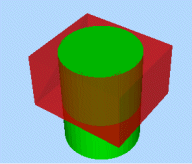
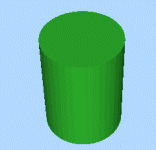
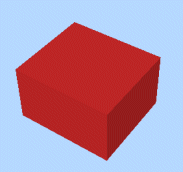
In the following example, an overlapping cube and cylinder are available for selection (as independent wireframe objects). The table further below details the output data created as a result of using the Wireframe Union command.
Initial objects
|
Original Wireframe Objects |
|
|
|---|---|---|
|
Object 1 |
Object 2 |
Output |
|
|
|
|
To generate a union object of two input wireframe data sets:
-
Load both wireframe objects that will be considered during the Boolean calculation.
-
Choose the data to represent Wireframe 1. This can either be an entire Object, or the Selected triangles of one or multiple wireframe objects.
Optionally choose a Key field for Wireframe 1, or choose <None>.
Note: if using selected triangles, click Store current selection to identify the data to be used in calculations. If you change your selection, remember to reselect this button to ensure the input data is updated.
-
Do the same for Wireframe 2.
Optionally choose a Key field for Wireframe 2, or choose <None>.
Note: you don't have to follow the same data selection method as Wireframe 1 (for example, Wireframe 1 could be a full object and Wireframe 2 could be selected triangles).
-
Choose the Output Wireframe mode.
-
Single Object: output is written to one object.
-
Multiple New Objects: output is split into multiple objects according to key field grouping.
-
If both input key fields are <None>, only one output object is created.
-
If one input key field is set, one output object is created for each key value group in that input.
-
If both input key fields are set, one output object is created for each value-by-value combination.
When multiple output objects are created, names use the configured Prefix plus an incremental numeric suffix (for example, Union: 1, Union: 2).
If only one new output object is created, the New field text is used as the object name.
If output is directed to an existing object, the existing object name is preserved.
-
-
Click OK.
Union data is generated.
Related topics and activities
