
Block Model Creation and Manipulation
Creating Block Models
Block models are created by the following general methods:
-
output from an underground or open pit optimizer
-
filling perimeters (closed strings) with cells
-
filling wireframes with cells
-
estimating grades into a block model prototype
-
generation from a set of XYZ data.
The block modelling process usually starts with the creation of a block model prototype, which contains information about the spatial position, orientation and extents of the model, as well as the size of the parent cells. It only contains a data definition i.e. the table does not contain any data records. This model prototype is then used as input to other functions, including implicit modelling tools and other processes and commands.
There is a wide range of commands and processes that support the creation of block models, including:
-
PROTOM – Generates a block model prototype (its data definition).
-
PERFIL – Fills perimeter strings with block model cells.
-
TRIFIL – Fills wireframes with block model cells.
-
WIREFILL – Automatically generates a block model prototype and then fills a wireframe will block model cells.
-
-
Calculates IJK values for an existing model with XYZ values for cell definitions using a prototype model.
-
Recalculates IJK values when expanding a model. For this, it is only necessary to define the new origin, number of cells etc. using PROTOM before using IJKGEN.
-
-
create-model-prototype – Generates and previews a block model prototype.
-
model-from-multiple-wireframes – Generates block models from multiple wireframes.
Sorting on IJK
Having a block model sorted on the IJK field is a prerequisite for:
-
using many of the block model combination and manipulation commands/processes, and;
-
loading the block model into Studio.
Typically, processes that generate a model will create one that is sorted.
Sorting a block model on the IJK field is done using MGSORT with the @ORDER parameter set to '1' (ascending order, the default setting).
Combining Block Models
The order in which block models are combined is important.
The following diagram shows the sequence in which individually modelled features need to be added in order to create a composite block model:
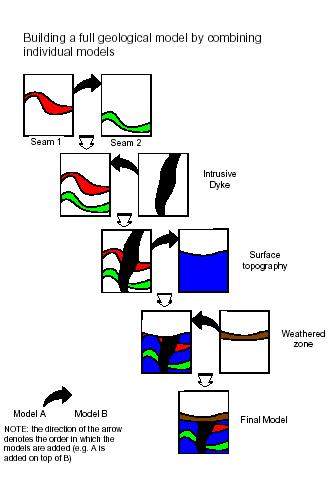
The following processes and commands are used to combine block models:
-
ADDMOD – Combines two block models.
-
SLIMOD – Splits model cells along boundaries defined by a new prototype block model. This is needed in order to combine two block model that do not have the same data definition.
-
MGSORT – Sorts table records, typically on the IJK field.
Note: Before models are combined, they need to be sorted on the IJK field.
Manipulating Block Models
Block models are typically manipulated in order to:
-
Optimize the model cells (reduce the number of subcells, say, after two models have been combined).
-
Place the block model in a new model prototype space.
-
Modify block values, for example, correcting numeric flag values after optimizing or regularizing a block model.
The following processes and commands are used to manipulate block models:
-
PROMOD – Optimizes the number of subcells in a block model.
-
REGMOD – Generates a regular celled (no subcells) block model.
-
SLIMOD – Splits model cells along boundaries defined by a new prototype block model. This is needed in order to combine two block model that do not have the same data definition.
-
MDTRAN – Translates and/or rotates a block model into a new prototype space.
-
MGSORT – Sorts table records on the IJK field.
-
EXTRA – A general purpose EXpression TRAnslator that allows you to transform the contents of Datamine files by modifying fields and creating new ones which can be based on the values of existing fields
-
SETVAL – Inserts a user-defined value into a given field either during copying of a file or as an in-place operation.
-
edit-model-cell-values – Allows block model cell values to be interactively edited in a 3D window.
Note: The Table Editor can also be used to edit data definitions and table data of any physical Datamine file (.dm or .dmx).
Related topics and activities:
