
Mining Width Control
To access this screen:
-
Optimization control bar >> Pushbacks >> Settings and select the Mining Width Control tab.
The Mining Width is a key parameter affecting pushback creation. It controls pushback shapes and locations with respect to other pushbacks and the ultimate pit boundary.
Excessive mining width settings may make it impossible to get pushbacks of desired size when strictly following the Ultimate Pit OES. The work around in such cases is to use the pushback adjustment tool.
Note: Mining widths can also be constrained on a per-pushback basis using the Size Control screen.
Consider the following example showing pushback shapes in section, where the Mining Width is constrained to 20 meters at the top and 40 meters in the bottom image:
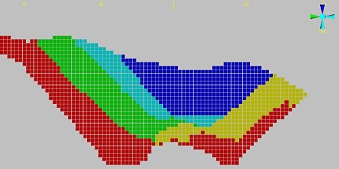
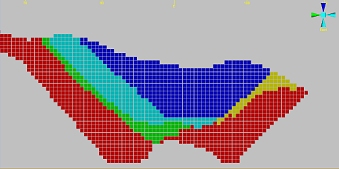
Use the Mining Width Control screen to ensure simulated pushback excavation matches known geotechnical and operational constraints.
To define mining width settings for the pushback and ultimate pit generators:
-
Define the Mining Width constraint. This is the minimum allowed distance between pushback boundaries (except when these boundaries coincide with the ultimate pit boundary).
Note: The distance must be defined in the same units as the block dimensions.
-
Choose how and when the mining width constraint is applied, from one of these exclusive options:
-
Control Mining Width on benches, the Final Pit may be smoothed – Pushbacks are generated by checking the mining width on bottom benches. The mining width must be defined in the same units as the block dimensions.
-
Control Mining Width on benches, keep the Final Pit unchanged – Pushbacks are generated by ignoring the mining width on the bottom few benches of each pushback. The mining width must be defined in the same units as the block dimensions.
-
Use old pushback generation method – In this case, pushbacks are generated using an old algorithm that checks the mining width on the top bench of each pushback. It is retained for legacy purposes, and in general, the top option is recommended.
-
-
Define Controls specific to the first two pushback generation options.
Note: The following options aren't available if using the old pushback generation method.
-
Add, if possible, disjoint pits... – If the size of a generated pit doesn't exceed a specified percentage of the target size set for the final conjoined or contiguous pushback, then a disjoint pit will be added. The default value is 40% and the possible range is 20% to 60%. If there are any pits with with a lower mass than the specified percentage, calculations consider merging these to the corresponding pushback.
-
Update Ultimate Pit OES after a pushback if...: this tolerance setting allows you to set an upper limit on the overall percentage of blocks that are outside the current sequence before the UP optimal extraction sequence is recalculated. Setting a value of zero, for example, will force a recalculation if any blocks are found to be outside the sequence. The default is 2%.
Note: Essentially, if enabled, you will recreate new nested pit shells and their corresponding Optimal Extraction Sequence (OES) after each pushback where the percentage of out-of-sequence blocks exceeds the value specified. If this is set to 0 (zero) a new optimized pit and OES will be created after each pushback.
-
-
If appropriate, define what constitutes a Remnant for removal. A remnant is an area between the ultimate pit and pushback rims. Specify the Minimum remnant (surface area) below which the area is considered a remnant.
Note: Once entered, the equivalent number of blocks appears below (Minimum remnant area is equivalent to).
Related topics and activities:
