
Friction Cones
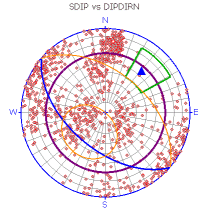
Circular cones are projected on a stereonet as small circles with a radius representing an angle about a vector that passes through the origin. Any point on the small circle is a constant angle from the vector. The potential for a block to slide is a function of the resultant shear force and the limiting frictional shear resistance force along sliding planes. Both forces depend upon the orientations of the resultant force and the normal of the sliding plane.
For a given resultant force, the vector orientation at which these two forces are equal (i.e. limit of equilibrium) is a function of the orientation of the plane's normal and the friction angle of the plane's surface. Considering all possible orientations of the resultant force gives us a set of limit equilibrium vectors defining a cone about the plane's normal. This cone is referred to as the friction cone. This is important for the analysis of data liable to sliding failure, especially where the features are exposed at a slope surface (daylight envelope).
To add a friction cone to a stereonet chart:
-
Display the Stereonet screen.
-
Display the Cones tab
-
Click New Cone.
The New Cones screen displays.
-
Enter the Cone Name "SlideBoundary1".
-
Leave the Axis Dip value at 90 but set the Axis Dip Direction to 25.
Set the Angle to 60 and click OK.
-
On the Stereonet screen, set the cone Color to purple and Line Thickness to 4:
Related topics and activities:
