
|
|
Example - Bench Definition Setting up your pit bench definitions |

Bench Definition
Before you generate mid-term mining blocks, you need to define both pit phases and benches. Pit benches can be defined automatically, based on values within the planning model, or from data within an input string file, or (as in this example) they can be generated manually by defining base characteristics.
Prerequisites
-
You have completed Defining Phases
Exercise: Create manual bench definition
For this example, you aren't relying on external 3D data to determine the geometry of your pit benches. Instead, you will define a series of pit benches that will be applied, starting from a pit reference elevation downwards, in fixed increments.
Using this method, the reference elevation is always the uppermost crest elevation of the ultimate pit rim, and benches are projected downwards at fixed intervals.
- Using the Setup ribbon, select Benches | Define.
- You are going to used fixed elevations and
a standard bench height (throughout the pit), make sure the Elevations radio button is
selected:
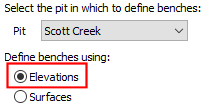
- Initially, the bench table is empty. Select
the Manual radio button
on the right of the table area:
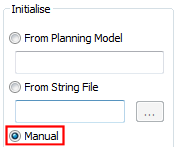
- Enter the following parameters:
Crest Elevation: 2260
Bench Height: 10
No. of Benches: 22 - Click the nearest Apply button and a table of bench definitions is generated on the left, starting with the uppermost bench and describing lower elevations down the table.
- Although it is possible (and easy) to edit the generated definitions, for this simple example, you can accept the generated definitions and continue to the next exercise. Save and Close your task.
