
 Studio OP
Studio OP is the complete solution for open pit design and operational scheduling. It contains functionality for both medium- and short-term planning of open pit mines.
Studio OP has tools for the design of pits and generation of mining surfaces, and allows you to generate mining blocks from pit and phase shapes. Mining blocks can be evaluated against a block model and scheduled to generate medium- and short-term operational plans. If the model contains strategic planning information such as pushback or sequencing information, this can be used.
Existing external mine designs in the form of string and surface data can be used in the generation of the mining block reserves for scheduling.
Studio OP contains functionality for both medium and short term planning of open pit mines.
- Mine planning block model preparation and manipulation
- Tools for pit design and the generation of mining surfaces
- A managed workflow for generating mining blocks and reserves within pits, mining phases and benches.
- Rich definition of mine infrastructure including haul routes, equipment, calendars and processing destinations.
- Medium and short term operational scheduling.
The mining blocks can be evaluated against a block model and scheduled to generate medium and short term operational plans. If the model contains strategic planning information such as pushback or sequencing information this can be used.
Existing external mine designs in the form of string and surface data can be used in the generation of the mining block reserves for scheduling.
Each of the main functional areas can broadly be used independently, offering flexibility in how you choose to work.
Who uses Studio OP?
Open pit mine designers, planners and operational schedulers.
Studio OP Benefits
Managed Workflow
A Managed Workflow is the cornerstone of Studio OP. A set of integrated, smart tools are available for creating and evaluating mining block reserves. The workflow is used to generate mining block reserves that can be scheduled to form a mine plan. Mining blocks are represented by wireframe solids and outlines. The workflow consists of managed tasks that can be accessed from the Reserves ribbon.
The workflow takes you the process of importing and managing planning block models, using mine phase designs and topographies to create phase shells, defining benches and mining block outlines and finally generating mining block reserves that can then be scheduled.
Automated Pit & Dump Design
Designing an open pit is an iterative process involving consideration of many design criteria, constraints and objectives. There is no single way to design a pit - every engineer does it slightly differently. Our objective in this tutorial is to show in detail how to use the various design tools in Studio to create a detailed pit design using three different methods. See Creating and Editing pit designs.
Operational Scheduling
Studio OP provides a highly sophisticated system for scheduling the mining block reserves to produce medium and short term operational plans, including exporting this data to Datamine Task Scheduler for further refinement.
Core Strength
Datamine's Studio product range has built on its strengths for over 40 years, and provides the mining industry with the most capable tools available for data visualization, editing and analysis. Featuring an extensive range of evolved processes and commands to suit every occasion, these tools have been designed by industry experts. Partnered with proprietary tools unique to Studio OP and a rich automation and scripting facility, you're always close to the most efficient solution.
MineTrust Data Management
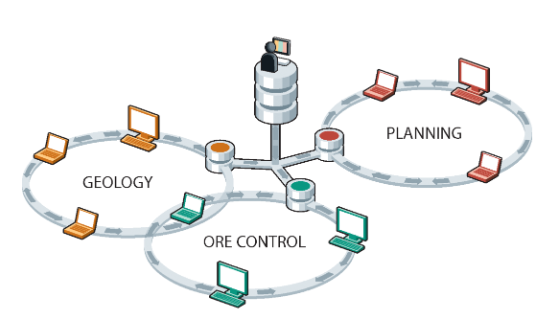
MineTrust is Datamine's data sharing service; a data management solution that is used to share and synchronise versions of files and groups of files between multiple users and teams in separate locations. Unlike many other file synchronisation systems, MineTrust can deal with groups of files, or packages, with a mix of file types that are synchronised and shared together. MineTrust can tag packages and files with any amount of meta data to reflect the data’s content, purpose, and how it is used within organisations and business processes.
Note: If you are interested in supporting your business with MineTrust but haven't made the move yet, contact your local Datamine office to work out a plan that's best for you.
MineTrust is built into Datamine Studio products by default. The use of automatically assigned tags specific to products and workflows, enables data to be shared automatically and efficiently between users and products, removing the need to manually manage and transfer files.
A cloud-hosted, highly secure data storage service, MineTrust provides reliable data management services for all team members, regardless of their location. Data is 'pushed' to the server following changes on the desktop and 'pulled' to other users' machines where newer data is available. This makes the following tasks to be performed very quickly and easily:
-
Sharing the latest 'ground truth' with other team members, such as sharing the latest field mapping data with resource modellers, or the latest EOM survey results, and so on.
-
Sharing reference data amongst multiple team members, such as the latest development plan to update reconciliation results, or a standard legend to be used for corporate-level reporting, for example.
-
Pushing data along a workflow, such as the latest drillhole sample data for implicit modelling revisions.
MineTrust is built specifically for resource modelling and mine planning workflows. Its integration with Studio products ensures teams collaborate in real-time without leaving their familiar working environment. It helps eliminate miscommunication and data duplication by centralising project files and enforcing structured sharing practices across departments, operations and the corporate enterprise.
See MineTrust and MineTrust-Enabled Projects to get started.
Related topics and activities:
