
Create Bench Solids

To access this screen:
-
Reserves ribbon >> Phases >> Bench Solids.
Use the Create Bench Solids task to generate bench volumes for each phase in a pit.
A phase bench solid contains one or more closed wireframes that represent a single bench within a phase.
Bench solids are generated by intersecting a phase solid with planes created from the pit’s bench definition. Define the phase solid and bench definition before you create bench solids.
When you generate a bench solid, Studio OP also creates a bench outline. The bench outline represents the hull of the phase bench when viewed from above.
You can use check boxes to show the generated data and visually validate it in the 3D window.
Bench Solids and Strata Data
If your phase solids include strata generated using the Define Strata task, bench volumes respect the strata boundaries and subdivide the output.
If the phase solids do not include strata, bench volumes are generated using the full phase bench height based on the relevant bench definition.
You can use strata volumes with 3D and surface benches. The output bench solids honour both the input surfaces and the generated strata volumes.
Bench solids and 3D and surface benches
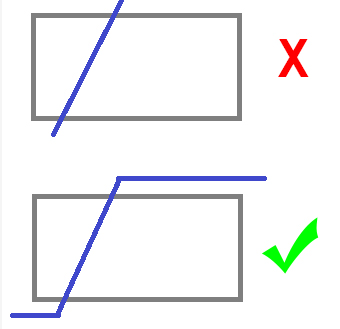
If you define a bench surface rather than using horizontal elevation values, the surface must extend beyond the limits of the phase solids in plan view. If it does not, Studio OP reports an error and stops bench solids generation for that phase.
The diagram below shows a bench surface that does not extend fully across the phase solids, and an updated surface that does.
Activity steps:
-
Display the Create Bench Solids task.
-
Select the Pit that contains the phase solids you want to process.
-
In the Phase Solids Table, select one or more phases to generate bench solids for.
-
Phase – Review the available phase definitions for the current pit.
-
Phase Solids – Check to display the phase solid in the 3D window. Uncheck to hide it.
-
Bench Solids – Check to display the generated bench solids in the 3D window. Uncheck to hide them.
-
Bench Outlines – Review the outline string file that Studio OP creates when you generate bench solids.
-
-
Click Create to generate bench solids for the selected phases, or click Create All to generate bench solids for all defined phases.
-
Enter values for Remove solids with volume below and Remove solids with maximum thickness below to automatically remove insignificant solids.
-
Check and uncheck the display check boxes in the table to validate the generated bench solids and phase solids in the 3D window.
Related topics and activities:
