
Wireframe Texture Options
The Wireframe Properties screen is used to format the appearance of wireframe overlays in 3D windows.
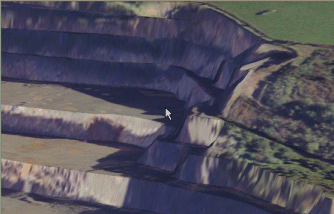
An example of a textured wireframe
You can apply a texture to your wireframe to show real-life landmarks, guide digitizing or survey reporting or even overlay information to enhance the display.
The following options are available:
- None – Disable all texture mapping for the target wireframe. If the wireframe is currently textured (either with a nominated image file or using embedded triangle-based texture information), selecting this option disables texturing and displays the wireframe in whichever Colour is set.
-
Texture image – Browse for a texture image. If the selected image contains georeferencing information (for example, as part of a .png/.pngx file pair or an .ecw format file), you are asked if you wish to use this data. See Draping Images.
-
From object – If your loaded data object contains per-triangle texture position information, you can choose to use it with this option (this is the default option for certain wireframe data types, such as Wavefront .obj files and similar). If selected, the triangle-based information is used to position your wireframe texture.
If your loaded wireframe object does not contain embedded texture position information, the From object option is unavailable.
Note: If your loaded data object supports per-triangle texture position information (such as with loaded .obj, .ply and similar data object types), this information is set for texturing by default.
Texture Preservation
When splitting a textured wireframe using one of the wireframe plane tools (such as wireframe-split-string):
-
Where split data is written to the current object, textures are preserved.
-
When outputting to a single (non-current) object, or a new object, textures are preserved.
-
When generating each 'split' as a new independent object, it is not possible to preserve textures. A multiple-object output is displayed in the current fixed colour instead.
Related topics and activities
