
road-outline-intersection
See this command in the command table.
To access this command:
-
Using the command line, enter "road-outline-intersection" and press ENTER.
-
Display the Find Command screen, locate
road-outline-intersectionand click Run.
Command Overview
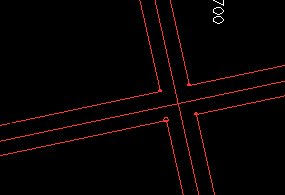
Create an intersecting road layout from two intersecting strings.
Command steps:
-
Ensure two intersecting strings are displayed in any 3D window.
-
Run the command.
-
Select one of the strings (the order is unimportant).
The Combine Road Strings screen displays.
-
Enter the 1st String Road Width and click OK.
-
Select the second, intersecting string.
The Combine Road Strings screen displays again.
-
Enter the 2nd String Road Width and click OK.
A road crossover is created, preserving the original design strings, for example:
Related topics and activities:
