
Creating Production or Internal Jobs from Schedule Jobs
Overview
Schedule jobs are used to schedule automatic production or internal job registration using the system scheduler and batch processor.
Process
As soon as a schedule job is configured as required in the CCREGN—Job application, a job generation task can be executed in the system scheduler, such that, at the appointed time, the batch processor creates samples in the target production or internal job. This process can create the production or internal job if it does not exist as yet.
The Execute option is only available if the schedule is not in execute mode already.
A schedule job can only be executed if the job's Is Active For Auto Registration is selected.
A schedule job can only be executed if the job's Expires On date-time is not defined, or is defined and later than the current system date-time.
Upon executing a schedule job:
-
A CCBSJGEN job is created in the system scheduler.
 Execute a schedule in the system scheduler for sample registration from a schedule job
At the appointed time of execution:
-
A CCBSJGEN batch job is created which determines the target production or internal job, and creates it if it cannot find it, then registers samples in it based on the stream samples in the schedule job.
If required, a CCBSJGEN job in the system scheduler can be terminated. When a schedule job is terminated, then:
- All schedules in the system scheduler related to the schedule job are deleted in the MSESCH—Schedule application.
- The Scheduled Status on the job's Schedule tab is set to Terminated.
Terminate a Schedule in the System Scheduler for Sample Registration from a Schedule Job
Current and historical system batch jobs used to register production and internal jobs can be viewed.
View current and historical system batch jobs for sample registration from a schedule job
Batch jobs in current execution can be terminated, if required.
The stopping action also inhibits any post-job generation tasks (for example, emailing and printing).
When a system batch job is terminated, where the batch job is comprised of multiple steps, then the step that is currently being executed is completed by the batch queue, but any further steps are skipped if their associated batch job is already cancelled or stopped. This inhibits any post-job generation tasks being executed. For example, if there is a batch job that contains three steps: job generation from a schedule job, e-mail and printing, and the user stops the process upon job generation, then the job generation is continued until it is completed, but the e-mail and printing steps are not executed.
Stop current system batch jobs for sample registration from a schedule job
Scheduling the Schedule Job Registration Batch Job in the System Scheduler
All events that are scheduled earlier than the current system date-time are deleted on the job's Schedule tab and can be seen from the schedule. Refer to Maintaining Schedules and Batch Job Executions.
If less than 10 scheduled events are defined on the job's Schedule tab, then up to 10 active future events are created for the job, at the appointed time, as per the defined frequency, and displayed in the grid.
For the 10 earliest active future events that exist for the job, a schedule is created in the system scheduler for the sample registration from the schedule job. The state of this scheduled job can be viewed. Refer to Maintaining Schedules and Batch Job Executions.
The Scheduled Status on the job's Schedule tab is set to Scheduled and the future events on the Future Events tab are read-only. The options now are to allow the scheduled events to run, or to terminate the schedule.
Placing the Schedule Job Registration System Batch Job in the System Batch Queue for Execution
At the appointed time, as per the defined frequency, a CCBSJGEN system batch job is created on the system batch queue which attempts the sample registration. Refer how to Set the BATCH_QUEUE_TASK_PRIORITY Preference and Maintaining Schedules and Batch Job Executions.
The system batch job history and the execution steps are visible for an historical system batch job in the History tab.
Checking Conditions for Automatic Registration of the Job's Samples
If the schedule job's Is Active For Auto Registration is cleared, then the batch job is terminated (rolled back) and an error is raised: Schedule is inactive for Auto Registration.
If the schedule job's Expires On date-time is defined and earlier or at the current system date-time, then the batch job is terminated (rolled back) and an error is raised: Schedule is expired for Auto Registration.
If no error is raised, then the process proceeds.
Generating the Destination Job's Name
The system generates the Production Job Name from the schedule job's Production Job Name Syntax Code, which may or may not refer to the Future Event Date from the schedule, and the schedule job's Job Name Offset.
Example: Where the schedule job's Production Job Name Syntax Code references a syntax containing PLANT $DD$MM$YY, the Job Name Offset is -2H, and the Future Events Date (date-time) is 1st November 2017 12:00:00, then the Production Job Name is determined as PLANT 011117.
An error is raised if the syntax is subsequently not found, or the destination job's Name cannot be determined, and the batch job is terminated (rolled back) with the error indicating the problem occurred during destination job name construction.
Checking that No Conflicting Org-scope Template Job Exists
If the system locates an org-scope template job exists with a Job Name matching the Production Job Name, then an error is raised.
Populating the Destination Job when a Matching Destination Job Exists
If the system locates a lab-scope production or internal job with a Job Name matching the Production Job Name, then the job is used, and:
- The destination job inherits the following details from the schedule job:
- Reporting (Job Stakeholders)—Schedule job stakeholders that do not exist already in the destination job are added. Existence is matched on the job stakeholder’s Client Code + Contact Code + User Code + Scope Type + Report Template Code + File Name + File Name Syntax Code + Language.
- Job Biofields—Schedule job biofields that do not exist already in the destination job are added. Existence is matched on the job biofield’s Code.
- Paperwork & Labels—Schedule job paperwork that do not exist already in the destination job are added. Existence is matched on the job paperwork’s Report Template Code + Output Format + File Name + File Name Syntax Code + Language.
- i18n
- Samples:
- Stream samples that exist already in the destination job are not recreated in the destination job.
- Stream samples that do not exist already in the destination job are created, but only if the stream sample's Is Active for Auto Registration is selected and the stream sample's schedule matches the executing schedule.
- Existence is matched on the sample’s Client Sample Name (see below for details on generating the sample's Client Sample Name) within the destination job.
- If the stream sample's Use Schedule Job Frequency check box is cleared, then the Future Event Date is checked against the stream sample's schedule, and if it does not match, then the sample is not created within the destination job.
If no error is raised, then the process proceeds. The event is audited.
Creating the Destination Job when a Matching Destination Job Does Not Exist
If the system does not locate a lab-scope production or internal job with a Job Name matching the Production Job Name, then it is created:
- Job Code—Generated as per usual for any job.
- Job Name—Set to the generated Production Job Name.
- Job Type —Production or Internal.
- Description —Generated using the schedule job's Production Job Description Name Syntax Code, which may or may not use the schedule job's Job Name Offset. If the syntax is subsequently not found, or the Description cannot be determined, the Description is populated from the schedule job's Description .
- Workflow Status—Set to Registered.
- Registered On date-time—Set to the Future Event Date + the schedule job's Job Name Offset.
- Received On date-time—If the schedule job's Auto-receive Job is selected, then set to the Future Event Date + the schedule job's Job Name Offset, otherwise left empty (and all downstream dates, that is, Required Date, Agreed Date, and Possible Date are left empty also).
- All dates are set in the same manner as when Registering Jobs from Template Jobs.
- The destination job inherits the following details from the schedule job:
- Primary details, including Is Auto Paperwork
- Reporting (Job Stakeholders)
- Job invoices
- Job biofields
- Notes
- Paperwork & labels
- i18n
- Samples:
- Samples are created, but only if the stream sample's Is Active for Auto Registration is selected.
- The stream sample's schedule matches the executing schedule, that is, if the stream sample's Use Schedule Job Frequency check box is cleared, then the Future Event Date is checked against the stream sample's schedule, and if it does not match, then the sample is not created within the destination job.
If no error is raised, then the process proceeds. The event is audited.
Generating the Sample's Client Sample Name
The system generates the Client Sample Name from the stream sample's Production Client Sample Name Syntax Code, which may or may not use the stream sample's Sampling Start Offset and Sampling Date Offset, which are referenced in the syntax using $Sample.SamplingStartOffset.asEllipseValue, and $Sample.SamplingDateOffset.asEllipseValue.
Example: A schedule job contains the following stream samples:
|
Production Client Sample Name Syntax |
Sampling Date Offset |
|
CON $DD$MM$YY $HH:$NN |
-2H |
|
FEED $DD$MM$YY $HH:$NN |
-2H |
|
TAIL $DD$MM$YY $HH:$NN |
-2H |
|
CON $DD$MM$YY $HH:$NN |
-1H |
|
FEED $DD$MM$YY $HH:$NN |
-1H |
|
TAIL $DD$MM$YY $HH:$NN |
-1H |
When the Future Events Date (date-time) is 12:00, then the resulting Client Sample Name for each destination sample are:
|
Resulting Client Sample Name |
|
CON 011117 10:00 |
|
FEED 011117 10:00 |
|
TAIL 011117 10:00 |
|
CON 011117 10:00 |
|
FEED 011117 10:00 |
|
TAIL 011117 10:00 |
When the Future Events Date (date-time) is 14:00, then the resulting Client Sample Name for each destination sample are:
|
Resulting Client Sample Name |
|
CON 011117 12:00 |
|
FEED 011117 12:00 |
|
TAIL 011117 12:00 |
|
CON 011117 12:00 |
|
FEED 011117 12:00 |
|
TAIL 011117 12:00 |
When the Future Events Date (date-time) is 16:00, then the resulting Client Sample Name for each destination sample are:
|
Resulting Client Sample Name |
|
CON 011117 14:00 |
|
FEED 011117 14:00 |
|
TAIL 011117 14:00 |
|
CON 011117 14:00 |
|
FEED 011117 14:00 |
|
TAIL 011117 14:00 |
If the stream sample's Production Client Sample Name Syntax Code is empty, the destination sample's Client Sample Name is set to the stream sample's Client Sample Name. (Note that a schedule sample's Client Sample Name cannot be cleared.)
An error is raised if the syntax is subsequently not found, or the sample's Client Sample Name cannot be determined, and the batch job is terminated (rolled back) with the error indicating the problem occurred during destination sample name construction.
Creating the Sample when a Matching Sample Does Not Exist in the Destination Job
For any sample created within the destination job:
- Sample Code—Generated as per usual for any sample, that is, using the syntax that is in scope and has a Syntax Type of Sample and a Syntax Code of SAMPLE_NAME_SYNTAX.
- Sample Name—Generated as per usual for any sample.
- Client Sample Name—Set to the generated Client Sample Name.
- Description—Generated using the schedule sample’s Production Sample Description Syntax Code, which may or may not use the stream sample's Sampling Start Offset and Sampling Date Offset. If the syntax is subsequently not found, or the Description cannot be determined, the Description is populated from the schedule job's Description.
Note: Where the stream sample's Production Client Sample Name Syntax Code and Production Sample Description Syntax Code are using the same syntax code, then the destination sample's Client Sample Name and Description display same value.
- Workflow Status—Set to Registered.
- Registered On—Set to the Future Event Date + the stream sample's Sampling Date Offset.
- Sampled On—Set to the Future Event Date + the stream sample's Sampling Date Offset. (It is currently using the Sampling Start Offset.)
- Sampling Started On—Set to the Future Event Date + the stream sample's Sampling Start Offset. (It is currently using the Sampling Date Offset.)
- Received On—Set to the Future Event Date + the stream sample's Sampling Date Offset.
- Other dates are set in the same manner as when Registering Jobs from Template Jobs.
- For each sample, sample details are taken from the stream sample within the schedule job:
- Primary Details
- Sample Biofields
- Notes
- Specifications
- Portions
- i18n.
If no error is raised, then the process proceeds.
- Conditions for Defaulting the QC Source for a Sample
- Conditions for Calculating Job and Sample Required On Date
Checking Conditions for Registering Schemes and Analytes for a Sample
For each scheme within the stream sample, if the scheme's Include in Auto Reg is selected, then the scheme is copied to the destination sample, and for each analyte within the stream sample, if the analyte's Include in Auto Reg is selected, then the analyte is copied to the destination sample scheme.
Creating a Scheme within a Stream Sample in the Destination Job
The scheme is created for the sample in the destination job. The sample scheme details are taken from the stream sample scheme within the schedule job:
- Primary Details
- Template Sample Code
- Workflow Status
- Paperworks?
- Labels?
- Linked scheme relationships
- Precursor scheme relationships
- i18n.
If the job scheme record exists already in the destination job, then it is updated to include composite details of the new samples, where appropriate.
If the job scheme record does not exist already in the destination job, then the destination job scheme details are taken from the schedule job scheme, where appropriate, and it is updated to include composite details of the new samples, where appropriate.
Creating an Analyte within a Stream Sample Scheme in the Destination Job
The analyte is created for the sample scheme in the destination job. The sample scheme analyte details are taken from the stream sample scheme analyte within the schedule job:
- Primary Details
- Template Sample Code
- Workflow Status
- i18n.
If the job scheme analyte record exists already in the destination job, then it is updated to included composite details of the new sample schemes, where appropriate.
If the job scheme analyte record does not exist already in the destination job, then the destination job scheme analyte details are taken from the schedule job scheme analyte, where appropriate, and it is updated to include composite details of the new sample scheme analytes, where appropriate.
- Conditions for Clearing the Ready Date for Sample Schemes
- Conditions for Calculating Expiry and Warning Dates
- Conditions for Defaulting Gridding on Sample Scheme Analyte Copy
- Conditions for Auto-appending of Job QC
- Conditions for Auto-generation of Paperwork and Labels
Creating Duplicate QC Samples for a Stream Sample or Replicate QC Samples for a Stream Sample Scheme in the Destination Job
For a sample that is included in automatic registration, if the stream sample's No. of Duplicates is greater than 0, and the Dup QC Type Code is set, then the defined number of duplicate QC samples are created. Duplicate QC samples are added to the current job scheme in the destination job and to all linked schemes and sequel schemes in the destination job. Replicate QC samples are also created for these duplicate QC samples.
When a duplicate QC samples is created, then the duplicate QC sample is propagated into all other job schemes, but only where the target job scheme contains the duplicate QC sample's original sample.
For a scheme that is included in automatic registration, if the stream sample scheme's No. of Replicates is greater than 0, and the Replicate QC Type Code is set, then the defined number of replicate QC samples are created. Replicate QC samples are added to the current job scheme in the destination job and to all linked schemes and sequel schemes in the destination job.
When a replicate QC samples is created, then the replicate QC sample is propagated into all other job schemes, but only where the target job scheme contains the replicate QC sample's original sample.
Refer to Default Settings for Duplicate or Replicate QC Samples.
Catching Up Execution from a Schedule Job caused by Server Downtime
Create a SCHEDULE_JOB_SAMPLE_RECOVERY batch job on the system batch queue. When it is run, it determines which scheduled jobs require catching up and creates a SCHEDULE_JOB_SAMPLE_RECOVERY_BY_JOB scheduled task for each job requiring it. Refer to Maintaining Schedules and Batch Job Executions.
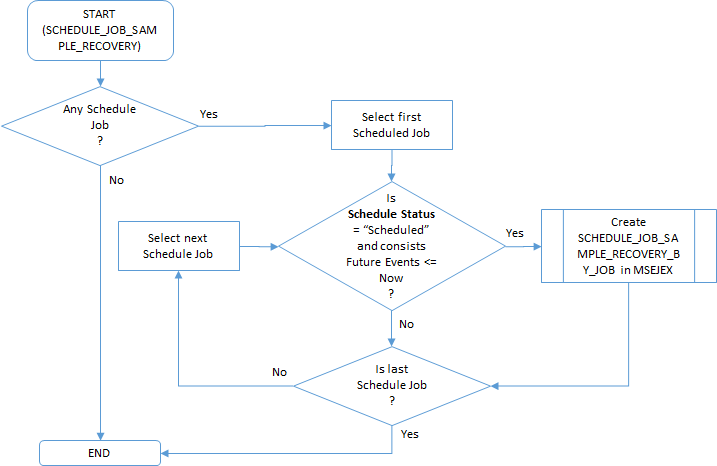
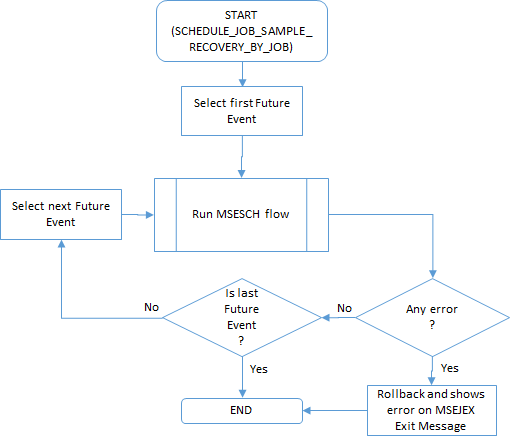
The batch job history and the execution steps are visible for a historical job executions in the History tab.
 Related processes...
- Maintaining Schedule Jobs
- Drafting Jobs from Schedule Jobs
- Registering Jobs from Draft Jobs
- Maintaining Schedules and Batch Job Executions
- Maintaining Jobs
- Registering Ad-hoc Production Jobs
- Registering Internal Jobs
- Registering Jobs using Proposals
- Registering Jobs using Electronic Request Sheets
- Registering Jobs from Template Jobs
- Configuring Registration
- Configuring the System Batch Queue
