
Reviewing Job Audits in the Universal Audit
Overview
A job audit is an electronic registry of the business processes applied to a job and its samples or their child objects, with details on who, when, and what changed or occurred.
Audits are written automatically during the processing of a job and its samples and does not require user interaction for that update.
Job audits are written for all types of jobs, however, when changes are made to a laboratory batch job, the auditing occurs in both the production job and in the laboratory batch job. Changes made to production samples as part of a laboratory batch job are audited in both the laboratory batch job and in the production job.
Examples of job audit situations:
Process
Where CCLAS 6 is configured for Writing Audits to the Universal Audit, then job audits are viewed using the Universal Audit Web application, external to CCLAS 6.
The data for these job audits comes from two sources. The first source is Oracle, which provides base information on jobs lists. The second source is the Universal Audit API, which serves as the back-end for Elasticsearch searches. The Universal Audit Web interface allows users to customise their search criteria using a variety of field conditions in combination.
Azure authorisation is required to ensure both the Universal Audit Web application and API are secured. That is, a user must log in with valid Azure credentials as only authorised requests can be processed.
Sign In to the Universal Audit
The Universal Audit can be accessed by entering the Web address of the Universal Audit repository using any standard Web browser, and selecting a Windows account that is configured for access to the repository.
Users who access the Universal Audit do not need to be users of CCLAS 6.
Search for jobs in the connected CCLAS 6 instance
Once you are signed in to the Universal Audit, you can search for jobs that exist in the connected CCLAS 6 instance.
 Search for jobs in the connected CCLAS instance
The job search page is laid out as follows:
-
Search criteria, comprising:
-
SEARCH button
-
RESET button
-
One or more groups. The first group is the parent group. Subsequent groups are children of the parent group. The first group's operator denotes how the parent group's rules and child groups are conditioned. The first group's rules are overarching rules. A child group's operator denotes how the child group's rules are conditioned.
Note: It can be misleading if rules are added to the parent group and they appear at the end. Although it looks like they belong to the last group, they are still parent group rules.
For each group:
- Operator—AND (default) or OR
- +Rule button
-
+Group button
-
 (Clone group) button, for child groups only
 -
 (Delete group) button, for child groups only
 -
Group rules. For each rule:
- The rule that comprises job field, operator, value
-
 (Clone rule) button
 -
 (Delete rule) button.
 -
(Clone group) button
-
(Delete group) button
-
-
Search results grid containing the jobs returned from the search. A link to the job log in the Universal Audit is provided for each job.
For a rule in the job search:
| Job field | Operator | Value |
|---|---|---|
| Laboratory Code |
Indicates how the jobs are searched by the denoted field against the value:
|
Free text entry of a laboratory code. |
| Job Name | Free text entry of a job name. | |
| Job Type | Selected from job types: Production, Internal, Proposal, Template, Schedule, Draft and Lab Batch. | |
| Workflow Status | Selected from job workflow statuses: None, Registered, Not Started, Started, Analysed, Released, Completed, Finalised and Cancelled. | |
| QC Status | Selected from job QC statuses: Not Tested, Not Required, Pass, Warning and Failure. | |
| Spec Status | Selected from job specification statuses: Not Tested, Not Required, Pass, Warning and Failure. | |
| Archive Status | Selected from job archive statuses: Online Only, Online and Archived and Online Archived Obsolete. |
Examples of criteria:
Given:
-
LAB1:
-
Production jobs: JOB1, JOB2
-
Internal jobs: JOB3, JOB4
-
Laboratory batch jobs: LBJOB1, LBJOB2
-
-
LAB2
-
Production jobs: JOB1
-
Internal job JOB2
-
Laboratory batch jobs: LBJOB1, LBJOB2, LBJOB3
-
-
When the following search criteria are entered:
OR +Rule +Group
Job Name = JOB1
Job Name = JOB2
Then LAB1-JOB1, LAB1-JOB2, LAB2-JOB1, LAB2-JOB2 are returned from the search.
OR +Rule +Group
OR +Rule +Group
Job Name = JOB1
Job Name = JOB2
Then LAB1-JOB1, LAB1-JOB2, LAB2-JOB1, LAB2-JOB2 are returned from the search.
AND +Rule +Group
Laboratory Code = LAB1
Job Name = JOB1
Then LAB1-JOB1 is returned from the search.
AND +Rule +Group
AND +Rule +Group
Laboratory Code = LAB1
Job Name = JOB1
Then LAB1-JOB1 is returned from the search.
AND +Rule +Group
Laboratory Code = LAB1
OR +Rule +Group
Job Name = JOB1
Parent group criteria Laboratory Code = LAB1 is applied using the 'AND' operator. Therefore, LAB1-JOB1 is returned from the search. Note that the OR operator on the child group has no impact as there is only one rule in that child group.
AND +Rule +Group
Laboratory Code = LAB1
OR +Rule +Group
Job Name = JOB1
Job Name = JOB2
Parent group criteria Laboratory Code = LAB1 is applied using the 'AND' operator. Therefore, LAB1-JOB1, LAB1-JOB2 are returned from the search.
AND +Rule +Group
Laboratory Code = LAB1
OR +Rule +Group
Job Name = JOB1
Job Name = JOB2
Job Type = Production
Parent group criteria Laboratory Code = LAB1 is applied using the 'AND' operator. But only LAB1-JOB1 is returned from the search as it is the only production job.
OR +Rule +Group
AND +Rule +Group
Job Name = JOB1
Laboratory Code = LAB2
AND +Rule +Group
Job Name = JOB2
Laboratory Code = LAB1
Then LAB1-JOB2, LAB2-JOB1 are returned from the search.
OR +Rule +Group
AND +Rule +Group
Laboratory Code = LAB2
AND +Rule +Group
Job Name = JOB2
Laboratory Code = LAB1
Then LAB1-JOB2, and all jobs from LAB2 (LAB2-JOB1, LAB2-JOB2, LAB2-LBJOB1, LAB2-LBJOB2, LAB2-LBJOB3) are returned from the search.
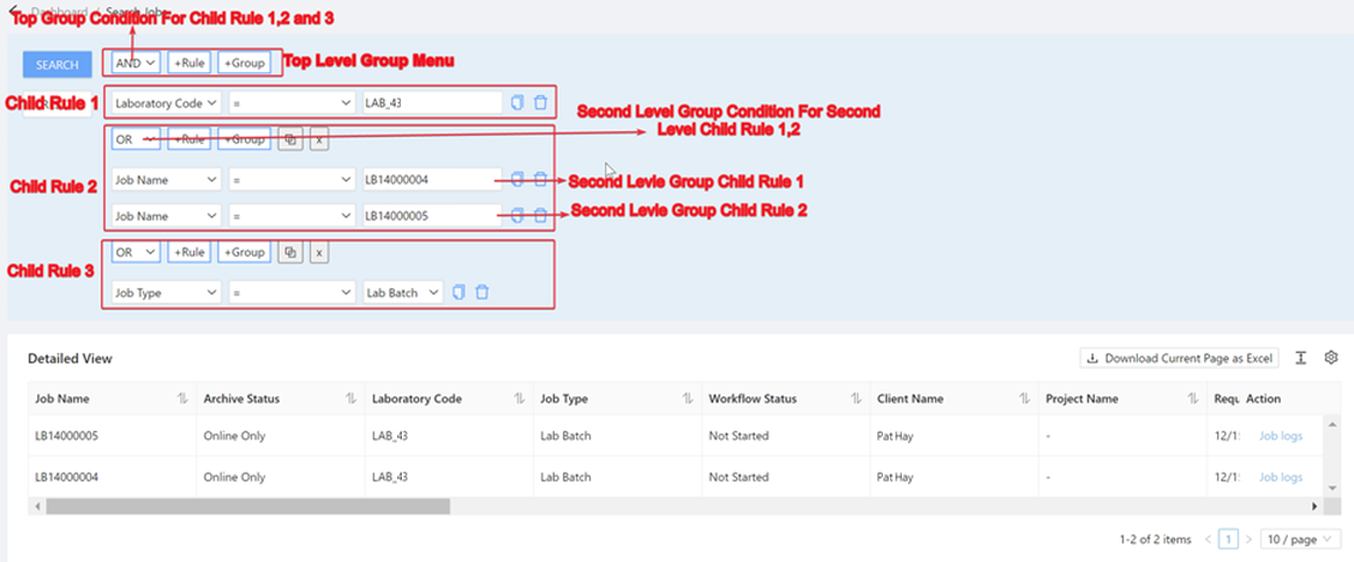
AND +Rule +Group
Laboratory Code = LAB2
OR +Rule +Group
Job Name = JOB1
Job Name = JOB2
OR +Rule +Group
Job Type = Lab Batch
Then LAB2-JOB1, LAB2-JOB2, an all laboratory batch jobs from LAB2 (LAB2-LBJOB1, LAB2-LBJOB2, LAB2-LBJOB3) are returned from the search.
AND +Rule +Group
Laboratory Code = LAB2
OR +Rule +Group
Job Name = JOB1
Job Name = JOB2
OR +Rule +Group
Job Type = Lab Batch
Job Type = Production <-- Added as a parent group rule
Then LAB2-JOB1, LAB2-JOB2 are returned from the search. The criteria in the second child group returns no jobs from LAB2 since a job cannot be both a laboratory batch and production job type.
AND +Rule +Group
Laboratory Code = LAB2
OR +Rule +GroupJob Name = JOB1
Job Name = JOB2
OR +Rule +Group
Job Type = Lab Batch
Job Type = Production
Then LAB2-JOB1, LAB2-JOB2 are returned from the search. The criteria in the second child group returns no jobs from LAB2 since a job cannot be both a laboratory batch and production job type.
Note also, that although the layout appears the same as example 7, the query is different as the Job Type = Production condition is only applied to the second child group, whereas in example 7, the Job Type = Production condition is applied at parent group level so affects all child groups.
Search audit events in the Universal Audit for a job
Once jobs are returned from the job search, the audit log in the Universal Audit can be accessed for a selected job. From there, you can search for audit events that exist in the log.
Search audit events in the Universal Audit for a job
The job audit event search page is laid out as follows:
-
Buttons, groups and rules in a similar format as the job search page, and the group and rule logic is applied in the same way. That is, the first group is the parent group. Subsequent groups are children of the parent group. The first group's operator denotes how the parent group's rules and child groups are conditioned. The first group's rules are overarching rules. A child group's operator denotes how the child group's rules are conditioned.
-
Search results grid containing the job audit events returned from the search.
For a rule in the job audit event search:
| Audit event field | Operator | Value |
|---|---|---|
| Correlation ID |
Indicates how the job audits are searched by the denoted field against the value:
|
Correlation ID associated with the database write to log the audit event. |
| Organisation Code | Free text entry of an organisation code. Defaults to the Organisation Code of the job opened in the job log. | |
| Laboratory Code | Free text entry of a laboratory code. Defaults to the Laboratory Code of the job opened in the job log. | |
| Job Name | Free text entry of a job name. Defaults to the Job Name of the job opened in the job log. | |
| Sample Code | Free text entry of a sample code. | |
|
Portion Code |
Free text entry of a portion code. | |
|
Scheme Code |
Free text entry of a scheme code. | |
|
Version Num |
Free text entry of a scheme version number. | |
|
Analyte Code |
Free text entry of an analyte code. | |
| Archive Status | Selected from job archive statuses: Online Only, Online and Archived and Online Archived Obsolete. Defaults to the Archive Status of the job opened in the job log. | |
|
Related Job Object Type |
Free text entry of an audited job entity:
|
|
|
User Code |
Free text entry of a user code. | |
|
Application ID |
Selected from the list of CCLAS 6 applications that deal with operational data. | |
|
Audit Type |
Free text entry of the Event Type, as outlined in the Appendix—Job Audit Event Codes. |
|
|
Audit Event |
Free text entry of the Entry Description held in the CC42 table type defined in the MSETBL—Table Code Service application, as outlined in the Appendix—Job Audit Event Codes. |
|
|
Field |
Free text entry of a field in the related table. | |
|
Data Type |
Selected from the data types associated with fields:
|
|
|
From Code |
Free text entry of an entity's code before an update. | |
|
From Name |
Free text entry of an entity's name before an update. | |
|
From Description |
Free text entry of an entity's description before an update. | |
|
To Code |
Free text entry of an entity's code after an update. | |
|
To Name |
Free text entry of an entity's name after an update. | |
|
To Description |
Free text entry of an entity's description after an update. | |
|
Event Date |
Between | From Date and To Date of the audited event, entered or selected from a date-picker. If an event date range is not defined, then the audit events from the last three months are returned, by default. |
The lists of audited job processes and audit event codes are viewable using the MSETBL—Table Code application, with the table type CC43 containing the audited job-related processes and table type CC42 containing the list of event codes. Refer to Appendix—Job Audit Event Codes.
Note that, for any delete event, the audit event will contain the field values as they were prior to the delete event. However, no audit event is recorded for a job delete event.
 Related processes...