
Configuring Price Catalogue Groups
Overview
A price catalogue group contains an ordered collection of price catalogues.
The collection of price catalogues within a price catalogue group may be based on, for example, currency, region or client type.
A price catalogue group is like a collection of bookshelves, with each bookshelf being a price catalogue that contains shelves of price books.
A laboratory's price catalogue group is used to determine the price book to use when creating job costs.
A client's price catalogue group is used to determine the price book to use when creating job invoices. A client's price catalogue group defaults from the laboratory's price catalogue group.
Price catalogues can exist in one or more price catalogue groups.
Multiple clients may be associated with the same price catalogue group.
Price Catalogue Groups within the Pricing Hierarchy
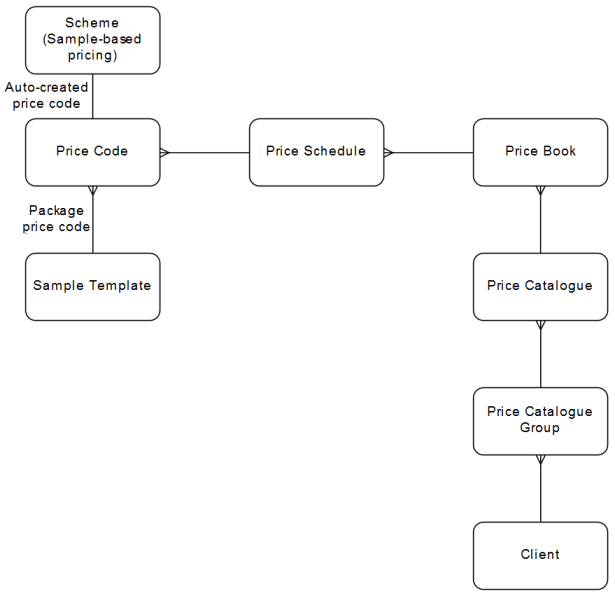
Downstream Dependencies
Job costs cannot be raised for a laboratory unless the laboratory is linked to a price catalogue group, and that price catalogue group contains a price catalogue containing a price book that is linked to the same currency as the laboratory and has a date range matching the job's received date.
Job invoices cannot be assigned a price book unless the client is linked to a price catalogue group, and that price catalogue group contains a price catalogue containing a price book that is linked to the same currency as the job invoice and has a date range matching the job's received date.
For example of a price catalogue group ENVIRONMENTAL_CLIENTS that contains three price catalogues, in this order: SPRING_2016_PRICING, NORMAL_2016_PRICING and NORMAL_2017_PRICING. The SPRING_2016_PRICING price catalogue contains two price books, in this order: AUS_SPRING_2016 and NZ_SPRING_2016. The NORMAL_2016_PRICING price catalogue contains two price books, in this order: AUS_NORMAL_2016 and NZ_NORMAL_2016. The NORMAL_2017_PRICING price catalogue contains two price books, in this order: AUS_NORMAL_2017 and NZ_NORMAL_2017.
Process
Price catalogue groups are configured using the CCPRCCATGP—Price Catalogue Group- application, accessed using the Invoice Setup » Price Catalog Groups menu option.
 Configure price catalogue groups
Price catalogue groups returned from a search can be exported to a report. Refer to Generating Grid Reports. Available report templates are defined in the SEARCH_REPORT_CCPRCCATGP application preference.
The order of the price catalogues in the grid is the sequence in which they are scanned when a quote or invoice action needs to determine the default price book for a job cost or job invoice. Price books are resequenced so that one price catalogue is used ahead of another price catalogue.
A price catalogue group has the following properties:
-
Scope for either organisation or laboratory use. An org-scope price catalogue group can contain both org-scope and lab-scope price catalogues. A lab-scope price catalogue group can contain both org-scope and lab-scope price catalogues.
-
Multiple price catalogues.
Price catalogues can be copied from one group to another, with accompanying price adjustment, to simplify the set up process.
 Related processes...