
Configuring Price Catalogues and Price Books
Overview
A price catalogue contains an ordered collection of price books.
The collection of price books within a price catalogue may be based on, for example, currency, date range, region, or client type.
Whilst a price catalogue is agnostic of currency, each price book must link to a currency and apply for a date range comprising a from-date and to-date, where the to-date may be left empty.
A price catalogue is like a bookshelf that is full of price books, where price books are added to the bookshelf in an ordered manner, with the more preferred price books searched ahead of the less preferred price books. The ordering of price books within a price catalogue assists where more than one price book for a currency exists for a particular date range. An example of this is where one price book contains default pricing for the financial year and another price book contains pricing for an advertised special that is active for a time in that financial year–moving the special price book ahead of the yearly price book makes the system take that price book in preference when a price book is automatically assigned for invoicing.
When the system searches the price catalogue for a price book, it searches by the price book sequence within the price catalogue and returns the first price book with a matching currency and valid date range matching the invoice's primary job's received date. As an example, the laboratory may wish to have a price catalogue containing seasonal pricing using price books for a collection of different currencies. Using either the listed order of valid price books, or by managing validity date ranges for particular price books, the active price book for a particular currency can be controlled for that currency.
A price book contains a collection of price schedules. Price schedules for the same price code can exist in different price books to allow for flexible cost calculations using a variety of models.
Price Catalogues and Price Books within the Pricing Hierarchy
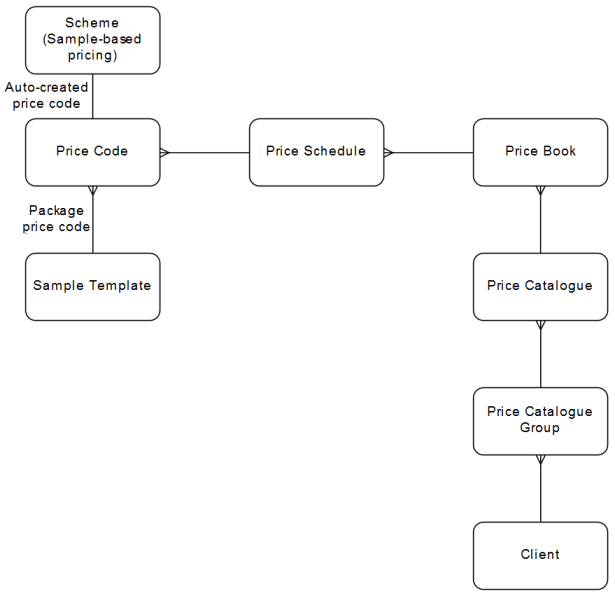
Downstream Dependencies
When a job invoice is created, the job invoice can only link to a price book that has an active date range encompassing the job’s registration date.
When determining prices for an invoice, the prices in the price book are applied if the selected price book’s date range encompasses the job’s registered date.
Process
Price catalogues and the price books within them, are configured using the CCPRCCAT—Price Catalogue application, accessed using the Invoice Setup » Price Catalogs menu option.
 Configure price catalogues and price books
Price catalogues returned from a search can be exported to a report. Refer to Generating Grid Reports. Available report templates are defined in the SEARCH_REPORT_CCPRCCAT application preference.
The order of the price books in the grid is the sequence in which they are scanned when a quote or invoice action needs to determine the default price book for a job cost or job invoice. Price books are resequenced so that one price book is used ahead of another price book, where the two price books link to the same currency and their date range overlaps.
A price catalogue has the following properties:
-
Scope for either organisation or laboratory use
-
Price Catalogue Code that is unique with the organisation and laboratory
-
Name
-
Description
-
Multiple price books.
Price books for a price catalogue can be exported to a report. Refer to Generating Grid Reports. Available report templates are defined in the SEARCH_REPORT_CCPRCCATBK application preference.
A price book has the following properties:
-
Price Book Sequence, also displayed as its Identifier, that indicates the order of use when more than one price book within the price schedule has the same currency for an over-lapping date-range.
-
Active flag
-
Currency, mandatory, and cannot be updated, to give monetary value to determined pricing and to match the price book to a job invoice's currency.
-
Name—This should identify the price book's purpose or period of validity. As an example, a price book created with start date, 1st Jan 2016 and end date, 31st Dec 2016, inside the AUS_LAB_PRICES price catalogue might be given the name 'Aus Lab Prices 2016'.
-
Description
-
Start Date and optional End Date (so if not defined, makes it open ended), for example, a French price book contains special price schedules for August, or the laboratory's costing book contains normal price schedules from the start of the year, going forward without no foreseeable end.
-
Multiple price schedules, with each price schedule linked to a price code, such that, a price book can have only one price schedule per price code, although, each price book can contain a different price schedule for a price code.
Once a price book is created, then the price schedules are added. That is to say, a collection of price codes are added to the price book, and then the actual costing details added as required.
Price books returned from a search can be exported to a report. Refer to Generating Grid Reports. Available report templates are defined in the SEARCH_REPORT_CCPRCBK application preference.
Maintain price schedules in a price book.
Pricing for book price schedules and quote price schedules is configured using the CCPRCSCHD—Price Schedule Detail screen. Refer to Configuring Price Schedules.
Updating Prices in Price Books
Price books are reviewed regularly, such that, whilst an individual price schedule can be modified, from time to time, it is usual for a bulk update to be applied to all the price schedules in selected price books in a price catalogue, or in selected price schedules in a price book. For example: Where a new year's price book is created from the previous year's price book, then a 5% CPI increases can be applied to the new year's prices, to increase or decreases prices in all associated price schedules, without having to update each price book individually.
Change prices for selected price books or price schedules
Updating Prices in the Shareable Underlying Base Quote
Selected price books in a price schedule or selected price schedules in a price book can have a specified Percentage change applied, after which:
-
a selected rounding factor, Round New Scheme, Sample and Price prices by, is applied to round new price determinations for price book schedules that have a Price Type of Scheme-Based, Sample-Based and Analyte-Based, after which prices are rounded again to the currency's Minor Unit digits, and
-
a separate rounding factor, Round New Unit Prices by is applied to round new price determinations for price book schedules that have a Price Type of Unit-Based , after which prices are rounded again to the currency's Minor Unit digits + 1.
 Related processes...
- Configuring Currencies
- Configuring Price Catalogue Groups
- Configuring Price Schedules in a Price Book or Quote
- Generating WIP and Estimate Job Costs
- Generating WIP and Estimate Job Invoices
- Maintaining Job Invoices in Registration
- Maintaining Job Invoices in an Invoice
- Maintaining Header Details for an Invoice
- Generating WIP and Estimate Job Invoices
- Generating WIP and Estimate Job Costs
- Releasing Invoices
