
Configuring Price Codes
Overview
A price code links a costed or priced entity to a price schedule within a price book. Costed and priced entities include schemes, analytes and template samples for package pricing.
Actual pricing is not built directly into the price code. The pricing of a price code is always within the context of a price book. This intersection of price book and price code is known as a price schedule.
When a price schedule is created for a price code, the base and block price notes are inherited from the price code.
A single price code can exist in many price books.
Price Codes within the Pricing Hierarchy
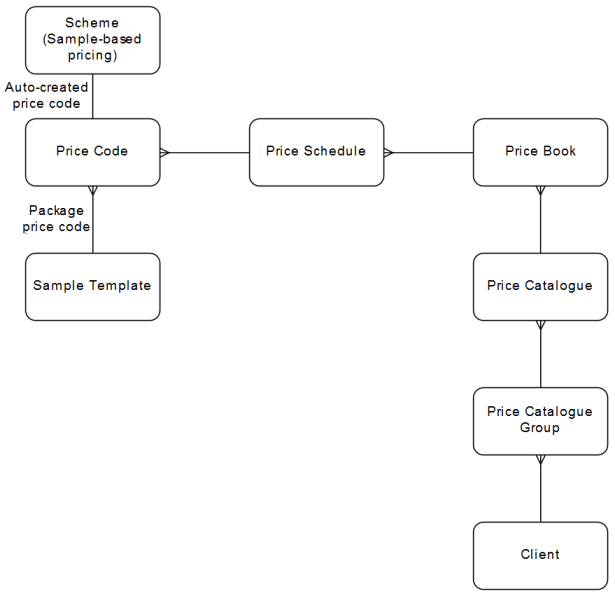
Downstream Dependencies
Price codes must be defined before price schedules can be created within price books, and before schemes, analytes and template samples can link to them (although the system can be configured to create scheme price codes automatically as a scheme is created).
Process
Price codes are configured using the CCPRCCODE—Price Code application, accessed using the Invoice Setup » Price Codes menu option.

When searching for price codes:
-
Price codes that are created when a quote price schedule is created are deemed as belonging to the system. Where Created for Quotes is set to No, then price codes that are created when a quote price schedule is created, an deemed as belonging to the system, are NOT returned in the search.
-
Where Include Hidden is unchecked, then price codes that are attached to a scheme, or to an analyte within a scheme, that is NOT visible to the laboratory (that is, an org-scope scheme that is NOT enabled for use by the laboratory) are NOT returned in the search.
-
Where Used by Scheme or Analyte is set to Not Used, then only price codes that are NOT attached to a scheme, or to an analyte within a scheme, and price codes that are only attached to template samples as a package price, are returned in the search
-
Where Used by Scheme or Analyte is set to Used, then only price codes price codes that are attached to a scheme, or to an analyte within a scheme, are returned in the search. Note that this also excludes price codes that are only attached to template samples as a package price code.
-
Where Used by Scheme or Analyte is set to All or Used, and:
-
Scheme Name, Scheme Description, Section Name or Section Description is supplied, then only price codes attached to schemes are returned.
-
Analyte Name or Analyte Description is supplied, then only price codes attached to analytes are returned.
-
Both scheme-based and analyte-based criteria are supplied, then only price codes attached to schemes and analytes are returned from the search.
-
No scheme-based or analyte-based criteria are supplied, then price codes attached to schemes and analytes, and price codes that are only attached to template samples as a package price, are returned from the search.
-
| Include Hidden | Used by Scheme or Analyte | ||||
|---|---|---|---|---|---|
| N | Y | Not Used | Used | All | |
| Org-scope price code that is not associated with any scheme or analyte. | Exclude | ||||
| Org-scope price code that is associated with an org-scope scheme or analyte that is not enabled for use by the laboratory. | Exclude | Exclude | |||
| Org-scope price code that is associated with an org-scope scheme or analyte that is enabled for use by the laboratory. | Exclude | ||||
| Org-scope price code that is associated with a lab-scope scheme or analyte. | Exclude | ||||
| Lab-scope price code that is not associated with any scheme or analyte. |
Exclude |
||||
| Lab-scope price code that is associated with a lab-scope scheme or analyte. | Exclude | ||||
Price codes returned from a search can be exported to a report. Refer to Generating Grid Reports. Available report templates are defined in the SEARCH_REPORT_CCPRCCODE application preference.
Only price codes returned from a search, subjected to the above restrictions, can be included in a laboratory invoice.
Where a price code is not associated with a quote price schedule, it can be used to create another price code.
A price code has the following properties:
-
Organisation Scope flag
-
Price Code that is unique within the organisation and laboratory
-
Created for Quotes indicates whether the price schedule was created for a quote price schedule. Quote price schedule price codes are not for use in price books.
-
An optional Name and Description
-
Active flag
-
Price Type of either:
- Scheme-Based—Pricing is determined by the flat number or range of number of analytes analysed, across samples. A price code of this type is attached to a scheme where the scheme's Scheme Type is Analytical Preparation or Analytical and the scheme's Price Type is Scheme-Based.
- Sample-Based—Pricing is determined by the flat number or range of number of samples. A price code of this type is attached to a template sample as the Package Price Code, or to a scheme where the scheme's Scheme Type is Sample Preparation, Analytical Preparation, Analytical or Miscellaneous and the scheme's Price Type is Sample-Based.
- Unit-Based—Pricing is determined by the flat amount or range of amount recorded on the job scheme that represents hours, kilometres, consumed amount of substance, etc. A price code of this type is attached to a scheme where the scheme's Scheme Type is Sample Preparation, Analytical Preparation, Analytical or Miscellaneous and the scheme's Price Type is Unit-Based.
- Analyte-Based—Pricing is determined by the flat amount or range of amount of final numeric result for an analyte, across samples. A price code of this type is attached to an analyte in a scheme where the scheme's Scheme Type is Analytical Preparation or Analytical and the scheme's Price Type is Analyte-Based.
-
An optional Default Base Price Note and Default Block Price Note.
A price code that links from a scheme, scheme version analyte, template sample, price book schedule or quote cannot be deleted.
 Related processes...
- Configuring Price Schedules in a Price Book or Quote
- Maintaining Tests for a Quote
- Maintaining Schemes
- Maintaining Scheme Version Analytes
- Maintaining Job Tests
- Maintaining Template Jobs and Samples
- Creating Production Jobs from Template Jobs
- Adding Samples to a Job using a Template Sample
- Adding Tests to a Sample using a Template Sample
- Applying and Removing Package Pricing for Samples
- Maintaining Job Invoice Samples and Tests from Registration
- Maintaining the Samples and Tests on a Job Invoice in an Invoice
