
Targets
To access this screen:
-
Project Settings >> Targets.
You use targets to set anticipated values for Production and Summary fields. You can modify targets over time and, if you expect fluctuations, you can allocate high and low values.
-
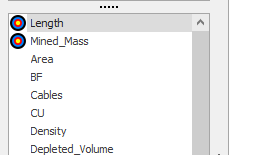
This screen lists all production and summary fields of the active project. Fields that already have targets are shown at the top of the list and marked with a target symbol.
-
Use multiple Date From entries if targets change across the schedule timeline.
-
All production and summary fields appear in this list. The fields for which targets have already been defined, are shown at the top of the list and highlighted with the target symbol, for example:
Activity steps:
-
Display the Targets screen.
-
In the fields list, select the production or summary Field you want to target.
-
If Per Period is available, enter a number and select the time period that the targets apply to.
Note: Use Per Period only for normal (non-weighted) fields. It is not available for grade (weighted) fields.
-
In the targets grid, add or edit a row.
-
Enter Date From to set the start date for this target range.
-
Enter Low as the value below which the system flags the target as low.
-
Enter High as the value above which the system flags the target as high.
-
To change targets over time, add additional rows with new Date From values.
-
Click OK to update your project.
-
Save your project.
Related topics and activities:
