
Task Information: Dependencies
The Dependencies tab is used to define dependency methods and summarize information about predecessors and successors for the selected task.
This screen is divided in two halves. The left half displays the fields that apply to links to the predecessor task of the currently displayed task. The right half displays the fields that apply to links to the successor task of the currently displayed task. The fields on both halves are basically the same.
The following table describes the fields on this screen as shown below:
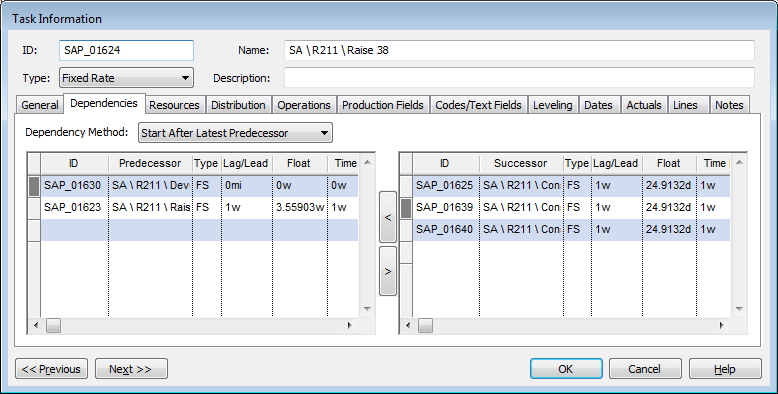
| Field | Description |
| Dependency Method | The method used to schedule the current task when considering dependencies.
By default, this value is set to Start After Latest Predecessor.
|
| ID | The unique ID of the predecessor or the successor task. |
| Predecessor / Successor | The Name of the predecessor or the successor task. |
| Type | The type of link (dependency) between the predecessor or the successor task and the currently displayed task. |
| Lag/Lead | Indicates the lag or the lead time for the dependency. |
| Float | The duration before the task becomes a part of the critical path for the project. |
| Time between | The duration between the current task and the task it is linked to by the dependency. |
| Layer | The Dependency Layer assigned to this dependency.
|
| Previous | Click to display the Task Information screen of the task before this one - the task listed in the Task Table above the one you are currently displaying. |
| Next | Click to display the Task Information screen of the task after this one - the task listed in the Task Table below the one you are currently displaying. |
| OK | Click to save your changes and close the screen. |
| Cancel | Click to lose the changes you made and close the screen. |
| Help | Click to display the help for this screen. |
 This is the Default Dependency Method specified in the
 This field is only applicable for Predecessor tasks.