
Task Information: Resources
The Resources tab can be used to view the assigned resources to the selected task.
The following table describes the fields on this screen as shown below:
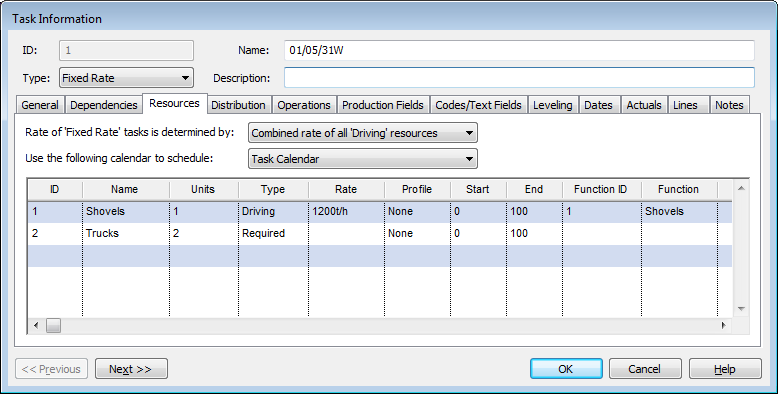
| Field | Description |
| Rate of 'Fixed Rate' tasks is determined by |
Specifies the means of calculating the rate of tasks that have assigned more than one resource using the Driving assignment Type. Select a value from the drop-down list. Valid values are:
|
| Use the following calendar to schedule |
Specifies the calendar to be applied to scheduling the task. Select a value from the drop-down list. Valid values are:
|
| ID | The unique identifier of the resource.
|
| Name | The name of the resource.
|
| Units | The number of resources assigned to the task.
|
| Type | The type of the assignment. Assignments can be defined as:
|
| Rate | The rate of the resource as assigned to the task.
This rate is set when you create the resource. For more information, see Creating Resources. |
| Profile |
If this field displays None, there is no profile applied to the resource. If this field displays click for details, there is a profile applied to the resource. To see the details:
For more information, see Displaying Resources Profile Details. |
| Start, End | The assignment's offset from the start of the task as a percentage. These fields are not editable and may be changed by the levelling or optimisation algorithms. |
| Function ID, Function (Name) | If the resource specified in the ID column has the function/skill of a replaceable resource, then this Function ID represents that replaceable resource. |
| Previous | Click to display the Task Information screen of the task before this one - the task listed in the Task Table above the one you are currently displaying. |
| Next | Click to display the Task Information screen of the task after this one - the task listed in the Task Table below the one you are currently displaying. |
| OK | Click to save your changes and close the screen. |
| Cancel | Click to lose the changes you made and close the screen. |
| Help | Click to display the help for this screen. |
 This ID is assigned to the resource when the resource
is created. For more information, see
This ID is assigned to the resource when the resource
is created. For more information, see  The number of units cannot be modified for Effort
Driven tasks (as this is a calculated value).
The number of units cannot be modified for Effort
Driven tasks (as this is a calculated value).