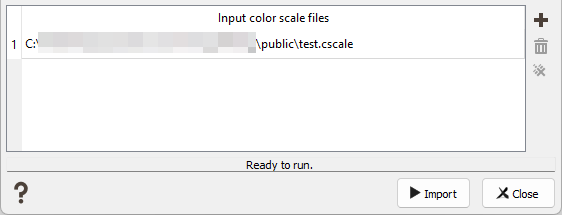
Color Scale Import
This task enables you to import color scale(s) from another Isatis.neo project (or created from scratch) or coming from Studio RM (Datamine).
Click on  to pop up a window file selector and select the file(s) you want to import. Two formats are currently supported.
- The imported color scale(s) must be stored with a .cscale extension for Isatis.neo color scales.
- Color scales coming from Studio RM (known as legends) are stored as .elg files. Only the “value” and “range” legend types, with a numerical data type can be imported. The other legends will be skipped with a warning message printed. The new color scale is created as categorical, with one category per value/range and its associated color.
Note: The import of Studio RM color scales is only available on a Windows operating system.
Click  to remove from the list of the input files the selected color scale file(s).
Click  to clear all the input files.
No other parameter is required, you can then directly click on the Import button to finalize the import.
The imported color scale(s) will use the name defined in the file. If a color scale with the same name already exists, a confirmation message asking if you want to overwrite it will be popped up.