
Block simulations: Gaussian discrete simulations
The aim of the Cox Process - Block simulations: Gaussian discrete simulations application is to perform simulations of the Number of stones variable. The available method is the Turning bands.
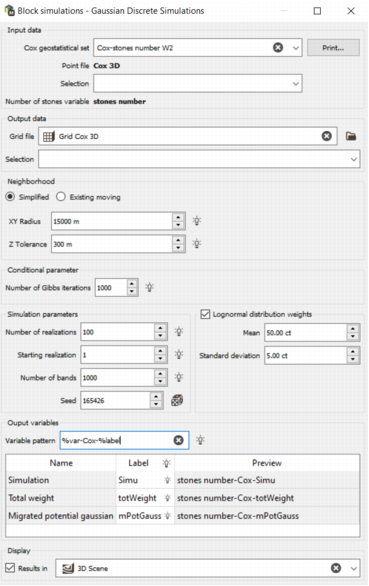
Input data
-
Cox geostatistical set: select the geostatistical set from the previous task ’Block support correction’. It must contain the point gaussian anamorphosis and the gaussian variogram model of the Number of stones variable. Plus, it must have a nugget effect and at least one structure among the spherical, exponential and gaussian types.
The content may be printed in the Messages window by pressing the ’Print’ button.
The file and variable associated to the geostatistical set are printed in the interface.
- Selection: a selection variable may be chosen in the referenced file from the geostatistical set. The default is the selection saved in the geostatistical set (if any). Optional.
Output data
- Grid file: select the grid on which the simulations will be performed. The dimension of the grid (2D or 3D) must be consistent with the input point file.
- Output selection: set a selection on the grid if needed. Optional.
Neighborhood
Define the neighborhood to perform the simulations.
-
Simplified: set the parameters of a rectangular neighborhood.
-
XY radius: set the radius of the neighborhood along X and Y (same value in the two directions). The default value is the maximum grid mesh size along X or Y, multiplied by three.
XY radius = 3 x max(DX, DY).
- Z tolerance: set the vertical component of the neighborhood. Only available in 3D cases. The default value is set to the grid mesh size along Z (i.e. DZ) multiplied by three.
-
The other parameters (non-editable) used in the simplified neighborhood are:
- number of sectors = 1
- minimum number of samples = 1
- optimum number of samples = number of samples in the input point file.
-
- Existing moving: an existing neighborhood can be selected here. The ’Print’ button prints the neighborhood parameters in the Messages window.
Conditional parameter
- Number of Gibbs iterations: set the value to initialize the gaussian block value at sample location. The default is set to 1000.
Simulation parameters
These parameters will be used to perform the simulations for the model validation.
- Number of realizations: set the number of realizations for the simulations. Minimum is 1 and maximum is 1 000 000. Default is 100.
- Starting realization: set the index of the first realization to perform. Minimum is 1 and maximum is 999 999. Default is 1.
- Number of bands: set the number of bands used with the Turning bands simulation method. Minimum is 100 and maximum is 10 000. Default is 1 000.
- Seed: set the seed with a specific value or a random value by clicking the dice button. The default value is 165426.
Lognormal distribution weights
Tick the checkbox to activate the calculation of the weights of the stones using the log-normal distribution. When activated, the Total weight variable will be created on the output grid file and the Weight variable will be created on the output point file.
- Mean: set the mean of the log-normal distribution. The minimum is 0 carat (ct).
- Standard deviation: set the standard deviation of the log-normal distribution. The minimum is 0 ct. The standard deviation must be greater than 0.
Output variables
- Variable pattern: enter a pattern to homogenize the names of the output variables.
-
Table: tick the checkboxes on the left to select the variables that will be created. The label column is editable so you can customize the variable names. Three output variables will be created:
- Simulation
- Total weight
- Migrated potential gaussian
Display
Tick the checkbox and select the scene where the first simulation result will be displayed at the end of the run.
Run
The run will launch the calculation using the Turning Bands algorithm. The output variables will be created in the grid file.
The parameters summary and statistics on the output variables are printed in the Messages window.
