Sample simulations: Gaussian potential variogram
The aim of the Cox Process - Sample simulations: Gaussian potential variogram application is to build a gaussian discretized variogram for the Cox Process simulation of the gaussian variable linked to the number of stones by means of the potential parameter. The discretized variogram calculated by this application has then to be fitted using the standard variogram fitting procedure.
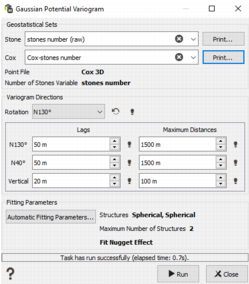
Geostatistical sets
- Stone: select the geostatistical set of the Number of stones variable. This geostatistical set should have been calculated in the Exploratory Data Analysis (EDA). It must contain a raw point model with a nugget effect, but not a pure nugget effect variogram.
- Cox: select here the geostatistical set that has been created in the previous task (Histogram modeling). It must contain the point gaussian anamorphosis of the Number of stones variable.
The content of each geostatistical set can be printed in the Messages window, by pressing the associated ’Print’ button.
The file and variable of the geostatistical sets are printed as information. The geostatistical sets must rely on the same file and variable.
Variogram directions
- Rotation: define the orientation of the variogram. By default it is set to the major direction of the Stone variogram.
- Lags: enter the lag distances along each direction to calculate the experimental variogram.
- Maximum distances: enter the maximum distances along each direction to calculate the experimental variogram. By default the maximum distance is the extension of the bounding box multiply by 0.25.
Fitting parameters
An automatic fitting of the model is done. The used parameters are printed in the interface (structure types, number of structures, fitting of the nugget effect). These parameters may be changed by the user by clicking the ’Automatic fitting parameters...’ button.
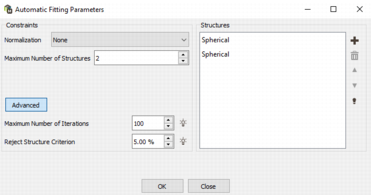
The options are the same as in the main EDA - Variogram task.
- Normalization: if activated, it can be proceeded during or after the fitting. Deactivated by default.
- Maximum number of structures: select the maximum number of structures used in the model fitting. The default is set to 2 structures.
- Structures: select the types of structures (on the right hand side). Be careful, the order of the structures may impact the results.
-
Advanced...
- Maximum number of iterations: the algorithm will try to meet the minimization criterion. If the criterion is not attended after the maximum number of iterations, an error message to say that the algorithm failed the fitting will be printed. The default value is 100.
- Reject structure criterion: it represents the percentage of variance below which a structure will be discarded. The default value is 5%.
Output
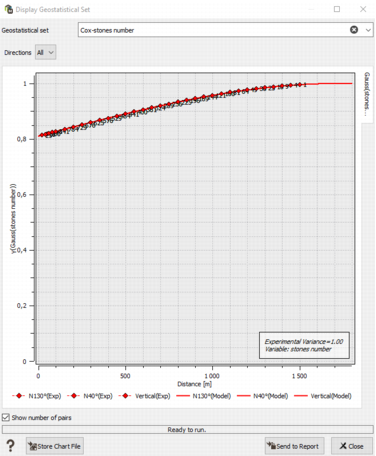
This task will create an experimental variogram and the associated variogram model. They will be saved in the Cox geostatistical set, with the previous anamorphosis. Gaussian statistics are also calculated.
The variograms (experimental & model) are automatically displayed after the run and statistics are printed in the Messages window.