
Export NetCDF
The Export NetCDF functionality allows the export of variables located on a dataset (grid or points) into an NetCDF file.
The tool is located in the following sections:
- Home / Export / Grid Export / NetCDF
- Home / Export / Points Export / NetCDF
Parameters
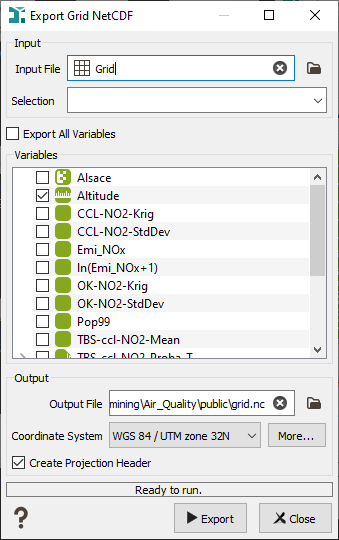
-
Input:
- Input File: Click to open a Data Selector to select the dataset which contains the variables you want to export. The dataset can also be dragged and dropped directly from the Data tab. The input dataset can be 2D or 3D.
- Selection: Choose a Selection variable to define which variable of the grid you want to export.
-
Variables: Click on Export All Variables if you want all your variables exported in the same NetCDF file. You can also choose to select only some variables (categorical, text, macros...).
Note: If the grid is rotated, you cannot export Text or Categorical variables.
-
Output:
- Output file: Choose the name and path of the exported NetCDF file (.nc).
- Coordinate System: Select the Coordinate System in which your data will be exported.
- Create projection header: if the toggle is selected, another output file (.prj) will be created containing the selected Projection.
