
Block Model Import
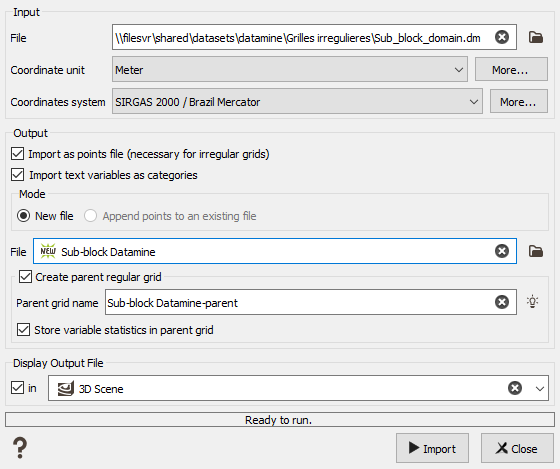
The block model import is designed to load files that define a grid which can be regular (i.e. all the cells have the same size) or irregular (i.e. the cells are sub-cells of a parent grid, with a varying cell size).
Datamine block model files are determined by having at least the following fields: IJK, XC, YC, ZC, XINC, YINC, ZINC, XMORIG, YMORIG, ZMORIG. If they are rotated, they have the additional fields: ANGLE1, ANGLE2, ANGLE3, ROTAXIS1, ROTAXIS2, ROTAXIS3, X0, Y0, Z0.
All the variables "from the user" are imported as numerical or text variables.
Parameters:
- Input File: select a Datamine file to import.
- Coordinate Unit: set the unit of the coordinates (longitude, latitude and elevation). The same unit will be applied to all the coordinates in the file.
- Coordinates system: select the coordinate system for the block model. This field is only available when the project is already defined with a specified system (not the Local User system).
-
Import as Points file (necessary for irregular grids): this is optional if the block model is regular, but mandatory in case of irregular block model.
The sub-block files in Isatis.neo are based on points files, which contain additional information about the parent grid geometry and the size of each sub-block.Ticking this box will create a points file instead of a regular grid. The points file will contain a “BLOCK_DEF” compound variable that contains the cells’ size. If the block model file contains the parent grid definition, this will be stored in the file too. If a file is detected to be an irregular block model, this option is obligatory checked.
- Import text variables as categories: check this parameter to create a categorical variable in the Facets data table for each string variable from the Datamine triangles file. An associated catalog is created at the same time, based on the variable’s name.
-
Output Mode: "New file" mode will create a new file on the Data Tree (or overwrite if you enter a name that already exists) whereas "Append" mode will add the blocks to an existing file in your Isatis.neo project.
Note: Importing sub-blocks with the "Append" mode will add the new sub-blocks to the existing sub-block file. The behavior will be the same as points. If the option to create the parent grid is activated, the parent grid will be created again and the statistics will be updated to take into account the old and new sub-blocks.
Note: Importing the block model as regular grid will add the variable values from the new file into the existing cells, but the other variables will not be overwritten or erased.
- Output File: Name the file to create in the Isatis.neo project.
-
Create Parent Regular Grid: This is optional. When a block model file is imported as a sub-block file, this option allows to create a regular grid with the geometry of the parent grid, at once. The regular grid will be created in the same folder as the sub-block file in the data tree of Isatis.neo.
- Parent Grid Name: Name the parent grid. By default (using the magic wand) this is the name of the points file, with the suffix “-parent”. You can also use the pattern "%file" and the parent grid name will use the associated sub-block file name.
- Store variable statistics in parent grid: The resulting regular grid file will contain statistics of the variables defined on the original sub-block file. For numerical variables, each parent cell will contain the mean value calculated from all the sub-blocks in the parent cell, weighted by the volume of each sub-block. For categorical variables, the parent cell will contain the proportion of volume in each category.
- Display In: Option to directly display the output file in a selected scene after the import. The blocks will be colored based on the values of the first numerical variable.
