
Interface
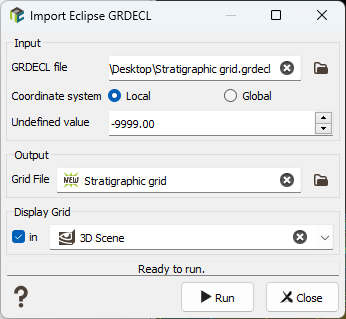
The program will create an Isatis.neo Grid File with the parameters defined in the window.
-
Input:
-
The input file parameter has no filter on extensions, as this can be .grdecl, .ASC, ...
Imported file have at least:
- a SPECGRID keyword to define the number of nodes on the 3 axes
- a COORD keyword, that defines ALL pillar trajectories along the 3rd axis between each ‘column’ of the grid ((NX+1)*(NY+1)*(NZ+1) values)
- a ZCORN keyword, that defines, for each of the 8 corners of ALL cells, the Z elevation along the trajectories (8*NX*NY*NZ samples).
- Coordinate system: In Local, if MAPAXES is present, the origin stored in the keyword will be used as offset for the grid coordinates. In Global mode, MAPAXES origin is ignored even if it is present in the file.
- Undefined value: By default, undefined values are codded with the -9999 value. But as this field can be customized when exporting, you have to enter here the numerical value which identifies undefined values.
Note: All the properties that have as much elements as grid cells are considered property data and are imported as FLOAT-64 variables.
-
-
Output: The objective of this step is to define the Isatis.neo output file. The output file selector is filtered to select 3D Grid files.
Note: If the grid already exists, the grid definition must be compatible with the parameters entered in the window. If not, the existing grid file will be deleted.
-
Display: Select the toggle to display in a defined scene (2D or 3D) a new layer displaying the imported data.
Note: Display a warning just before running the import, if the file is bigger than 1GB, to warn that display will likely be slow and ask for confirmation of display after import.
