Log Deviations
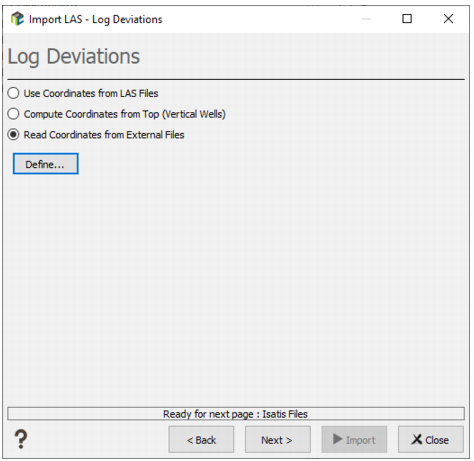
This step enables you to specify how to read the well trajectories.
By default, LAS files are read as vertical wells because they rarely contain coordinates along the well. However, some software have an option to put the coordinates as extra curves in the LAS file. Some other software record the deviation survey in a separate file near the LAS file. Isatis can only read this kind of file if the information is presented under the X,Y,Z,MD form (more details further).
As for the Top Coordinates page, you have the choice between 3 options:
-
Select Use Coordinates from LAS Files if your files contain coordinates. The X/Y/Z coordinate of each log sample is read in each line file. For this, the LAS files need to contain, in the ~Curve section, 3 variables that contain this information.
- You have then to choose the right keywords for X, Y and Z coordinates (Coordinates Field Names).
- The X and Y columns can contain either real values (absolute coordinates) or offsets. Switch on the toggle X/Y are Offsets to specify that X/Y values in the fields are relative to the top coordinates. The read values for X and Y will be added to the top coordinates of the current well before being stored to the database.
- Specify if the Z values are defined as Z, TVD (True Vertical Depth) or TVDSS (True Vertical Depth Sub Sea).
- Select Compute Coordinates from Top (Vertical Wells) if your files do not contain coordinates. Wells are assumed to be vertical, and the coordinate of each sample will depend on the tops coordinate, and the depth of the log sample.
-
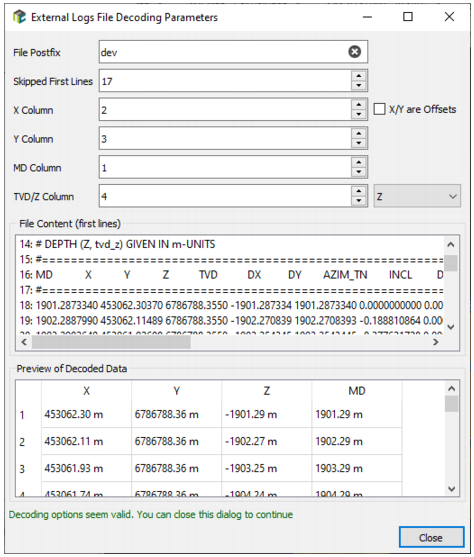
Select Read Coordinates from External Files if the deviation coordinates are not provided in the input files but in a separate external file as for the top coordinates. This option will calculate X,Y and TVD (True Vertical Depth stored in Isatis as the Z coordinate) values using the Measured Depth of the LAS file compared to Measured Depths appearing in the deviation survey file. Click Define to open the External Logs File Decoding Parameters dialog box and define the following parameters:
- The File Postfix is the character string used to define the name of the log deviation file from the current LAS file name. The .las extension will be replaced by the given string in the File Postfix box. For example, the value dev means that for each file AAA.las, the task will look for AAA.dev. Note that the dot symbol has to be present if needed. This allows file to have more a complex syntax. For example, if the deviation corresponding to file.las is file_dev.txt, the postfix must be set to _dev.txt.
- The file can contain either real values for X and Y or Offsets. Select X/Y are Offsets to add the read values for X and Y to the top coordinate of the current well before being stored to the database.
The deviation survey file must contain columns separated by spaces with at least X, Y, Z and MD information on each line.
- The file can start with some header lines (comments), you may specify the number of lines not to be read in the Skipped First Lines box.
- On each line of the log deviation file, the X,Y, MD (Measured Depth) and TVD/Z (True Vertical Depth or real Z) have to be present, with values separated by spaces. Enter the values of the corresponding columns to be read in the X/Y/TVD/MD Column boxes.
- File Content (first lines): This area shows you the first lines of the first external file to help you defining the different columns.
- Preview of Decoded Data: In this table, a line appears for each selected LAS file. The columns display the X, Y, Z and MD values. The different columns cannot be modified/edited and are provided only for information.
At the bottom of the interface, a colored status line indicates if everything seems properly configured, or if one setting seems invalid.
Click Close to close the External Logs File Decoding Parameters dialog box.