
Borehole Import
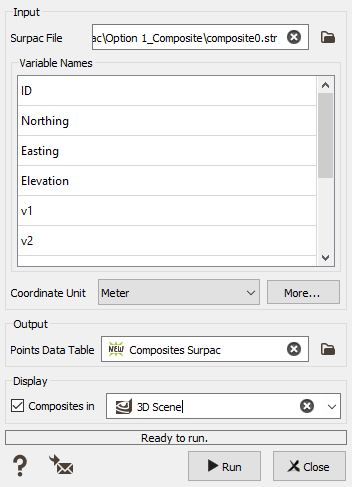
The borehole import is designed to only load a file that contains composited boreholes (3D points with spatial coordinates and optional variables of interest).
Parameters:
- Input File: select a Surpac string file to import (.str format).
-
Variable Names: in this table, you will see the different variables that have been detected. The variables ID, Northing (Y), Easting (X) and Elevation (Z) are mandatory to build the trajectories of the holes. The other variables will be named by default "v1", "v2", etc. The variable names are editable so the user can rename each variable.
All the "user variables" (i.e. v1, v2, etc.) are imported as numerical or text variables, according to their format in Surpac software.
- Coordinate Unit: set the unit of the coordinates (Northing, Easting and Elevation). The same unit will be applied to all the coordinates in the file.
- Output Points data table: Name the points file to create in the Isatis.neo project. The import task will create a new file on the Data Tree (or overwrite if you enter a name that already exists).
- Display Composites in: Option to directly display the output file in a selected scene after the import. The points will be colored based on the values of the first numerical variable.
