
Python
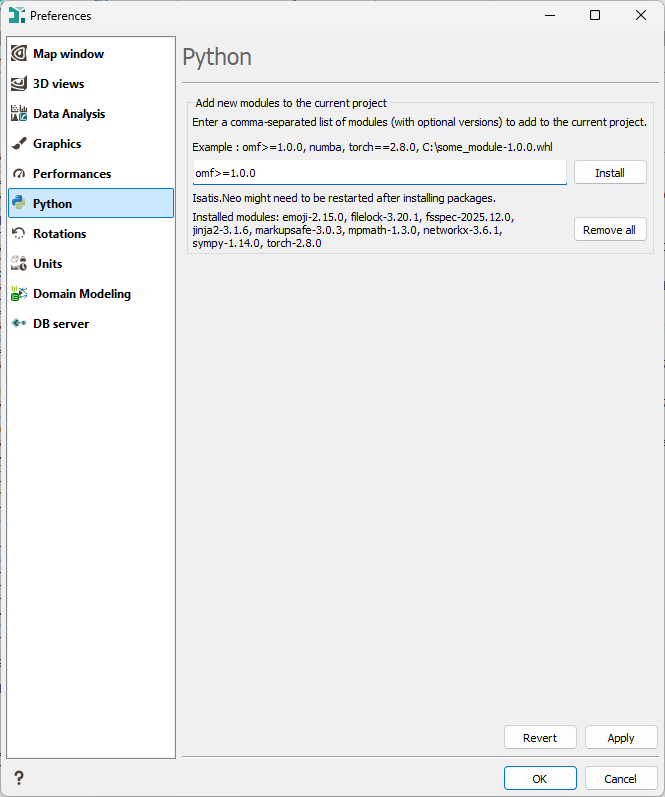
This tab, available from the Preferences dialog, allows you to install additional Python modules in the current project environment, so they can be used in Python blocks and scripts executed from Isatis.neo. To know about already installed Python modules, see Available Python packages.
-
Add new modules to the current project: Enter a comma-separated list of modules to install.
- You can specify version constraints (for example
torch==2.8.0oromf>=1.0.0). - You can also install a local wheel by providing its full path (for example
C:\some_module-1.0.0.whl).
- You can specify version constraints (for example
-
Click Install to add the selected modules to the project environment. A dialog box is displayed when the installation completes, indicating whether the operation was successful. The output of the
pipcommand is then written to the Messages window.Important: You may need to restart Isatis.neo after installing one or more Python packages for the current project.
- Installed modules: This list shows the Python modules currently installed in the project’s Python folder. If no module has been installed for the project, the list remains empty.
-
Click Remove all to remove all installed Python modules from the project’s Python folder.
Note: The Remove all action only deletes Python packages from the
pythonfolder of the current project. Packages that have already been imported remain available in the active Python session until Isatis.neo is closed.
Note: Once a Python package has been imported in Isatis.neo (via the Calculator, the Python Script Launcher, or a Python block in a batch), it becomes available to all projects for the duration of the current Isatis.neo session.
