
Step 1: Input Data
Go to the Statistics / Domaining menu and open the Sample Clustering application.
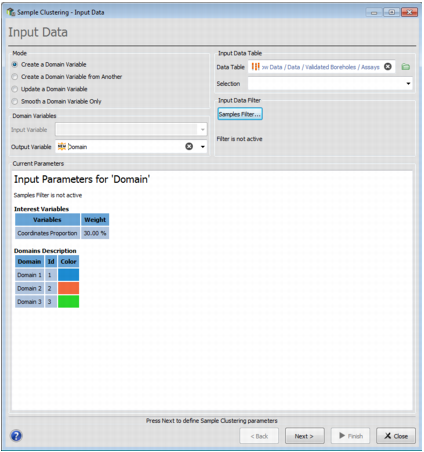
-
Mode. Select one of these modes:
- Create a Domain Variable: Creates a domain variable from scratch.
- Create a Domain Variable from Another: Initializes the parameters from a previous Sample Clustering run.
- Update a Domain Variable: Completes a domain variable which is partially defined. This mode is supposed to be used when a categorical/domain variable is defined on a given campaign and then some new samples are imported without any categorical variable. The new samples are classified using an hybrid data classification. This mode can be use with any categorical variable, previously created in Sample Clustering or not.
- Smooth a Domain Variable Only: Smooths the result of a previous domaining run.
- Input Data Table: Choose the Data Table and an optional Selection on which the domain variable will be created.
- Input Data Filter: Click on Samples Filter if you want to apply a filter on your data.
-
Domain Variables:
- Choose the Input Variable if the current mode is Create a Domain Variable from Another.
- Give a name to the Output Variable.
- Current Parameters: Input parameters and domains description associated to the output variable.
Press Next to go to the next step.
