
Services
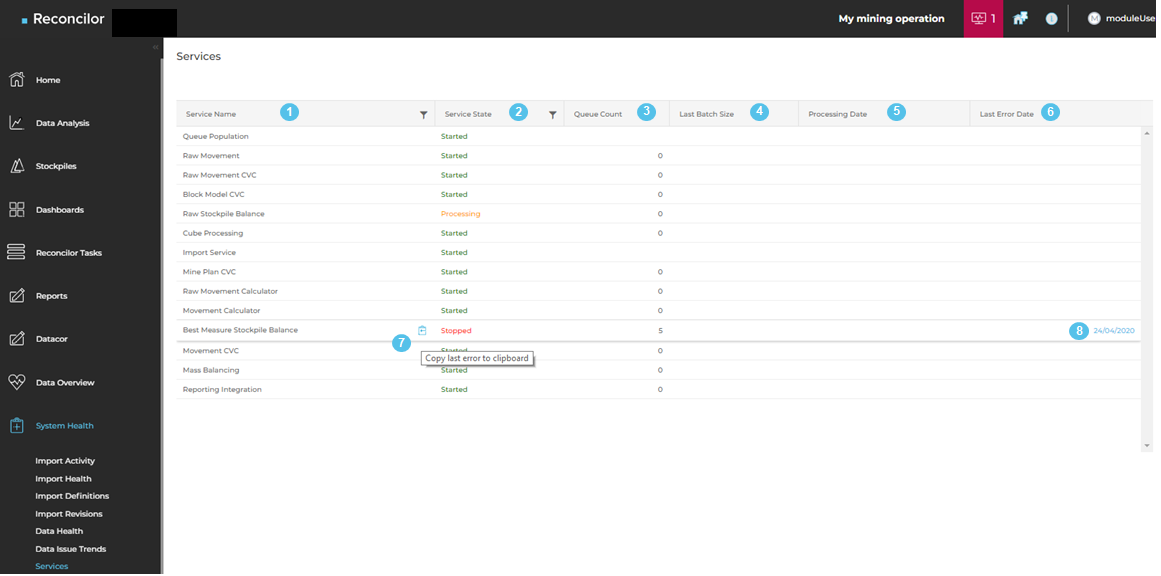
The Services screen provides a health overview of the background services that process data and calculations in Reconcilor. These services support imports, queue processing, and other system tasks that run outside the interactive screens.
Reviewing service health helps identify whether queued work is being processed normally or whether a service requires investigation. If a service is stopped or unhealthy, live data processing and downstream calculations can be delayed. For instructions, see View and filter services.
Error information
If a service records an error, the screen can show the most recent error date and provide a copyable error message for support investigation. Depending on the recorded issue, selecting a service can also display additional error details and stack trace information. This information is primarily intended for support staff.
System health notifications
Reconcilor can display system health notifications in the shell when critical import or service issues are detected. These notifications link to the Services screen so users can review the affected service status.
For instructions, see View system health notifications.
If Reconcilor cannot determine the state of the Reconcilor Engine, the system reports an unknown error condition and support investigation is required.
