
MineTrust
Note: This topic describes pre-release functionality for our development partners. MineTrust is coming soon, and if you are interested in finding out more about our powerful data management facility, please contact your local Datamine office.
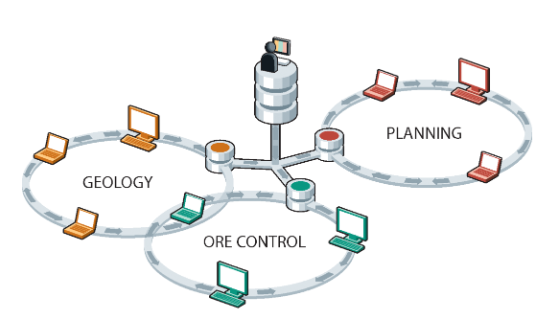
MineTrust is Datamine's data sharing service; a data management solution that is used to share and synchronise versions of files and groups of files between multiple users and teams in separate locations. Unlike many other file synchronisation systems, MineTrust can deal with groups of files, or packages, with a mix of file types that are synchronised and shared together. MineTrust can tag packages and files with any amount of meta data to reflect the data’s content, purpose, and how it is used within organisations and business processes.
Note: If you are interested in supporting your business with MineTrust but haven't made the move yet, contact your local Datamine office to work out a plan that's best for you.
MineTrust is built into Datamine Studio products by default. The use of automatically assigned tags specific to products and workflows, enables data to be shared automatically and efficiently between users and products, removing the need to manually manage and transfer files.
A cloud-hosted, highly secure data storage service, MineTrust provides reliable data management services for all team members, regardless of their location. Data is 'pushed' to the server following changes on the desktop and 'pulled' to other users' machines where newer data is available. This makes the following tasks to be performed very quickly and easily:
-
Sharing the latest 'ground truth' with other team members, such as sharing the latest field mapping data with resource modellers, or the latest EOM survey results, and so on.
-
Sharing reference data amongst multiple team members, such as the latest development plan to update reconciliation results, or a standard legend to be used for corporate-level reporting, for example.
-
Pushing data along a workflow, such as the latest drillhole sample data for implicit modelling revisions.
MineTrust is built specifically for resource modelling and mine planning workflows. Its integration with Studio products ensures teams collaborate in real-time without leaving their familiar working environment. It helps eliminate miscommunication and data duplication by centralising project files and enforcing structured sharing practices across departments, operations and the corporate enterprise.
See MineTrust and MineTrust-Enabled Projects to get started.
This section covers the current MineTrust Studio integration workflow: opening MineTrust project packages, working in View Only or Editing Mode, and synchronizing project updates.
Note: Current synchronization behavior is managed at the project package level.
Key MineTrust Benefits
Interested in MineTrust but unsure how it would work within your operation? Read on...
MineTrust offers flexible deployment models to suit varying IT policies and infrastructure capabilities. Clients may install the system on-premises, within their own Azure tenancy, or opt for Datamine’s fully managed cloud hosting.
Secure, Enterprise Ready
MineTrust enforces strict data separation through isolated Azure resource groups and encrypted storage. Identity management integrates with Microsoft services like Azure AD and B2C. Penetration testing is conducted regularly by third parties, and updates are delivered securely using automated deployment pipelines.
Efficient Sync & Version Control
MineTrust ensures smooth collaboration through background file synchronisation and conflict resolution tools. Features like version history, check-in/check-out, and automatic retry protect data integrity and help teams stay aligned across locations.
Scalable & Extensible
MineTrust supports growth, offering tiered database options for any size. User licences and storage can be expanded easily. Integration is enabled via a robust API and SDK, with native support for .NET, PowerShell, and C++, making it suitable for custom digital workflows.
Web Access & User Management
Named user seats are managed by Datamine from live accounts within the Datamine Customer Portal, as elected by the client administrator. The online portal provides browser-based access to files and metadata for users without desktop applications.
Deployment Options
MineTrust offers flexible deployment options to meet various IT and compliance requirements:
-
On-Premises – Installed and maintained on the client’s internal infrastructure.
-
Client-Hosted (Azure) – Deployed in the client’s existing Azure cloud environment.
-
Datamine-Hosted (Azure) – Fully managed by Datamine in a secure Azure tenancy.
Each deployment type supports the same synchronisation functionality and data architecture, with infrastructure responsibility varying based on hosting choice. Once configured, Studio products connect to the appropriate system and data synchronization begins for enabled projects (see below).
