
Automatic Dependencies
Generated Dependency Data
Generated dependencies data are represented by one or more string objects, where each object represents a particular design definition. These are automatically formatted to make it easier to see what each string represents.
By default, the string direction (clearly important when describing predecessor and successor activity points) is indicated by arrows along each string. These connect activity points, forming a non-negotiable relationship between mining operations (backfill can't start before excavation and mucking out completes, for example).
An example of dependency strings connecting activity points of a decline. The main decline development is indicated by blue arrows (using simple finish-start dependencies based on the string direction) whereas vertical and horizontal directional dependencies are shown in pink and red:
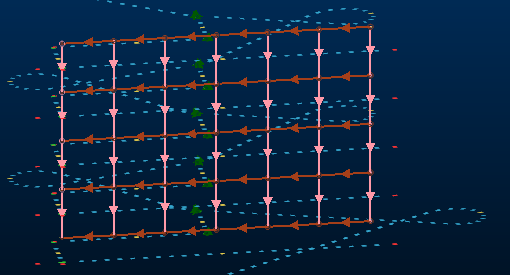
Each dependency string carries useful information in its database, in the form of string attributes aside from the default system fields for strings, including:
-
FROM_NAME – The name of the predecessor activity.
-
TO_NAME – The name of the successor activity.
-
FROM_ID – The internal ID used to identify the predecessor activity.
-
TO_ID – As above, but identifies the successor activity.
-
TYPE – The type of dependency the string represents:
-
FS – Finish to Start
-
SF – Start to Finish
-
SS – Start to Start
-
FF – Finish to Finish
-
PO – Percent Overlap?
See Task Dependencies.
-
-
LAG_QTY – The lag, if any, before the current activity starts following a trigger.
-
LAG_UNIT – The time unit used when describing lag (d=days, for example).
-
RULE_SET_ID – Where automated dependencies are formed, this is the internal ID used to identify the rule set that contains the automated rule that generated the dependency.
-
RULE_ID – The ID for the rule within the rule set that generated an automated dependency.
-
UG_START – A code represent a date/time on which the activity started.
-
RULE_SET_NAME – The name of the rule set containing the rule from which the dependency was generated.
-
RULE_SET_TYPE – The name of the rule from which the dependency was generated.
