
Maintaining the Samples and Tests on a Job Invoice in an Invoice
When a job invoice is first created, it has no samples and tests assigned to it, and no estimate or work-in-progress invoice can be generated for it.
Samples and tests cannot be appended to a job invoice if the associated job's Workflow Status is Registered, that is, the job has not been activated yet.
When a job is activated, but samples and tests are not yet added to its job invoices, an invoice preview for any of these invoices in the CCINV—Invoice application displays an empty invoice document.
Where a job is activated, samples and tests can be maintained on its job invoices on the Invoicing tab in the CCREGN—Job application, and under the job on the Jobs tab in the CCINV—Invoice application, unless the Samples and Tests Locked for Update is selected.
Note: A reprice of the invoice must be completed if any property that affects the line items is updated. Clicking the Generate Invoice button does not cause the invoice to be re-calculated, it merely creates the invoice documents.
Updating the Use of Package Pricing for job invoice samples
Where sample schemes and sample scheme analytes are linked to a template sample that caused its registration, the package pricing associated with the template sample can be applied or removed from all applicable sample schemes and sample scheme analytes. Where a sample scheme or sample scheme analyte is not associated with package pricing, it is priced using regular scheme and analyte pricing. This is done on the samples in the job.
Locking job invoice samples and tests from update
Where a job invoice is locked for sample and test update, samples and tests cannot be added to or removed from the job invoice.
Conditions based on the job's Workflow Status for maintaining job invoice samples and tests
The details that are updatable on a job invoice, and the available flows, depend on the job's Workflow Status and the related invoice's Invoice Status.
Job invoice samples, job invoice schemes, job invoice scheme analytes, job invoice sample schemes and job invoice sample scheme analytes can be added or deleted from a job invoice, or have their invoiceability updated, only where the related invoice has an Invoice Status of Initial or Draft, and the job invoice's Samples and Tests Locked for Update flag is false. (Note, however, that the sample scheme and sample scheme analytes in the job are updatable whilst the job is not finalised, to allow for the creation of other job invoices.)
| Job's Workflow Status |
Registered Can't release invoice as no samples and tests are on the invoice and job not completed
|
Not Started
Can't release invoice as job not completed |
Completed | Finalised | Cancelled | |||
|
Invoice's Invoice Status |
Initial |
Draft |
Initial |
Edited |
Released |
Cancelled |
<any> |
<any> |
|
Open Invoice Sample Grid |
Y, but it is empty |
Y, but it is empty |
Y |
Y |
Y |
Y |
Not available |
Not available |
|
Append Unassigned Samples and Tests |
Not available |
Not available |
Y |
Y, but returns error: Samples/Tests can only be added to job invoices in Initial or Draft state. |
Y, but returns error: Samples/Tests can only be added to job invoices in Initial or Draft state. |
Y, but returns error: Samples/Tests can only be added to job invoices in Initial or Draft state. |
Not available |
Not available |
|
Append All Samples and Tests |
Y, but returns error: Samples and tests cannot be appended until the job is activated |
Y, but returns error: Samples/Tests can only be added to job invoices in Initial or Draft state. |
Y |
Y, but returns error: Samples/ |
Y, but returns error: Samples/ |
Y, but returns error: Samples/ |
Not available |
Not available |
|
Clear Samples and Tests |
Y |
Y |
Y |
Y, but returns error: Samples/Tests can only be removed from job invoices in Initial or Draft state |
Y, but returns error: Samples/Tests can only be removed from job invoices in Initial or Draft state |
Y, but returns error: Samples/Tests can only be removed from job invoices in Initial or Draft state |
Not available |
Not available |
Conditions for adding samples and tests from the job to a job invoice
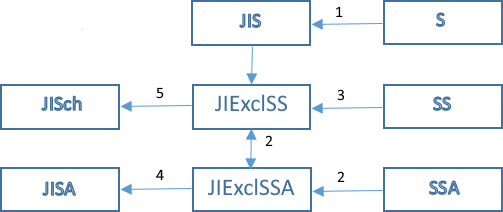
JISch—Job invoice scheme records
JISA—Job invoice scheme analyte records
JIS—Job invoice sample records
JIExclSS—Job invoice sample scheme exclusion records
JIExclSSA—Job invoice sample scheme analyte exclusion records
The directions in which the cascade operates within the join invoice with respect to invoiceability (defined by the isInvoiceable property on the related DTOs) is limited. This is to control the complexity and performance of a submit on invoice gridding. The following diagram shows how invoiceability cascade operates upon create or update.
-
When samples from a job are appended to a job invoice, samples are added to the job invoice only where the related condition is true for the sample's Primary Analytical Type:
- Unknown—All unknown samples are added to the job invoice.
- Duplicate—Duplicate QC samples are added to the job invoice only where the laboratory's Invoice Duplicates is selected.
- Replicate—Replicate QC samples are added to the job invoice only where the laboratory's Invoice Replicates is selected.
- Blank—blank QC samples are added to the job invoice only where the laboratory's Invoice Blanks is selected.
- Standard—standard QC samples are added to the job invoice only where the laboratory's Invoice Standards is selected.
- Spike—spike QC samples are added to the job invoice only where the laboratory's Invoice Spikes is selected.
Refer to Maintaining Costing and Invoicing Details for a Laboratory and Conditions for Auto-addition of Samples and Tests to a Job Invoice.
In each case, the job invoice sample's Is Invoiceable defaults to the sample's Is Invoiceable.
When tests from a job are appended to a job invoice, all schemes where the scheme's Price Type is Scheme-based, Sample-based or Unit-based are added to the job invoice, and all analytes where the scheme's Price Type is Analyte-based and the scheme version analyte's Is Invoiceable is selected are added to the job invoice. The job invoice scheme's Is Invoiceable defaults to checked and the job invoice scheme analyte's Is Invoiceable defaults to checked. -
When a JI is created, then only invoiceable SSAs are included in the JI, so no records are initially written to JIExclSSA.
When a JI is updated, then only sample scheme analytes in the JI that are not invoiceable are written to JIExclSSA.
-
When a JI is created, then only invoiceable SSs, and non-invoiceable SSs that have invoiceable SSAs, are included in the JI, and records are written to JIExclSS for those non-invoiceable SSs that have invoiceable SSAs.
When a JI is updated, then only sample schemes in the JI that are not invoiceable are written to JIExclSS.
-
When a JI is created or updated, where any sample scheme analyte in the JI is invoiceable, then the JISA is invoiceable.
-
When a JI is created or updated, where any sample scheme in the JI is invoiceable, then the JISch is invoiceable.
Deleting samples, schemes and analytes from a job invoice
Samples, schemes and analytes can be deleted from a job invoice. When a job invoice sample, job invoice scheme or job invoice samples scheme analyte is deleted, then any associated job invoice sample scheme and job invoice sample scheme analyte exclusion records are deleted also.
Updating the invoiceability of job invoice samples, job invoice schemes and job invoice scheme analytes
For sample-based, or unit-based pricing, a sample scheme is invoiceable where:
- The job invoice sample is invoiceable.
- The job invoice scheme is invoiceable.
- The sample scheme in the job is invoiceable.
- No invoice sample grid exclusion exists for the job invoice sample scheme.
For scheme-based pricing, a sample scheme is invoiceable where:
- The job invoice sample is invoiceable.
- The job invoice scheme is invoiceable.
- The sample scheme in the job is invoiceable.
- No invoice sample grid exclusion exists for the job invoice sample scheme.
- More than one sample scheme analyte is invoiceable where:
- The job invoice scheme analyte is invoiceable.
- The sample scheme analyte in the job is invoiceable.
- No invoice sample grid exclusion exists for the job invoice sample scheme analyte.
For analyte-based pricing, a sample scheme analyte is invoiceable where:
- The job invoice sample is invoiceable.
- The job invoice scheme and job invoice scheme analyte are invoiceable.
- The sample scheme and sample scheme analyte in the job is invoiceable.
- No invoice sample grid exclusion exists for the job invoice sample scheme or job invoice sample scheme analyte.
A job invoice sample's invoiceability is inherited from the sample's invoiceability. Refer to Adding a Group of Samples to a Job and Maintaining Samples.
Applying invoice sample gridding to an invoice at the granular levels of job invoice sample scheme and job invoice sample scheme analyte
The invoice sample grid, maintained using the CCINVGRD—Invoice Grid application, is used to include different combinations of samples and tests in the job invoice, allowing pricing to change per client recipient of the invoice. The grid shows the intersections between samples and tests for a job invoice, and allows job invoice sample schemes and job invoice sample scheme analytes to be made not invoiceable, even where the job invoice, job invoice scheme or job invoice scheme analyte is invoiceable in the job invoice.
Accessing the invoice sample grid
The CCINVGRD—Invoice Grid application is accessed either from a job invoice for a job opened in the CCREGN—Job application (refer to the Maintaining Job Invoice Samples and Tests from Registration process), or for a job invoice in an invoice opened in the CCINV—Invoice application.
This invoice sample grid is updatable only where the invoice's Invoice Status is Initial or Draft and where the job invoice's Samples and Tests Locked for Update check box is cleared.
Where the invoice sample grid is updated, ensure to reprice the invoice as this activity sets the Is WIP/EST Outdated state of the invoice to true.
Layout of the invoice sample grid
The invoice sample grid is presented in normal mode that displays the scheme-analytes across and samples down the page.
When the invoice sample grid is opened, then job invoice schemes are displayed by default. Job invoice schemes are expanded or collapsed to display or hide the job invoice scheme analytes. Sub-analytes are displayed like ordinary analytes.
Schemes included in the invoice sample grid
When the invoice sample grid is opened, then all job invoice schemes and job invoice scheme analytes are displayed in their various columns, regardless of their Invoiceable flag.
Samples included in the invoice sample grid
When the invoice sample grid is opened using the Open Invoice Sample Grid flow, then only samples where the job invoice sample's Invoiceable is selected and the sample's Workflow Status is something other than Listed Not Received, Insufficient Sample or Not Analysed, are included in the grid.
Where the invoice sample grid is opened using the Open Invoice Sample Grid (All) flow, then all samples in the job invoice are included in the grid.
Invoice sample grid cell colours to indicate the invoiceable state
The grid displays each related job invoice sample scheme's and job invoice sample scheme analyte's Invoiceable state.
Note: When samples and tests are added to a job invoice, whilst the sample's Invoiceable flag is pushed into the related job invoice sample's Invoiceable flag, it is NOT pushed down to related job invoice sample schemes and job invoice sample scheme analytes. But when a job invoice sample's Invoiceable flag is updated on the job invoice's Samples tab, then on submit, the job invoice sample's Invoiceable flag IS pushed down to related job invoice sample schemes and job invoice sample scheme analytes.
The colour of the grid's cells indicates the Invoiceable state of the job invoice sample schemes and job invoice sample scheme analytes:
-
Green—Indicates that the job invoice sample scheme's or job invoice sample scheme analyte's Invoiceable flag is true.
-
Red—Indicates that the job invoice sample scheme's or job invoice sample scheme analyte's Invoiceable flag is false.
-
Blue—Indicates that the sample scheme or sample scheme analyte is not included in the job invoice, or does not exist in the job at all.
When the grid is save with cells highlighted red, then job invoice sample scheme and job invoice sample scheme analyte exclusion records are written only. These exclusion records are used as follows:
-
During invoicing of a scheme that has a Price Type of Scheme-Based, then a job invoice sample scheme is invoiced only where the job invoice sample is invoiceable, the job invoice scheme is invoiceable, and no exclusion record exists for the job invoice sample scheme, and analytes are counted in the scheme where the job invoice sample is invoiceable, the job invoice scheme analyte is invoiceable, and no exclusion record exists for the job invoice sample scheme analyte.
-
During invoicing of a scheme that has a Price Type of Sample-Based or Unit-Based, then a job invoice sample scheme is invoiced only where the job invoice sample is invoiceable, the job invoice scheme is invoiceable, and no exclusion record exists for the job invoice sample scheme.
-
During invoicing of a scheme that has a Price Type of Analyte-Based, then a job invoice sample scheme analyte is invoiced only where the job invoice sample is invoiceable, the job invoice scheme analyte is invoiceable, and no exclusion record exists for the job invoice sample scheme analyte.
Invoice sample grid functions
Right-click menu options are available to set sample schemes or sample scheme analytes, which are invoiceable in the job, to be invoiceable or not invoiceable for the job invoice.
The invoice sample grid supports the following right-click menu options:
|
Name |
Action |
|---|---|
|
Set to Invoiceable |
Remove the exclusion for the job invoice sample scheme or job invoice sample scheme analyte, thereby driving invoiceability only from the sample scheme or sample scheme analyte in the job. |
|
Set to Not Invoiceable |
Apply an exclusion for the job invoice sample scheme or job invoice sample scheme analyte, by flagging each selected sample scheme analyte as not invoiceable for the job invoice, thereby overriding where a sample scheme or sample scheme analyte is invoiceable in the job. |
|
Expand All Schemes |
Expand the invoice sample grid to show sample scheme analytes. |
|
Collapse All Schemes |
Collapse the invoice sample grid to show sample schemes. |
Invoiceability cascade from the sample grid
JISSA to JISA—Where all JISSAs for a scheme analyte across all samples are marked as not invoiceable, then the JISA cascades to not invoiceable and is not shown when the invoice sample grid is displayed in the default mode.
JISS to JISch—Where all JISSs for a scheme across all samples are marked as not invoiceable, then the JISch cascades to not invoiceable and is not shown when the invoice sample grid is displayed in the default mode.
JIS to JISS—Where a JIS is marked as not invoiceable, then all related JISSs cascade to not invoiceable and are not shown when the invoice sample grid is displayed in the default mode.
Note: In this case, JISS exclusion records are created, however, JISSA exclusion records are not created, for performance reasons.
JISS to JISSA—Where a JISS is marked as not invoiceable, then all related JISSAs cascade to not invoiceable and are not shown when the invoice sample grid is displayed in the default mode.
JISSA to JISS—Where all JISSAs for a sample scheme within one sample are marked as not invoiceable, then the JISS cascades to not invoiceable and is not shown when the invoice sample grid is displayed in the default mode.
Note: Where all JISSs within one sample are marked as not invoiceable, then the JISS does NOT cascade to not invoiceable, so the sample is still shown when the invoice sample grid is displayed in the default mode, though the cells are highlighted red. To hide the sample on the invoice sample grid, then the JIS must be manually marked as not invoiceable.
Note: Just because the JI SS or JI SSA is shown to be Invoiceable in the Invoice Grid, it DOESN’T mean that the item is actually charged for, as the SS and SSA will control this at the Invoice Calculation engine. The JI SS and JI SSA invoiceable flags are only applicable IF the SS and SSA are invoiceable. This is allow the creation of the JI SS and JI SSA records (the exclusion flags) as an optional dimension.
As of CCLAS 6.12-GA there is a new mode of this Invoice Grid, that will show ALL Samples (rows) and ALL Scheme/Analytes (columns), regardless of their Invoiceable flags on the JI-Sample, JI-Scheme or JI-SchemeAnalyte levels).
This new mode may be confusing if the user is flagging the JI-Scheme and JI-SchemeAnalyte as Non-Invoiceable, as they will not be necessarily visible as Red cells in the Grid.
For example if the JI-Scheme or JI-SchemeAnalyte are flagged as Non-Invoiceable, they will still be visible with non-Red cells when the Grid is displayed (as there are no JI-SS or JI-SSA exclusion records created).
 Related processes...