
Limiting User Visibility of Schemes and Functionality by Section
Just as the line of business prevent laboratories from viewing schemes that belong to a different line of business than their own, so too do the schemes that belong to the individual sections of the laboratory.
Sections are the individual operational areas of a laboratory, each of which can have specific schemes and scheme groups assigned to suit their area of specialisation. This assignment allows work schedules, statistical analysis, sample throughput, costing and reporting to be broken down by laboratory section. The work performed in each section of a laboratory can also be tracked.
Sections created for a laboratory can also be grouped to make searching for sections and reporting on sections more efficient for laboratory managers.
User roles (typically Operators) are allocated within each section of a laboratory, and is limited to viewing and using the schemes specific to their allocated section. Users can also be grouped within each section, with each user group defining who is able to perform specific aspects of data entry/capture, result release and validation within the schemes in the section.
Each section defined for a laboratory can have access, release and validate user groups associated with the section, such that, for any scheme linked to the section, only the users of those user groups can perform the specific functions on those schemes.
Note: The ability to change the details of schemes, users, scheme groups and user groups depends upon whether the records were created with org-scope or lab-scope. The roles that a user has can limit create, delete and update permissions based on whether a scheme, scheme group or user group has org-scope or lab-scope.
Associate Schemes with Sections
Create a user group containing the users who perform a section's access, release and validation tasks. Refer to Maintaining User Groups.
Create a section and link the section to its access, release and validate user groups. Refer to Maintaining Sections.
Create a scheme and link it to the section. Refer to Maintaining Schemes.
Register the Scheme on a Sample
Create a production job. Refer to Maintaining Jobs.
Add a group of samples to it with the scheme registered on the sample group. Refer to Adding a Group of Samples to a Job.
Effect of Scheme Section
Batching
The schemes that a user sees available for batching is limited by section, such that, the user can only see schemes that are not associated with a section, schemes that are associated with a section but that section is not associated with an access user group, or schemes that are associated with a section and that section is associated with access user group and the user is a member of the user group.
Refer to Batching Samples for Analysis.
Workbook
The schemes that a user sees available for entering results in workbook is limited by section, such that, the user can only see schemes that are not associated with a section, schemes that are associated with a section but that section is not associated with an access user group, or schemes that are associated with a section and that section is associated with access user group and the user is a member of the user group.
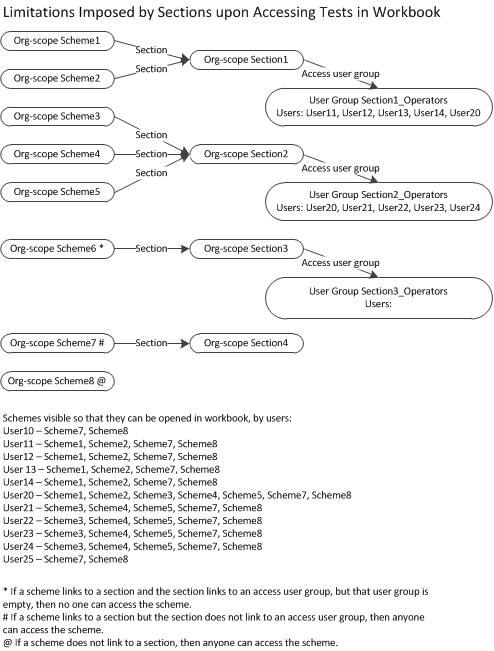
Refer to Loading a Workbook.
Validation
The schemes that a user sees for a sample during sample and job validation is limited by section, such that, the user can only see schemes that are not associated with a section, schemes that are associated with a section but that section is not associated with an access user group, or schemes that are associated with a section and that section is associated with an access user group and the user is a member of the user group.
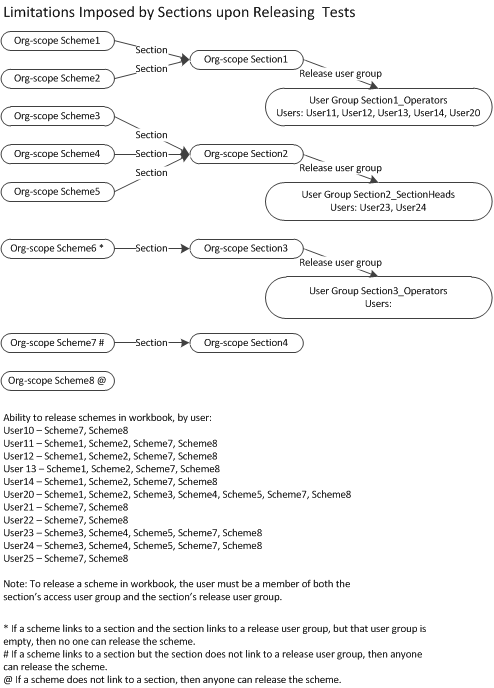
The schemes that a user can release for a sample during sample and job validation is limited by section, such that, the user can only release schemes that are not associated with a section, schemes that are associated with a section but that section is not associated with a release user group, or schemes that are associated with a section and that section is associated with a release user group and the user is a member of the user group.
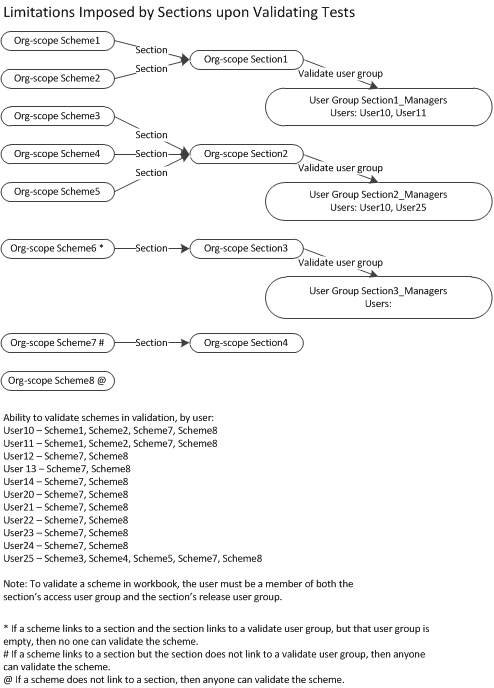
The schemes that a user can validate for a sample during sample and job validation is limited by section, such that, the user can only validate schemes that are not associated with a section, schemes that are associated with a section but that section is not associated with a validation user group, or schemes that are associated with a section and that section is associated with a validation user group and the user is a member of the user group.
Refer to Completing and Validating Samples and Jobs.
 Related processes...
- Maintaining Schemes
- Maintaining Sections
- Maintaining User Groups
- Batching Samples for Analysis
- Locating Workbooks
- Opening a Workbook Session
- Releasing Results in a Workbook Session
- Configuring Automatic Result Validation for an Analyte
- Validating Results in a Workbook Session
- Configuring Automatic Result Release for an Analyte
- Loading a Worklist
- Searching for Samples that Require Validation
- Releasing and Validating Results during Job and Sample Validation
