
Production Field Formula Details
To display this screen:
-
Right-click a Production Field in the Task Area and select Field formula detail.
Production fields in the task table that are shown with a light-yellow background are calculated fields and are not editable. Use this screen to see how these fields derive their values.
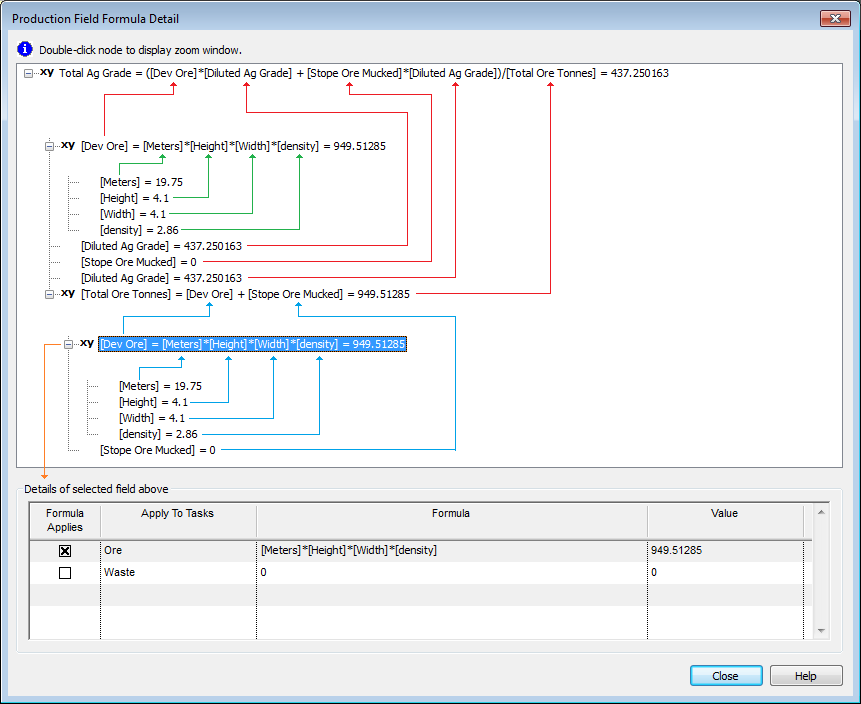
The Production Field Formula Detail screen shows the formula tree that applies to the selected field for the selected task.
- The top window shows the applicable formula in the first row, then shows the value of each individual parameter in the lines below.
- If a parameter derives its value from another formula (sub-formula), then this formula and each of its parameters are shown in the tree (on a lower level) is well.
- Since a production field can have several formulas which apply to different tasks (specified by a task filter), the grid at the bottom of the form shows all the formulas for the highlighted row, and marks the formula that applies in this case. This is useful when debugging formulas.
Example Output
Hover over the image below for a clearer view:
Related topics and activities
